New post
Avatar
0

What would prevent me from moving a single staff closer to the top of a page? Once it gets closer than like 3 inches it goes onto the previous page. This only happens on some pages of a 36 page score for one instrument of one staff. I'm using a MacBook pro and the newest Big Sur.

9 comments

Date Votes
Avatar
0

Some things to examine.

Probably 1) is the solution, but you could examine 2) as well:


1) Page View.

Page Layout Tool.

Click the top system to select it.

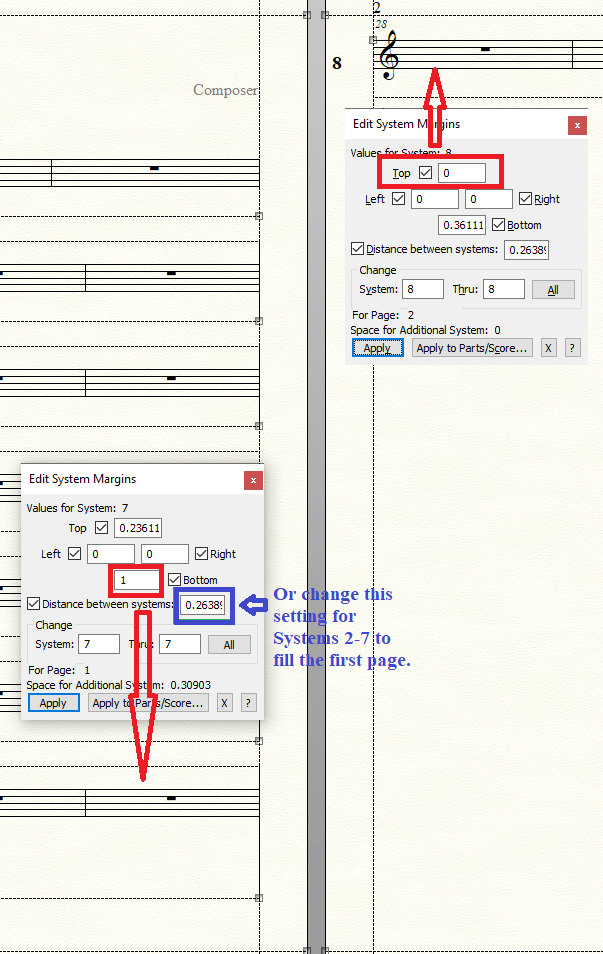
Page Layout menu > Systems > Edit Margins…

(or get there faster via the context menu)

You can set the Top Margin as low as zero.


2) Scroll View.

Staff Tool.

Click a measure to select the staff.

Staff menu > Staff Usage…

You can set the

Distance From Top of Previous Staff

as low as zero.

If you switch to Page View, you can take a look at

Staff menu > Respace Staves…

Since your document is a 1-staff document, Respace Staves may not matter.

Comment actions Permalink
Avatar
0

Do you have any other ideas? These did not work.


Comment actions Permalink
Avatar
0

Page Layout Tool.

Page Layout menu > Page Margins > Edit Page Margins…

You can set the Top Margin as low as zero.

Comment actions Permalink
Avatar
0

nope

Comment actions Permalink
Avatar
0

Your system margins can also be set to zero.

Comment actions Permalink
Avatar
0

Also, in the dialog box Edit System Margins you can set the Distance Between Systems as low as zero.

Comment actions Permalink
Avatar
0

Tried all of these and none work. I am still unable to move a single staff closer to the top than 5 inches in some cases without the staff going to the previous page.  I have altered the system margins in every way to no effect.

Comment actions Permalink
Avatar
0

Increase the space between the staves in the page (or the bottom margin of the staff) before the staff you want on the following page so there is no room on the "first" page before tinkering with the page or system margins of the staff you want closer to the top.


Comment actions Permalink
Avatar
0

Yes, that did it! Many thanks. I did it with the layout tool and altered the squares around the previous staves by moving the little squares around so the stave I didn't want to go to the previous page couldn't. 

Comment actions Permalink

Please sign in to leave a comment.