New post
Avatar
0

I have been using Finale for over 30 years, and I have extensive experience with entering lyrics because most of the music I write is vocal.   Until recently, I have never had an issue with lyrics' syllables overlapping.  There has always been automatic spacing.   I have read the manual and I have gone into document settings and the box is already checked for lyric spacing to include no collisions.  What is happening?  I need to get this fixed.

v.26

Windows 10 Home

7 comments

Date Votes
Avatar
0

Is Automatic Spacing on? Have you tried applying music spacing from the menu?

Comment actions Permalink
Avatar
-1

I'm having this same problem on iMac with Big Sur.

Comment actions Permalink
Avatar
1

I'll ask you the same questions.

Comment actions Permalink
Avatar
0

Yes to both questions. If I put fewer measures on the stave, it looks better in page view, but the collision still appears in scroll view.

Comment actions Permalink
Avatar
0

Can you post a screenshot?


Generally, collisions in scroll view are irrelevant, but you should still be able to correct them.


In Document Options > Music Spacing > Avoid Collision Of > is Lyrics checked?

Comment actions Permalink
Avatar
0

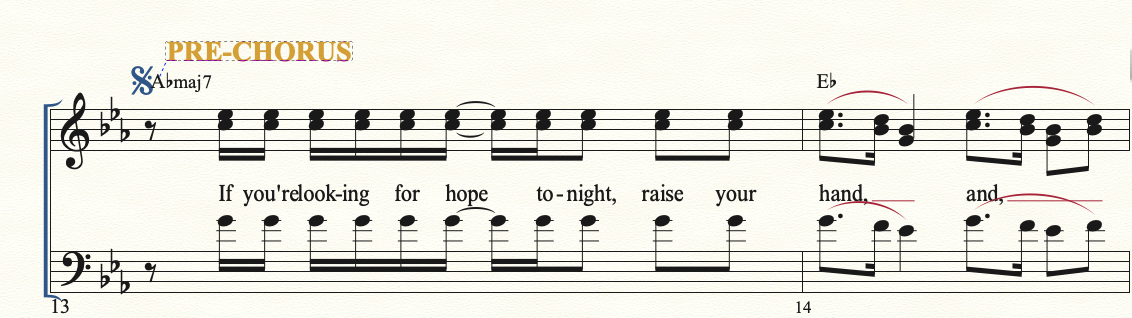
Here's a fairly typical example. I can find others. I used to be able to correct this with little problem...

Comment actions Permalink
Avatar
0

If you select that system and tap CMD-4, there is no change?


Could you post that doc to DropBox and post a link, here? Or, send it to me and I'll check it. My email is encoded in my signature.

Comment actions Permalink

Please sign in to leave a comment.