New post
Avatar
0

I own FINALE 27.4.1 on a PC computer. Overall things are working well. But no matter what tempo I set for the playback [like quarter note = 100] the tempo will not change [same speed for quarter note 100 as for quarter note 30]. Could anyone suggest something?

14 comments

Date Votes
Avatar
0

If I understand you correctly, you are setting the playback tempo in the Playback Controls - right?


Three things control the tempo in Finale:

MIDI Tool (= the recorded tempo changes)
Expression Tool (= the expression tempo changes)
Playback Controls

And they work in a hierarchical fashion.

The tempo in the Playback Controls is overridden by an Expression that sets a tempo.
This is overridden by the MIDI Tool, which is at the top of the “Tempo Hierarchy”.


As a first step, check whether an expression is the culprit.

You can clear the expression, and then check whether clearing the expression helped.


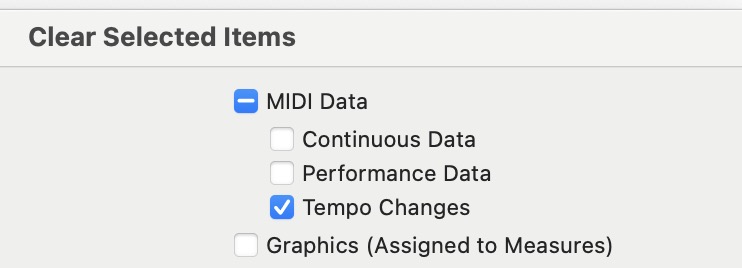
If not, then try clearing Tempo Changes in the MIDI Data.

Edit menu > Clear Selected Items…

Comment actions Permalink
Avatar
0

Is this from the start, or mid-score tempo changes?

Have you tried shutting down and rebooting the computer?

Comment actions Permalink
Avatar
0

Hi Mike,

It is from the start. And yes....I have re-booted my computer many times. This has lasted for many months....even though I have continued to use FINALE without any other difficulties.

Bill 

Comment actions Permalink
Avatar
0

Thanks, Peter.

I am using the VST Playback. There are no EXPRESSIONS in this music. But a change in the PLAYBACK TEMPO CONTROL will not change the tempo of the playback.


Comment actions Permalink
Avatar
0

Try clearing Tempo Changes in the MIDI Data.

Edit menu > Clear Selected Items…

Comment actions Permalink
Avatar
0

Peter, 

Where do I find CLEARING TEMPO CHANGES?

Comment actions Permalink
Avatar
0

When you go to Edit menu > Clear Selected Items…, first select NONE, and then check the box for MIDI Data:Tempo Changes

Comment actions Permalink
Avatar
0

Thanks, Mike. 

I did that...but (believe it or not) it's playing faster than ever (with no control over the tempo). The playback works....but it is ver, very fast.

Bill 

Comment actions Permalink
Avatar
0

Try this, as a test (not as a solution):


Make a duplicate copy of the Finale document.

In the duplicate copy, clear all MIDI Data (Continous Data, Performance Data, Tempo Changes).

Now, try to play back the duplicate copy.

Is the tempo problem solved?

Comment actions Permalink
Avatar
0

Peter, 

This helped a little...because it seemed to play the tempo that I had previously set. But, when I chose a new tempo, the playback tempo did not change.

Bill 

Comment actions Permalink
Avatar
0

Try closing the document, and opening it again.


I suspect that the “old” playback is still “in the buffer”.

When you close the document, and open it again, Finale sees the document as another document.

Comment actions Permalink
Avatar
0

Peter, that did not change anything. 

I opened the document again....and changed the tempo setting....but it did not change the playback tempo. 


Comment actions Permalink
Avatar
0

Are you using Human Playback?


If the answer is ‘yes’, then consider the possibility that Human Playback adds MIDI Data.

Try toggling Human Playback off, clear MIDI Data, close the document, and open it again.

Comment actions Permalink
Avatar
0

Praise the LORD! It worked. 

For some reason, I had HUMAN PLAYBACK turned on (by mistake). But I did you suggested and cleared the MIDI DATA and things are working just fine now. 

Thank you.

Bill 

Comment actions Permalink

Please sign in to leave a comment.