New post
Avatar
0

Greetings!

It has been some time since I have written sheet music and I'm already getting rather frustrated so I'm hoping somebody might be able to offer some assistance.

I am attempting to put in lyrics to a second verse underneath the first verse. I used a second layer for any notation changes (extra notes to fit words etc.) and I'm thinking I have to go on the second layer for those affected lyrics as well. This kind of works but selecting anything after the fact is a hit or miss situation ( am trying to move the second line down and I just can't get to that row of arrows so it's all smooshed together) and, because the changed notes on the second verse would be a little smaller, the lyrics are showing up smaller as well.  Am I doing something wrong? How do I fix all of this?

I do have an older version of Finale - 2012, in fact - so I don't know if an upgrade would make a difference - but any insight would be appreciated! Thanks so much!



7 comments

Date Votes
Avatar
0

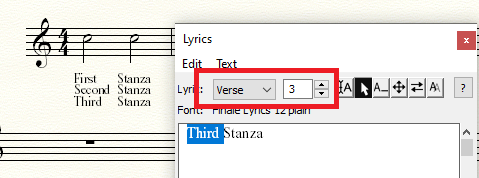
Are you putting different stanzas in the different verses in the Lyrics Panel?


You can also specify different stanzas and then type the syllables directly into the music if you wish.


Comment actions Permalink
Avatar
0

Oooh, this might change things! I'm so out of practice I didn't even think of actually going to different verses. I just knew there was a way to put words under other words so when it technically worked I just went with it :-)  I'll give it a go and see what happens. Thanks so much for the quick reply!


Comment actions Permalink
Avatar
0

… because the changed notes on the second verse would be a little smaller, the lyrics are showing up smaller as well …


Instead of resizing the notes, resize only the noteheads.

In that way the lyrics sizing will not be affected.

Comment actions Permalink
Avatar
0

Thanks, Peter! It occurred to me that, instead of using the % tool like I had been, there should be a way to just change the note head and, sure enough it worked! It seem to be applying the adjustment to all layers instead of just the one I selected but I'll take it. :-)

Comment actions Permalink
Avatar
0

I just rediscovered that you can "show active layer only" to make changes without affecting other layers! Yay! It's starting to come back!


Comment actions Permalink
Avatar
0

… instead of using the % tool like I had been, there should be a way to just change the note head …


Actually the % tool (= the Resize Tool) can also resize just the notehead.

Resize Tool.

Context-click on the notehead.

In the context menu, choose {Resize Notehead…}.

Comment actions Permalink
Avatar
0
Comment actions Permalink

Please sign in to leave a comment.