New post
Avatar
0

Can't Add A Rallentando For Playback  And  Can't find Rulers & Grids ... spent entire day trying various old and new Finale procedures
Manual reads as follows ...
3. Click Edit. The Expression Designer dialog box appears.
4. Click the Playback tab to display the playback options. Choose Type > Tempo; select Execute Shape, and click the
Execute Shape Create button. You’re now in the Shape Designer.

IN THE "EXECUTABLE" SHAPE DESIGNER, AND NOTHING FOLLOWS AS WRITTEN
ALSO I AM UNABLE TO LOCATE ANYTHING FOR RULERS AND GRID , ANYWHERE

5. Choose Shape Designer > Rulers and Grid. The Rulers and Grid dialog box appears.
6. Click Eighth Notes, type 1, and click OK. Choose Shape Designer > Show > Grid. The grid appears; each imaginary vertical grid line represents an eighth note’s duration; each horizontal line represents a tempo change of one beat per minute.
7. Choose the Line Tool . You’re about to draw a graph of the playback effect of the rallentando marking. To use the Line Tool, you drag it across the drawing area. To make your shape match the one pictured here, observe the H: and V: numbers as you move the cursor, and stop when the H: number is 4 and the V: number is –5.
8. Draw a line, as shown:

10 comments

Date Votes
Avatar
1

Human playback should interpret a text expression "rallentando" for playback. Have you tried that instead of messing with shapes?

Comment actions Permalink
Avatar
0

… Can't find Rulers & Grid …


In my own copy of Finale:

Shape Designer.

Shape Designer menu > Rulers and Grid…

Comment actions Permalink
Avatar
0

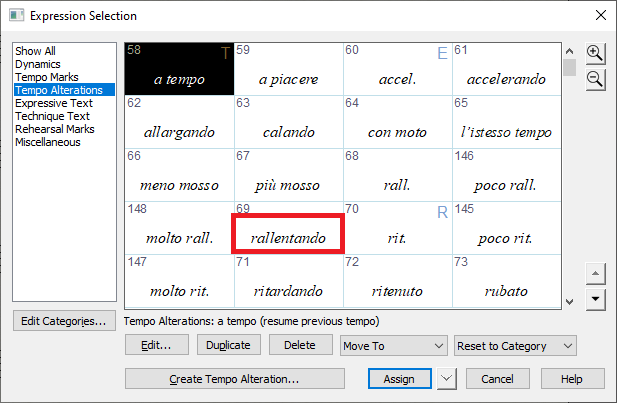
Thank you for your response Jeffrey ... but I can't find a rallentando in text expressions because their is none in the default library, and if there were it would require one to follow the procedure i outlined

Have you tried a rallentando and been successful ?

If so, I would appreciate what you did 

webs

Comment actions Permalink
Avatar
0

I just use rit.

One can always hide that mark and add the word rallantando over it.


And in a newly created Finale 27.1 file, rallantando does exist and works as expected (given a concluding tempo mark, shown or not).


Comment actions Permalink
Avatar
0

Thank you for your response Jeffrey ...

I just tried reloading the Expressions Text Library again today, and it is greatly expanded and contains Rallentando 

BUT ... I need to adjust the tempos and that may or may not work

Will get back to you soon,  meanwhile thanks again

webs

Comment actions Permalink
Avatar
0

Peter ...

Thank you for your response

Are you using Windows or Mac ?

All I get is Executable Shape Designer and no Grid

Though I'll try all this with Jeffrey's response


Comment actions Permalink
Avatar
0

Thank you J Adrien

I am on Finale Mac v26,  which I should have said in my original post.

Rall and Rit have slightly different meanings and playbacks (as I understand it),

and the nerd work i'm doing require me to differentiate if possible.

webs

Comment actions Permalink
Avatar
0

Rall. and Rit. might have different meanings, but remember that you're dealing with computer playback here. It can't give you the nuances that a human could.


If you're using Human playback, then you don't need to worry about executable shapes for a rall. Just put the word in where you want it to start, and put a destination tempo after the rall. so Finale knows how much to slow down. It should work just by putting in a few text expressions.

Comment actions Permalink
Avatar
0

Thanks To All For Your Very Useful Advice ... I Finally Got it

I Used The Following Procedure, Which May Be Useful To Someone, Somewhere, Sooner Or Later


Expression > Tempo Alteration > "rall" > Edit > Playback >

Type = Tempo > Use Quarter Note (Default) > Execute Shape >

Select (Highlight) Shape > Select 11 > Edit Opens Executable

Shape Designer With Shape ID 61 >  Set Level Scale  = 12 to 1

(8 to 1 Is Minimum) > Set Time Scale  =  2 to 1 (Lasts Twice

As Long) > OK > Select > OK > Assign

Again, thank you all 

webs

Comment actions Permalink
Avatar
0

… All I get is Executable Shape Designer and no Grid …


From your description it sounds like you never found the Shape Designer.

It is a drawing environment (a small drawing program) inside Finale.

When you have arrived in the Shape Designer, you will see that in the menu bar there is a Shape Designer menu.


Try this:

When you are in the Executable Shape Designer, note that there is a text field next to the button “Shape ID…”.

In that text field, delete the number (or replace the number with a zero).

Then, click on “Shape ID…”.

You get to the Shape Selection.

From the Shape Selection you can get to the Shape Designer in two ways:

- Click on “Create…“,

or

- Select a shape, and click on “Edit…”.

Comment actions Permalink

Please sign in to leave a comment.