New post
Avatar
0

Dear Forum:

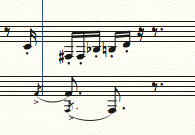
Finale annoyingly moves grace notes to the wrong location, especially after entering an articulation on it.  Is there a way to fix it without resorting to the Note Mover and manually placing the note in the correct position in the measure?

Thank you!

Erik Lundborg

OS High Sierra, Finale 26

8 comments

Date Votes
Avatar
0

Erik Lundborg,


I tried to reproduce the problem, but was unable to do so.


It is not clear to me what you mean.

What articulation are you talking about?

Normally you do not put articulations on grace notes.

Could you attach a graphic showing the layout you need?


An idea (but it may not be relevant - since I do not know the exact problem):

Enter a normal note instead of a grace note.

Then, resize only the notehead (not the entire note).

Comment actions Permalink
Avatar
0

Peter Thomsen: Thank you!  Please see attached picture file.  Regarding your suggestion to change the note size, that might work but how does one add the cross mark that stretches over the flag, an action that is so easily effected with the semicolon?  In a related matter, I've noticed that when adding articulations, Finale automatically applies some spacing. Why?  That's the very problem here where the grace note is moved leftward into the previous measure, which is incorrect?
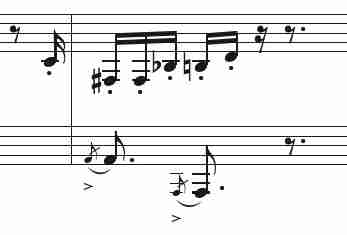
Thank you!

Erik

Comment actions Permalink
Avatar
0

Erik Lundborg,


I tried to reproduce the problem, but was unable to do so.

* See the attached graphic.


Two thoughts:


1) What is going on in the other instrument(s)?


2) What are the Grace Note settings in Document Options?

Comment actions Permalink
Avatar
0

Thank you!

1) The other instruments are doing unrelated activities.

2) Document Settings/Distance between grace note and regular note: .08333

In a somewhat related issue: after adding an articulation, followed by a dynamic, frequently the dynamic collides with the articulation.  Is there a way to insure, within Document Options or Program Options, that these items NEVER collide?

Again, thank you!

Comment actions Permalink
Avatar
0

… Document Settings/Distance between grace note and regular note: .08333 …


I suppose that the distance is .08333i - right? (= .08333 Inches)

- which is the same as in my example (= 6pt).


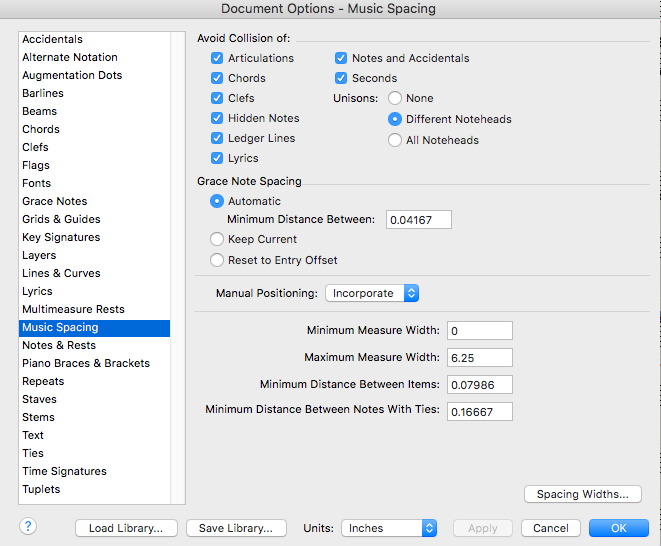
What are the Music Spacing settings in Document Options? (you can attach a screen shot)

Comment actions Permalink
Avatar
0

Thank you!

Please see picture file, below:

Comment actions Permalink
Avatar
0

The settings are almost the same as in my example.


1) In my example I set Manual Positioning to Clear, to get a “clean” example.


2) In your screen shot the Minimum Distance Between Items is .07986i (which is equal to 5.75pt)

You could try a lower value, e. g. 3pt.

Comment actions Permalink
Avatar
0

Thank you!

Comment actions Permalink

Please sign in to leave a comment.