New post
Avatar
0

I am creating a scholarly edition of a symphony by a 19th-century American composer. Like the composer, The composer notates the brass instruments in concert pitch (no key signature), but for the clarinet (in A), he has added the key signature of 2 flats (so: in B-flat).  In order to have the brass instruments displayed in concert pitch I have to select "display in concert pitch" (e notates I am notating the brass  He entered notation for his transposing brass instruments in concert pitch (under document).  This, however, makes the clarinet staff display also in concert pitch.  Is there a work-around for this? Please help.  Thanks.

17 comments

Date Votes
Avatar
0

Use/create Horns in C (at pitch) for your (otherwise transposed) score.


Handle the horn parts separately (by exporting and then transposing them) if necessary for a performance.

Comment actions Permalink
Avatar
0

OK. Thanks.  I've done that for the horns, and that seems to work.  But although I have unclicked "display in concert pitch" and have chosen (in score manager) a transposition of Down M2 (add 2 flats) for the clarinet in A, the staff for clarinet is still not showing two flats; rather it shows C major (the piece is in E minor). Other suggestions?

Comment actions Permalink
Avatar
0

… although I have unclicked "display in concert pitch" and have chosen (in score manager) a transposition of Down M2 (add 2 flats) for the clarinet in A, the staff for clarinet is still not showing two flats; rather it shows C major (the piece is in E minor) …


Unfortunately I am unable to duplicate your problem.

When I follow your steps, I get two flats.


Things to try:


1) Key Signature Tool.

Double-click on the {Clarinet in A} staff.

Regardless of the staff transposition the dialog box Key Signature should always display the Concert Key (= one sharp).

* Does the dialog box Key Signature display one sharp?


2) ScoreManager > Instrument List

Use the pop up menu {Add Instrument} to add a Clarinet in A.

Does the added instrument display two flats?

Comment actions Permalink
Avatar
0

Thanks.  I have tried what you suggest.

Using the Key signature tool, if I click on the Clarinet in A staff, the key signature displays one sharp.

Using the instrument list in the score manager, if I attempt to add another instrument (another clarient in A), it simply does not allow me to do that.  When I click on the "x" in the upper right corner, I get a "ding" and nothing happens.  The score has not been altered at all.  I have tried adding a different instrument--euphonium.  Same thing. 

I have sent an email to MakeMusic about this problem, but have not gotten much traction. They requested that I send along a copy of the file, which I did last Thursday (using my university's drop box), and then again yesterday (using the Google drive, since some folks in the past have not been able to access the university drop box). No response either way.  This is quite frustrating.

Comment actions Permalink
Avatar
0

That indeed sounds strange.


Is the problem document specific?

I mean, what happens if you try the same in a new, empty document?

Comment actions Permalink
Avatar
0

Here is what I did. To provide two flats in an A Clarinet, the concert key for the whole piece should be G major, and realize that Horn parts (in F) traditionally rely on accidentals and omit showing the key signature. Be sure that is not what your composer is doing rather than putting the horns in concert pitch.

(Sorry I misspelled normally.)


Comment actions Permalink
Avatar
0

Peter, the problem seems document-specific. It doesn't matter what transposition I choose for the clarinet (in score manager), the key signature does not change.  However, if I create a new orchestral template in E minor, with an A clarinet (transposition "Down M2, add two flats"), the key signature for the clarinet in my score is one flat. If I change the clarinet transposition to "Up m3, add three flats," the key signature in the score (for clarinet) changes to two flats. I don't understand this.

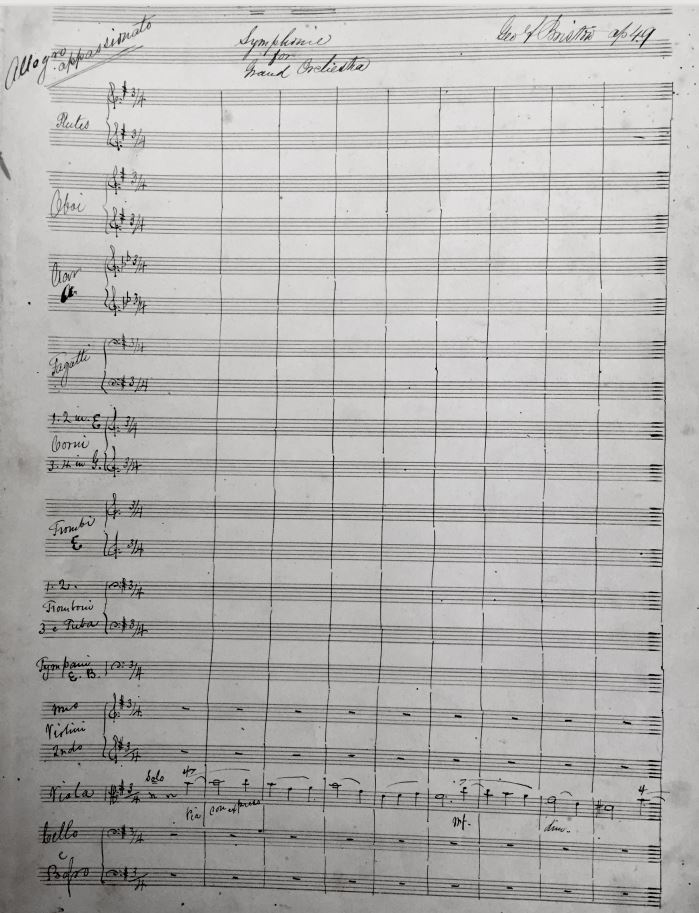
J. Adrian, the problem with your solution is that the piece isn't in G major--it is in E minor. So there is a one-sharp key signature, but I cannot change it to G major. The horns are in E and G, trumpet in E. I am thoroughly puzzled. Here's the first page of the MS:

Comment actions Permalink
Avatar
0

… I have unclicked "display in concert pitch" and have chosen (in score manager) a transposition of Down M2 (add 2 flats) for the clarinet in A …


… if I create a new orchestral template in E minor, with an A clarinet (transposition "Down M2, add two flats"), the key signature for the clarinet in my score is one flat …


Oops, I am so sorry!

I really should have seen that:

For an A Clarinet the correct transposition is {(A) Up m3, Add 3 Flats}.

No wonder why the key signature was wrong.

Comment actions Permalink
Avatar
0

Katherine,


Scanning your prior posts, I am not sure you say which version of Finale you are using, but in almost any recent version you should be able to use the Setup wizard to enter an A Clarinet, so I'm not sure what the fussing with the transposition was all about.


Since E Minor is the relative minor of G major, I am not sure why my example was not applicable. My reason for entering a couple of notes (G and D) was to illustrate how the transpositions would reveal themselves with the settings applied.


Without a key signature on the horn parts, the only way to know whether the composer was having the horns transpose would be to see what they were playing along with other instruments, which your reprint does not show. I believe this is the first time you revealed that the horns were in E and G, but I may have read over that in earlier posts.

Comment actions Permalink
Avatar
0

J. Adrian--

I am using Finale 27.  And yes, I realize that I should be able to use the Setup Wizard to enter an A clarinet. I am working from a transcription that someone else created a number of years ago (but which is now in Finale 27), and for some reason I cannot make the Setup Wizard show two flats for the key signature of the clarinet. The notes are all correct, and the clarinet is clearly in the right key (I haven't had to add accidentals for b and e), I just need to have the key signature appear at the beginning of each page because that is what the composer has in his MS.  If this wasn't for a scholarly edition it wouldn't matter, because the notes are correct.  But since it is, it does matter. That is what the fussing is about. I have tried everything that I can think of to make the program do that, and it will not.

If I create another orchestral template from scratch (in e minor--or, if you want--in G major), then I can get the correct key signature to appear on the clarinet staff.  I have no idea what glitch there is in my file that prevents it from doing what the Setup Wizard says it will do. I cannot start all over again with a new template, since this is a 73-page movement (868 measures) that is all but finished. 

I did not mention the keys of the brass instruments because it didn't seem important. The composer wrote them in "C" and--as you mention in one of your posts--added the accidentals en route. That isn't the problem.  The problem is that he didn't write the clarinet part in "C" and add accidentals, and I need somehow to replicate that. 

Comment actions Permalink
Avatar
0

Based on what you have said, my approach (and yours may differ) would  be to create the instrument setup via the Setup Wizard with any necessary alterations to the horns in Score Manager, and then transfer the information from your existing Finale file (either by MIDI import or by copy/pasting all musical items) to the new file.

Comment actions Permalink
Avatar
0

Yes, I thought of that (creating a new instrument setup via the Setup Wizard and transfer the information from the existing Finale file).  I tried it yesterday, using both "copy to the clipboard" and by copying, dragging, and dropping (I haven't tried MIDI important; I don't know how to do that.) The result in the new file is useless: the articulation marks are all over the place and some of them are missing.  It would probably take me longer to clean up this mess than it would to just throw the whole thing out and start over again.

Thanks, community, for your attempts to help me with this. 

Does anyone out there have any suggestions about how to get some help from Finale on this problem?  I am really disappointed by the abysmal customer service I have experienced.  I sent the question in last week, was asked to supply the Finale file and did so--twice.  I have not heard ANYTHING back from tech support for a week.  Any suggestions of where I might register a complaint?

Comment actions Permalink
Avatar
0

… Other suggestions? …

… the problem seems document-specific …


Instead of copy-pasting to a new document, try exporting as a MusicXML file.

Then, import the MusicXML file.

It is well known that the {MusicXML export/import} method often cleans up file corruption.

Comment actions Permalink
Avatar
0

Sorry, I have not read through all the suggestions, but have you tried checking 'independent elements' from the staff tool?

Comment actions Permalink
Avatar
0

Peter: I will try this.  Thanks. This might really help in other movements, where I have similar problems, but haven't yet done the editing.

Kristor: great I idea.  I had high hopes, but it didn't work. The key signature for the clarinet doesn't t change; I tried several different keys. Perhaps I should just leave well enough alone--the notation is correct (the Bs and Es are all flat) it is just that the key signature does not display. The exception is in notation in another layer, such as layer two, where I need to add the accidentals, which is totally weird)

Comment actions Permalink
Avatar
0

Peter, if I export the file as MusicXML and then import it, do I import it INTO a Finale score that I have already created with the Setup Wizard? Thanks for your help; I've never done this procedure.


Comment actions Permalink
Avatar
0

… I export the file as MusicXML and then import it, do I import it INTO a Finale score that I have already created with the Setup Wizard? …


I think that Finale imports the MusicXML file into a new, fresh copy of the Default Document.

Comment actions Permalink

Please sign in to leave a comment.