Nueva publicación
Avatar
0

When there are two or more layers in a staff, I know I can extract parts associated to one particular layer. But what if during composition process you simply want to explode a two layered staff, putting each layer on a staff below (both as layer 1 or 2 as prompted)? I usually use Copy/Move Layers tool but I need three steps to get what I want: 

1-Copy the whole passage to another staff.

2-Move layer 1 to layer 2 on original staff.

3-Select both staves and move layers 2 to 1.

Is there a way to use FinaleScript for this?


Thank you.

10 comentarios

Fecha Votos
Avatar
-2

How many times do you have to ask the same question?

Acciones de comentarios Permalink
Avatar
0

For some reason, it was posted three times. Probably new user error, and not a big deal.


However, somebody from MM should have deleted two of them.

Acciones de comentarios Permalink
Avatar
0

Sorry about the multiple posts, no idea what happened.
I started to mess with Finalescript and I managed to automate the process on a particular location (staff 1, bar 1, "exploding" to staff 2, bar 1, for example). Now I'm trying to find a way to choose a highlighted measure and explode layer 2 to the staff below regardless of bar number. Any thoughts?

Acciones de comentarios Permalink
Avatar
0

I really think you should either use the suggestion of View Active Layer Only, or JW Staff Polyphony. FinaleScript is pretty specific in what you need to tell it, while the other methods are much broader.

Acciones de comentarios Permalink
Avatar
0

+1 for the JW Staff Polyphony plug-in.

Acciones de comentarios Permalink
Avatar
0

I downloaded JW Staff Polyphony but I`m not sure which tool I should use. I`m trying Staves/Split from Voices but it doesn`t work. 

Acciones de comentarios Permalink
Avatar
0

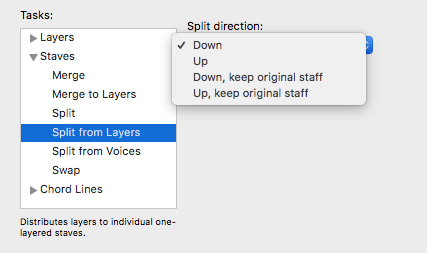
Staves -> Split from Layers.

Acciones de comentarios Permalink
Avatar
0

Thank you! This is already a time saver for me even though Split from Layers only copied second layer to the staff below but didn't erase it from the source but I guess I can just clear it with the same plug-in.

Acciones de comentarios Permalink
Avatar
0

Normally (I have tested it), layer 2 disappears from staff 1 and is moved to Layer 1 of Staff 2.

Acciones de comentarios Permalink
Avatar
0

Make sure that the Split Direction is set correctly. Just up or down, and NOT "keep original staff."


Acciones de comentarios Permalink

Iniciar sesión para dejar un comentario.