Nueva publicación
Avatar
0

Using Finale 2014.5.6359 on Windows 7.

When trying to enter some chords it doesn't know them. ie A7(#9b5) becomes A&(#9B5); C+7(b9) becomes C+7(B9).

Also when I enter some notes and try to select Rhythm Notation the bars become just whole note space.

6 comentarios

Fecha Votos
Avatar
0

… When trying to enter some chords it doesn't know them. ie A7(#9b5) becomes A&(#9B5); C+7(b9) becomes C+7(B9) …


Just guessing (while blindfolded):

1) Your layout is based on the Jazz font, right?

2) Document menu > Document Options > Fonts > Chord

In the pop up menu Chord, the Suffix font is set to JazzText, right?


Unfortunately you can not use the JazzText font for accidentals in chord suffixes.

Instead, use the Jazz font for the accidentals only.

You can still use JazzText for all the other characters in the suffix:


… when I enter some notes and try to select Rhythm Notation the bars become just whole note space …


Take a good look at the staff style Rhythm Notation.

My guess is that there is something wrong with the staff style’s definition.

Acciones de comentarios Permalink
Avatar
0

thanks, Peter, I'll try that for chord extensions.

However where do I find what the Rhythm Notation should look like? And BTW I've not changed and it worked on my last score.

regards, Ray

Acciones de comentarios Permalink
Avatar
0

Hi Peter

I've checked the Rhythm Notation definition against an earlier score and it's exactly the same. Anything else you can advise?

BTW chord extensions work OK now - thanks.

regards, Ray

Acciones de comentarios Permalink
Avatar
0

… Hi Peter

I've checked the Rhythm Notation definition against an earlier score and it's exactly the same. Anything else you can advise? …


Your info reveals that the problem is document specific, not program specific.

Since the staff style is not the culprit, take a good look at the Staff Attributes.

Both a staff style and the Staff Attributes affect the staff.

All the options that are not selected/included in a staff style, are controlled by the Staff Attributes.

Acciones de comentarios Permalink
Avatar
0

"where do I find what the Rhythm Notation should look like?"

Here is an example :

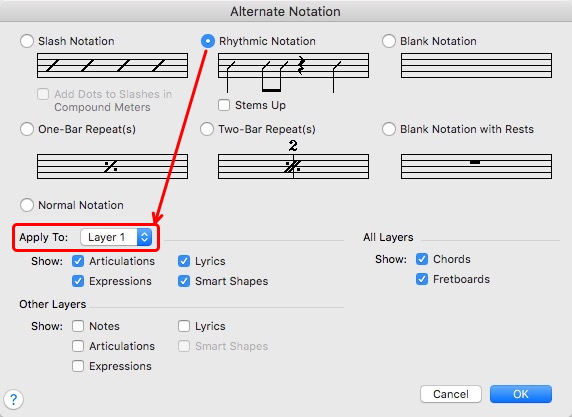
The figure in measure 1, after applying Rhythmic Notation to it, looks like measure 2, as long as the notes are entered in Layer 1 and the Staff Style (the default one in this case) is set to be applied to Layer 1 as well.


Acciones de comentarios Permalink
Avatar
0

Don't know why exactly, but it works now

Acciones de comentarios Permalink

Iniciar sesión para dejar un comentario.