
For some Focusrite Scarlett devices can cause an Audio Engine Fail to Load error. Here is a workaround that should allow the Focusrite to function as the Audio Device in Finale.
- Close all programs.
- Turn on the Focusrite
- Right click on the speaker icon in your system tray and choose Playback Devices.
- Select the High Definition Audio Device as the default device by choosing the device and clicking the Set Default button.
- Choose Recording, and set the High Definition Audio Device as the default device.
- Click Apply > click OK.
- Launch Finale and go to MIDI/Audio > Device Setup > MIDI Setup.
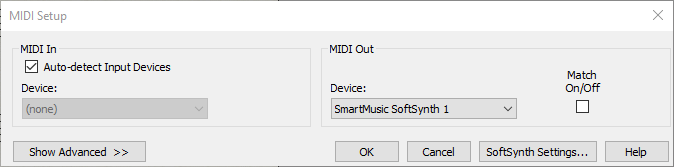
- Then click on SoftSynth Settings.
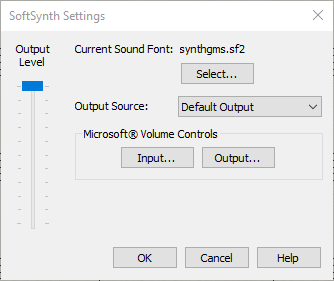
- Change the Output Source to Default Output; click OK.
- Make certain that the MIDI In and Out devices in MIDI Setup are not set to the Scarlett device. If they are please change these to None (for MIDI In), and SmartMusic SoftSynth (for MIDI Out).
- Click OK.
- Go to MIDI/Audio > Device Setup > Audio Setup. Set the Audio Driver to ASIO, and verify that Source and Mic Source is set to the Focusrite.
- Click OK.
- Restart Finale, test playback.