New post
Avatar
0

 Using Windows 10 and the latest Finale Make Music version.

I cannot make tuplets.  I have tried to follow the instructions probably 50 times.  On the fourth beat of a 4/4 bar, I get the bracket with a 3 in it while I am entering the first two eighth notes but when I put in the third one, it won't allow it, the 3 and the bracket disappear,, and I have no tuplet.  Any thoughts?


Bob Jones

22 comments

Date Votes
Avatar
0

Turn off the "Too many notes per measure " warning in the Simple/Speedy menu.

(There are other ways to do this, but you didn't say which tool you were using to enter notes.)

Comment actions Permalink
Avatar
0

I don't know how many times I've tried and failed over the years to create tuplets. Come to find out that it's because you have to disable the "Check for extra notes on mouse entry" feature in order to do it.

You know, I really love Finale, but stuff like this makes me tempted to migrate to Sibelius. Really? You never thought to explain that tuplets can't be created unless this warning is disabled? When I think of all the time I've wasted trying to use this feature, it makes me angry. 

Comment actions Permalink
Avatar
0
Comment actions Permalink
Avatar
0

David,


If you are determined to leave Finale (which after the years of experience you reference might not be, on reflection, something you really mean to do), a decision to choose Sibelius suggests you haven't really researched your options. If your complaint about Finale is a lack of communication, you would find the Dorico forum (and developers) much more responsive than I expect you would find Sibelius. Of course, there would be a learning curve with Dorico as with Sibelius.

Comment actions Permalink
Avatar
0

>Of course, there would be a learning curve with Dorico as with Sibelius.<


Goodgawd yes!

https://www.youtube.com/watch?v=dKx1wnXClcI 

https://www.youtube.com/watch?v=S-3wEC6Fj_8 


Martin Keary always promised to do a similar video on Finale but never did. He has a similar piece on MuseScore but since then, he has become the new Head of Design for Muse Group. I expect that, under his management, both MuseScore and Audacity will get better and, with MuseScore 3.6, that appears to be happening (I still can't stand it but it is a lot better). They couldn't have been worse.

Comment actions Permalink
Avatar
0

Martin Keary (Tantacrul) either gave a disingenuous "review" of Dorico or simply did not familiarize himself with basic capabilities of the software; so I would not put too much stock solely into his evaluation.

Comment actions Permalink
Avatar
0

Did you watch the entire thing?


Although 3.5 has come out since then and some of those issues have been addressed, I have no problem with its accuracy regarding Dorico 3. If the upcoming 4 doesn’t address many of the remaining issues, it will never get past the evaluation stage on my desk. I’ve spent enough money on an app that gets in my way and slows me down.


Finale lets me work the way I need to. Dorico, as nice as it looks, doesn’t. Its MusicXML input, although better than 3.0, still sucks. I could go on but that’s what the Dorico forum is for.

Comment actions Permalink
Avatar
0

Of course I watched the whole thing. And I am not here to try to sell anyone Dorico. My point initially was that given the OP's complaints about Finale's response that Sibelius's response compared to Dorico's certainly does not make Sib a better alternative if he were committed to leaving Finale (which I doubt he will).

Comment actions Permalink
Avatar
1
Comment actions Permalink
Avatar
0

I've landed here AFTER watching this tutorial, and I'm a fan of Jason Loffredo. But for some reason, the tuplets tool is simply NOT WORKING as it's supposed to. Do not get a crosshair. Driving me nuts… I'm with David Harris. Really FRUSTRATING.

Comment actions Permalink
Avatar
1

Katherine, did you read my tutorial, with the link posted above? If you did, and you're still having problems, I'm happy to help you out by phone or Zoom. My email address is encoded in my signature.

Comment actions Permalink
Avatar
0

Mike Rosen— wow, thank you for pointing out your tutorial and the offer of help. I am not using a numerical keyboard, looks like it’s worth getting one. The thing is, I have done triplets (and other tuplets) more or less without problems, but often WITH problems, and on this project I can’t get past square one… It’s wanting to do 6 over 4, so I tried to change that but the “box” wouldn’t open up. Or when it did I changed to 3/2 and then… it was the same. Messy retelling because I spent a lot of time fiddling with it to no avail. What’s your um suggestion: run out and get a number pad? THANK YOU FOR YOUR HELP! Katharine

Comment actions Permalink
Avatar
0

Forgot to say: using Mac and V27

Comment actions Permalink
Avatar
1

Yes, get that USB keypad! And feel free to contact me, if you would like a quick lesson.

Comment actions Permalink
Avatar
1

Many key combinations are different inside Finale than in other apps such as, say, all word processors. This causes a bit of confusion until one gets used to it.


An extended keyboard or a numerical keypad is not just a big help. On a Mac, it makes some things possible in Finale as the 3-key combinations on the short keyboard do not work.


If you get a keypad sidecar, make certain that it has both the Forward Delete and Escape keys. This has both and in the same locations as the Apple Extended Keyboard.

https://smile.amazon.com/HoRiMe-Aluminum-Numerical-External-Compatible/dp/B07HQB5CGQ/ref=sr_1_1_sspa 

Comment actions Permalink
Avatar
1

Mike and Mike (!) - thanks fo the expert advice. Is there a brand/model or two you recommend- for a Mac book Pro? I am looking forward to solving this hassle, with your help. If still stuck I’ll definitely knock on your door for a lesson🙏🙏🙏. Cheers, Katharine

Comment actions Permalink
Avatar
0

OK ajudar saw the link to one on Amazon. Also found it here (Portual) … at twice the price … oh well. Anything to staunch the pain! Thank you both!

Comment actions Permalink
Avatar
0

Meant “I just saw”…

Comment actions Permalink
Avatar
1
For what it's worth, I have somehow managed to mostly resolve my tuplets problems with no need for an extra number pad. I generally have to struggle for a few minutes, but I usually get there in the end. It really is frustrating, though, that it's not more straightforward. I want to spend my time and energy on creativity, not fighting with technology.
 
By the way, I think maybe the thing that has helped me the most has been to make sure there are extra beats open behind the tuplet I'm trying to create in the same measure. That sometimes means having to erase stuff and re-enter it, but at least it works.

Anyway, I mention all this just to save you the hassle of getting a number pad and then not having it really fix the problem. Maybe it will, but I wouldn't say that it's guaranteed.

In any case, good luck!
 
-David

PS I don't want to give anyone the impression I don't like Finale. I do, and I'm planning to stick with it. I've been able to do so much with this tool that I could never do before it was available, so a big thank you to all those developers who have made it what it is.
Comment actions Permalink
Avatar
0

Hi David— thanks for the heads-up. I have tried the "trick" of leaving a blank beat, but AT THIS PARTICULAR MOMENT, at least, it's not working. Agreed: want to create, not go mad!! 

I have also tried Sibelius, but it's no better, and less adequate for contemporary music. Still, you know, a triplet is NOT REALLY NEWS!!

Gosh, maybe Finale could up their support for this issue. Apparently it's not "just me". Thanks again to all. (Number pads not  in stock, stay tuned…)

-  Katharine 

Comment actions Permalink
Avatar
0

I'm so tired of saying this: With Simple Entry, and a Numberpad, tuplets are no problem, even on the last beat. Yes, if you are doing nested tuplets, or something like 14, 32ds in the space of... there will be some cleanup to do. But if you are doing "normal" tuplets, it's easy. I am happy to teach my method to anyone.


I've also just tried it with the Default Shortcut Table, so, no numberpad. It works just the same, except you use the numbers above the QWERTY line, instead of the numberpad. Katherine, and David, drop me a line, if you want some coaching.


My email is encoded in my signature.


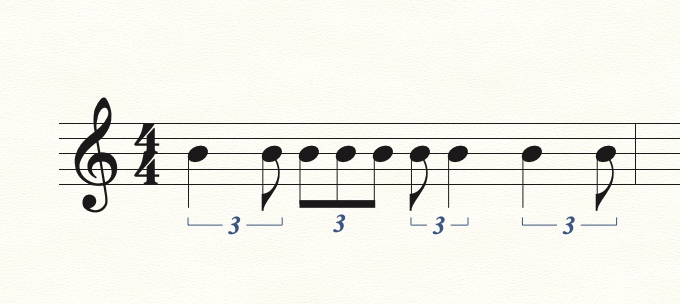
This measure was done without a numberpad, and with no backing up, no deletions, no empty beats, etc. QWERTY keyboard only.

Comment actions Permalink
Avatar
0

Impressive! OK, you're on! I will email you, THANKS! Katharine 


Comment actions Permalink

Please sign in to leave a comment.