New post
Avatar
-1

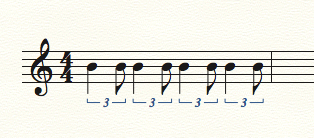
I am new to Printmusic and am doing a 30 trial.  My childrens music teacher handed out handwritten music for violin. There are several quarter note/eight note tuplets in the time of 2 eighth notes. I have read the directions but try as I might, I cannot get this to work. How is this done?

10 comments

Date Votes
Avatar
1
Comment actions Permalink
Avatar
0

Doesn't work - I just upgraded to Finale 25.4. No matter how I try and trick the tuplet tool into making a triplet with a quarter and an eighth the notes get quantized incorrectly by Finale so I can get a Quarter and a sixteenth note in the tuplet space (I specify three eighths in the space of two eighths) and a 32nd note rest is added. I used to be able to do this in Print music. Maybe I should revert back LOL 

Comment actions Permalink
Avatar
0

It works for me. 

At first, you mentioned a quarter/eighth, but later you said a quarter/sixteenth. Was that a typo, or were you actually trying for a quarter/sixteenth?

Comment actions Permalink
Avatar
0

Typo - I had to read a later post he made, where he explained the steps better and also added that he turned off the "find extra notes" in speedy entry for creating the tuplet figure at the end of a measure. After a few wrong turns I figured it out.

Thanks

Comment actions Permalink
Avatar
0

Trust me, it works. This is done in Simple Entry. All notes entered from the QWERTY keyboard. No mouse.


If you are still having problems, contact me at wawoodman at aol dot com, and we will work it out!


Comment actions Permalink
Avatar
0

Dear Mr. Rosen,

I too have tried to enter a quarter and an eighth note as a triplet in speedy entry without success. Then I tried to enter the same triplet using two tied eighth notes and a single eighth note with success. That's a bit simpler in using the simple entry workaround. But why should Finale be unable to process a quarter and a eighth note as a triplet (after on has properly prepared the entry by typing control 3); after all, this kind of a triplet is totally common? This should be reported as a glitch.

Comment actions Permalink
Avatar
0

I’m not very familiar with Speedy, but I think that 3 tells it to expect a three note triplet, of whatever duration you start with. In Simple, you can specify (for example) 3 eighths in the space of 2 eighths. Then, when you enter a quarter, Finale knows that you only need an eighth to fill the specified triplet. By the same token, you can enter an eighth, and then a quarter, and it works the same way. It’s neither a glitch or a bug, but rather, the new user not yet understanding the underlying logic of the program, and the difference between how Speedy and Simple handle the triplets.


If you’re still having problems, contact me at the email I showed a couple of posts up, and I’ll be happy to see if I can get you working!

Comment actions Permalink
Avatar
0

Jim McGiffin,


The fastest way in Speedy to get an Eighth note triplet of {Quarter + Eighth} is Control-1, and Return.

Control-1 defaults to {3 Eighths in the space of 2 Eighths}.


If you type Control-3, then Speedy’s sub-tool Tuplet Tool will define the triplet based on the first note you enter.

If the first note you enter, is a Quarter, then the triplet will be defined as a Quarter note triplet:

{3 Quarters in the space of 2 Quarters}.

Comment actions Permalink
Avatar
0

I have been trying, in vain, to get Finale to allow me to enter three notes in the space of two. It ALWAYS puts in an extra rest at the end! OR, in the case of 3 quarter notes in the space of 2 quarters, it simply won't let me add the 3rd quarter. I have followed the instructions in the user manual. 

Help! 

I have a iMac and am using Finale version 25.5.0.259.

Thanks,

Judy Lea

Comment actions Permalink
Avatar
0
Comment actions Permalink

Please sign in to leave a comment.