New post
Avatar
0

mac os sierra 

finale 2014.5  


When I am in a score that I have created, and put repeat signs with its brackets in the score, many of the brackets do not appear, even though I say to show on all lines. Why, and how do I fix it so the brackets show up on all of the parts?

7 comments

Date Votes
Avatar
1

When you are in the Staff Tool, check the Staff Attributes for each staff.

Is the display option “Endings and Text Repeats” selected or de-selected?


Also, the culprit could be a staff style that changes the display of “Endings and Text Repeats”.

Comment actions Permalink
Avatar
0

Peter's suggestion just helped me out (Yea!)...but I've got another step.  Whenever I open a new Finale score from the templates or one of my own templates, only the top staff is checked for "Endings and Text Repeats."   I tried several options, Brass Choir, Brass Quintet Woodwind Trio, and they all open with only the top staff as showing Endings and Text Repeats. 

They were not showing up in the individual parts after extraction either. I did figure out to check the "Show on Top Staff" in the Repeats menu on the individual parts. Is there someplace where I can make that box checked for all staffs as the default whenever I open a new document? It would save several steps.

Comment actions Permalink
Avatar
0

Check the box, and save it as a template for that arrangement of instruments. That's the easy way. You can also modify the default docs, but that's a little more complicated, since they are in a couple of locations.

Comment actions Permalink
Avatar
0

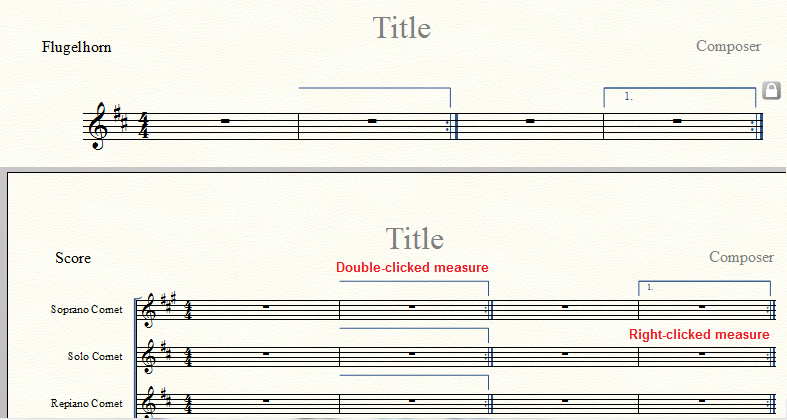
That's odd. When I open a Finale Template or use setup and right-click on a measure with the Repeat Tool, Create First & Second Endings gives me exactly what Joe says he wants.


But if I double-click on a measure, Finale puts the ending on every staff. The parts behave as expected in either case.


Comment actions Permalink
Avatar
0

Adrian,

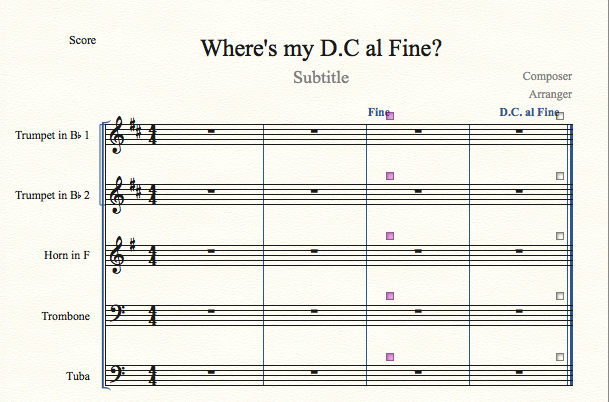
See if it behaves the same way when you try to put in a D.C. al fine or one of the TEXT endings.  Regular repeats and endings are no problem, it's ONLY the D.C. endings and "sign" and Coda markings that seem to consistently not show up in some of the inner staves unless I go to the staff tool and modify the individual staff.

Below is an example of when I select New Document w/Set-up Wizard > Brass Quintet --> then using the repeat tool from the main toolbar, I select any of the D.C al .... items (making sure that the Show on All Staves button is active.


I can now go to the staff tool and check, under the "Items to Display" section, Endings and Text Repeats.  Can't understand why this isn't already checked even when I create my own ensembles.  Let me know if you can duplicate this or if aliens have infiltrated my Mac.

Comment actions Permalink
Avatar
0

P.S.  Thanks for taking the time to look into my issue.  Hope it's not just me.

Comment actions Permalink
Avatar
0

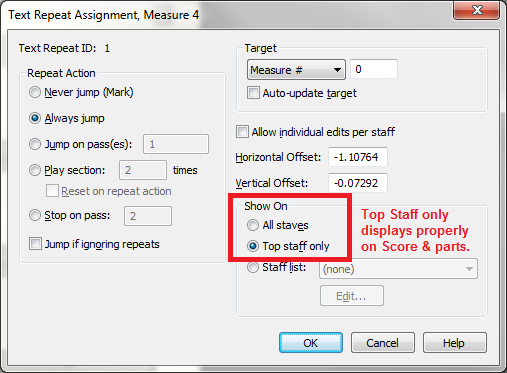
I do not have a Brass Quintet template, but when I tried entering a text repeat (D.C. al Fine) I found that one can only do this by double-clicking a measure, which gives the DC label on all staves, as you said. (No idea why MM made this the default.)


But if I select Top Staff Only, everything seems to work out fine in both score and parts. So that's what I suggest you do.


Comment actions Permalink

Please sign in to leave a comment.