New post
Avatar
0

Hi,

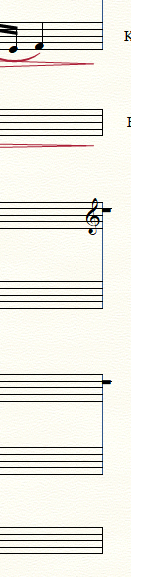
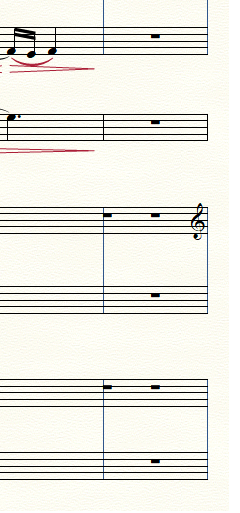
I'm having 'artifacts' in 2 parts of a score which look like whole bar rests. I don't have any clue how they got there (upper image). If I click the objects in selection mode they turn white but I'm unable to perform any action on the objects. I tried to remove the bar in question but then the objects only shift horizontally. Is there any way to delete these objects (lower image)?   Thanks!

Michael

Intel i5 4200M | 4GB RAM | Win10 Home, v.1709 

Finale 25.50.290 ENG | New user


5 comments

Date Votes
Avatar
0

I’ve seen that happen when a measure was overloaded. Try working in scroll view, and see if you cam delete them, that way.

Comment actions Permalink
Avatar
0

Thanks for your reply, Mike. I tried deleting in scroll view but that doesn't seem to make any difference, I wasn't able to delete the objects.

Comment actions Permalink
Avatar
0

OK. Send me the file at wawoodman at aol dot com and I'll have a look.

Comment actions Permalink
Avatar
0

My guess is similar to Mike's. Try in the measure before the one where it appears. In Speedy, use the arrows to move from one note/rest to the next. You may find an extra rest at the end of the measure.

Comment actions Permalink
Avatar
0

@Mike Rosen: thanks for your offer, problem is solved!

@Michel Herr: the problem was indeed in the measure before, thanks!

Comment actions Permalink

Please sign in to leave a comment.