New post
Avatar
0

MAC OS 10.11.6

I need to change the key signature multiple times throughout the music. I can not, for the life of me, find any information on how to do this!  Any help would be greatly appreciated.

19 comments

Date Votes
Avatar
0

NotePad can not change key signature mid-document, sorry.

You have to use the same key signature through the entire document.


As a workaround you can notate the key signature regions with note accidentals.


If this bothers you, consider an upgrade.

Comment actions Permalink
Avatar
0

That would definitely bother me :)  Upgrade to Finale? 

Comment actions Permalink
Avatar
0
Comment actions Permalink
Avatar
0

PM will certainly do a lot more than NotePad. I'd suggest you download the demo, and try it out for a month. If it does everything you need it to do, great. If not, then worry about going to Finale!

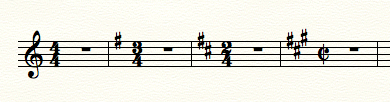
This was done in PrintMusic 2014.5:

Comment actions Permalink
Avatar
0

I actually already have PrintMusic. It won't allow me to just notate one staff. I'm doing individual instruments.  For instance, I'm just notating for a cello right now. Thank you for answering me though!  I may have found what I need in something else.

Comment actions Permalink
Avatar
0

I'm not sure what you mean. You can notate a single staff, easily.

Just start with the default document, and change it to whatever instrument you want in the Score Manager.

Comment actions Permalink
Avatar
0

I only want to see the bass clef for that one instrument. I don't want to see anything else.

Comment actions Permalink
Avatar
0

What else do you see?

Comment actions Permalink
Avatar
0

>I only want to see the bass clef for that one instrument. I don't want to see anything else.<


Huh? Couldn't be easier.  From the welcome screen, select Default Document—this gives you a single instrument (or vocal) line. Select the Clef Tool to change the clef: Double-click the first measure, select the bass clef


You're good to go.

Comment actions Permalink
Avatar
0

G clef and empty staves. Maybe I'm missing something on how to do what I want...

Comment actions Permalink
Avatar
0

Chavonne,

Send me an email at wawoodman at aol dot com.

I'll get you started!

Comment actions Permalink
Avatar
0

As Mike H said, not hard at all.

Comment actions Permalink
Avatar
0

I just did this in PrintMusic. I could have created it in Finale, too. See my earlier post.

Comment actions Permalink
Avatar
0

Mike H., I feel like a complete igit. I always make things more difficult than necessary. I was choosing setup wizard....UGH.  Mike R., thank you so much for the offer, I think I'm good now.

Comment actions Permalink
Avatar
0

This is what happens when you rarely use something and then someone knows you can do it and needs it yesterday!  THANK YOU BOTH!!

Comment actions Permalink
Avatar
0

You could have done it that way, too. Just click NEXT to the first screen, and then in the second, Strings>Cello>Add, and work your way through the next couple of screens.

Many ways to do things in finale.

Comment actions Permalink
Avatar
0

Thank you again. I appreciate you both!


Comment actions Permalink
Avatar
0

You're very welcome.

Comment actions Permalink
Avatar
0

What he said!

Comment actions Permalink

Please sign in to leave a comment.