New post
Avatar
0

Hello,

I am still using finale PrintMusic 2011 and I'm attempting to create a lead sheet of Polish Christmas hymns for my church congregation. I am having trouble typing the lyrics in and having access to the correct symbols for the Polish language. I tried to copy and past from MS Word, and it worked on on piece but not on another. Anyone done something similar and found a solution?


Thanks!

17 comments

Date Votes
Avatar
0

You can click on the notes and type the syllables underneath. Your normal font and language options should behave except for the dash which always takes you to the next note.


No matter how advanced the Lyric tool, some of us prefer doing it the old fashioned way.

Comment actions Permalink
Avatar
0

Thanks for your response. I know how to type in lyrics, but I'm trying to get non standard characters in the lyrics and they don't seem to be available through the insert symbol menu.

Comment actions Permalink
Avatar
0

How do you normally enter them in a text doc? 


What OS?

Comment actions Permalink
Avatar
0

Have you selected a font with the proper symbols in the Document menu > Select Document Fonts?


Comment actions Permalink
Avatar
0

You might also look at something like PopChars, which is avaliable for both Mac and Windows, to help with the special characters.


http://www.ergonis.com/products/popcharx/ 


But I don't think that will help with PM 2011.

Comment actions Permalink
Avatar
0

One problem that I see (if JAV's solution doesn't do it) is that 2011 was not yet Unicode-compliant. The easiest way to solve your problem would be to upgrade to PM 2014. Then you will have access to all of the characters you could possibly want!


Barring that, use a font like Times New Roman, and look up the ALT codes for the special letters you need. Once you have them written down, it will be easy to enter them as needed. (For example, the slashed L character Ł is at ALT+0321, and the lowercase ł is at ALT+0322.


If you are on a Mac, it will be a lot more difficult. You will need to find a font that has the Polish characters in the first 255 slots. Easier to upgrade PrintMusic!


Comment actions Permalink
Avatar
0

I get it now — didn't understand that Polish wasn't your main language or I would have suggested this already. There is an easy solution—at least for the Mac—it should also work in Windows.


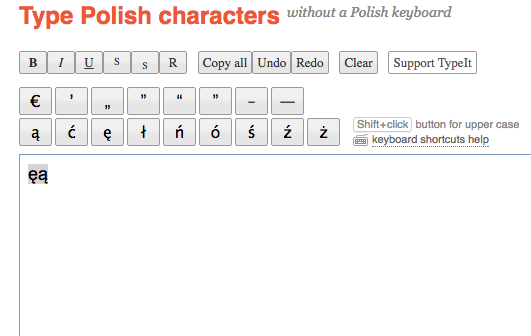
These guys have foreign character keyboards for a number of languages. Here is the Polish one:

http://polish.typeit.org/


Here is typit's home page: http://www.typeit.org/


I've been using these for years. Simply copy and paste. I just tested it Notepad 2012 and Finale 2011 to make sure it still works.


Comment actions Permalink
Avatar
0

Mike R,

Will downloading the demo version of PM 2014 overwrite earlier versions or co-exist with it as most versions of full Finale do?

Comment actions Permalink
Avatar
0

They coexist as long as the file names are not identical. PrintMusic will install as PrintMusic 2014.5 so will not overwrite PrintMusic 2011, for example.


The only app where you have to watch this is Finale 25 which installs as Finale.app. If you rename the installed version to say, Finale 25.3.app, then you can download and install the current 25.4.1 and it will install as Finale.app leaving the other build untouched and fully functional.


I currently have NotePad 2012, PrintMusic 2014.5, Finale 2011, Finale 2014.5, Finale 25.3, Finale 25.4 and Finale 25.4.1 (named as Finale.app) all installed and functioning (as well as they can in OS 10.12.5). I removed Finale 2014 and will soon do the same with 25.3 and 25.4 to free up some disk space as 25.4.1 is working great.


The only reason I have so many versions installed and working is so that I can be accurate when I answer questions.


Comment actions Permalink
Avatar
0

Mike H is correct; you can have as many versions as you want.


To Mike H: I tried that TypeIt Polish, and it did not paste correctly into PM2011 for me, either as lyric or text. I wonder what I was doing differently?

Comment actions Permalink
Avatar
0

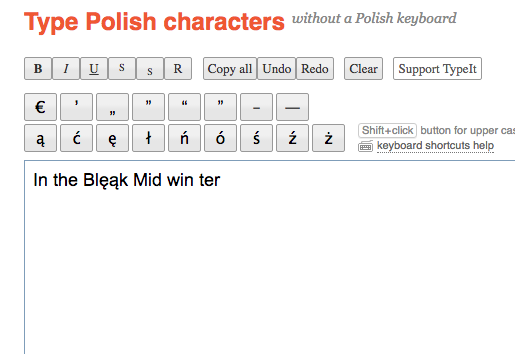
Hmmm... In these examples, first I went into typit and  clicked on the characters I was going to use, then highlighted and copied.

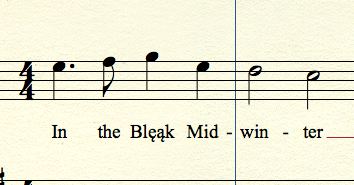
I then typed into NotePad 2012. As I came to the characters, I pasted. Notice that the font changes to match automatically when I pasted. I then kept typing.

I could have typed the entire words into http://polish.typeit.org/ , copied and pasted from there. Dashes would depend on if I was useng the Lyric window or pasting the syllables in.

Point is that you click on the foreign characters and type in the rest.

From my folk festival days, I have an international Christmas card list including Poland and Turkey. This works with mail merge for envelopes in Word and Filemaker. 

Comment actions Permalink
Avatar
0

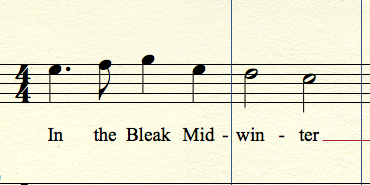
I could have entered text as normal, gone back and edited in the characters, too. This was how it looked when I created it years ago.

Comment actions Permalink
Avatar
0

Mike, 

Did you try it in 2011? When did the Unicode come into play?

Comment actions Permalink
Avatar
0

Weird, I did try it this morning and it worked in 2011 but now I'm getting exception errors and it crashes as I try to do nearly anything in edit mode. Importing the Music.xml from Notepad showed accent marks but not the characters.

Although, I think I can get it up again, not now as I am working. Hmmmm...


Anyway, I am in agreement that an upgrade to PrintMusic 2014.5 is highly recommended. We all know that will work and there's more than one way to do it.

Comment actions Permalink
Avatar
0

2011 to 2012 seems to be the dividing line. I have no trouble with 2012, and no good results in 2011.

Comment actions Permalink
Avatar
0

… Did you try it in 2011? When did the Unicode come into play? …


… I have no trouble with 2012, and no good results in 2011 …


Unicode support came in Finale 2012.

Comment actions Permalink
Avatar
0

That answers the question. Thanks, Peter!

Comment actions Permalink

Please sign in to leave a comment.