New post
Avatar
0

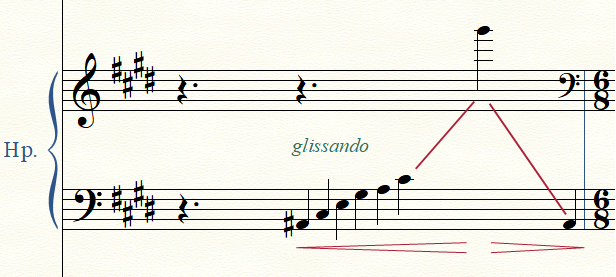
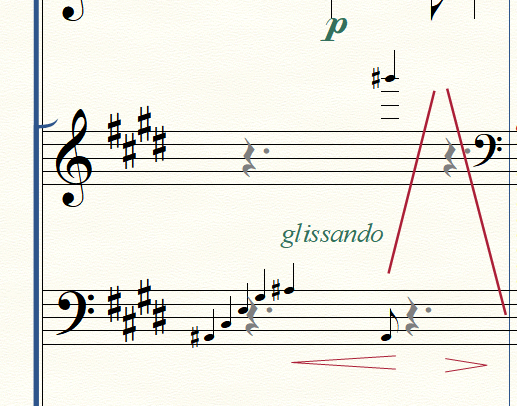
I entered the notes of a harp glissando as graces notes and moved the grace notes to their correct position using the note position tool. This seemed to work fine but after opening saving and opening the same file the grace notes switch back to their original position (image). You can see the glissando 'lines' still at the correct position. Do I have to go about in a different way?  
Thanks!   Michael
Intel i5 4200M | 4GB RAM | Win10 Home, v.1709 
Finale 25.50.290 ENG | New user

6 comments

Date Votes
Avatar
0

Instead of using grace notes, consider using regular notes (entered as a not displaying tuplet), and resize the regular notes to grace note size.

Comment actions Permalink
Avatar
0

@Peter: thanks for your reply. I tried this but wasn't able to enter the last A# (which by the way should be a quarter note). Finale just doesn't allow it. Also Finale asks to put a certain amount of notes (6 in this case) in a certain amount of quarter notes. This can not be altered in a given amount (for instance 2 and a half quarter).
Also it doesn't seem possible to enter a regular note in the upper stave. After deleting the single high G# grace note and deleting a quarter rest to make 'room' for a regular high G# quarter Finale always puts back the rests automatically. ?

Comment actions Permalink
Avatar
0

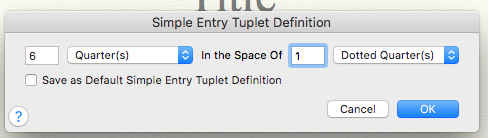
Set your tuplet as 6 quarters in the space of 1 dotted quarter. Then, as Peter said, choose not to display number and bracket.


Comment actions Permalink
Avatar
0

… it doesn't seem possible to enter a regular note in the upper stave. After deleting the single high G# grace note and deleting a quarter rest to make 'room' for a regular high G# quarter Finale always puts back the rests automatically …


If I understand you correctly, you delete a quarter rest to make ‘room’ for a quarter note, right?

But Finale fills up the measure with rests - before you can enter the quarter note, right?


I am unable to duplicate this problem.

Indeed there is the option “Fill with Rests at End of Measure”, but it should not fill the measure with rests until you go to another measure, or switch to another tool.

As a test (not a solution), what happens if you de-select “Fill with Rests at End of Measure”, and try again to enter the quarter note?

Comment actions Permalink
Avatar
0

@Peter: correct, that is what happened but I'm neither able to duplicate it again (Finale regularly makes me want to screem out loud.... :-) ) . B.t.w.: the 'Fill with Rests at end of Measure' option was and is not activated.

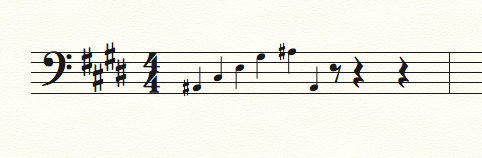
@Mike: I was able to set the 7 quarter notes of the lower bar to 1 quarter (I couldn't find how to set it to dotted note lengths? How do you do that?). The result (image) works for me.

Thanks Peter and Mike!

Comment actions Permalink
Avatar
0

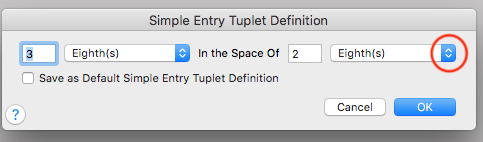
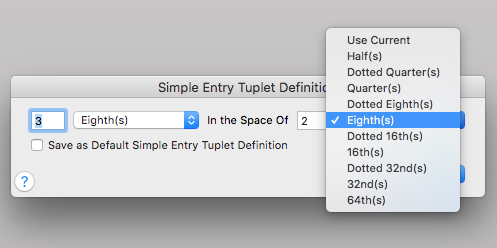
In Simple Entry, enter the first note of your tuplet. Then tap Alt-9 to open the Tuplet Definition box. Click where I have the red circle.


You will get a dropdown. Select the dotted note, there.

Comment actions Permalink

Please sign in to leave a comment.