New post
Avatar
0

I have updated to a MAC OS Sierra Operating System.(MAC OS Sierra 10.12.5. ) I am not longer able to access the Finale Songwriter.    My Finale Songwriter tells me I need Java Script 6. When go to Java website to install 6 it tells me it is not compatible with MAC OS Sierra?!!  


What to do?   Do I need a computer that runs Microsoft?? 


Thank you.  

Nancy


7 comments

Date Votes
Avatar
0
Comment actions Permalink
Avatar
0

I recently purchased a new Mac that has Sierra installed. Since I use Finale 2012, I had to download and install Java Script 6, which I did. I can't speak for your Songwriter, but if it is the 2012 version, it should work, as long as Java 6 is installed. Finale 2012 works fine for me, with the one exception being Human Playback, which Songwriter doesn't have.


Here is the download link I used to get Java:

https://support.apple.com/kb/DL1829?locale=en_US 

Comment actions Permalink
Avatar
0

You may (probably) have more than one 32bit application requiring JRE 6. Use the link that Bruce gave you to download. Save the download after installing—when you update to High Sierra, you'll need to install it again.


When Oracle bought SUN Micro, Apple and Microsoft were no longer allowed to bundle JAVA with subsequent OS releases. The run time that Apple has was licensed by SUN. Apple can make it available but Oracle won't let them bundle it.


The JRE 8 that you get from Oracle is 64bit only. Finale 25 does not require it but many web sites and a few applications do. Unless you are a developer, you don't need the Toolkit (ignore error messages that say you do). The Java Runtime Environment (JRE) is what apps need. 

Comment actions Permalink
Avatar
1

Hello, `

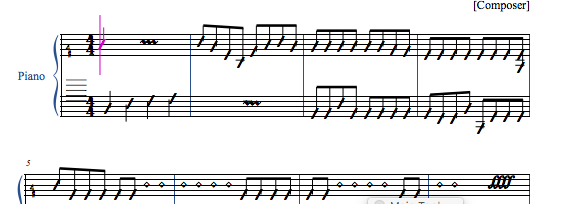
I've also installed my version of song writer 2012 that I 've purchased and used under windows for 5 year  on new mac (under sierra). It is working (except the human playback) but layout and notation style look like this and I can't find how to change this. Any idea ?


Comment actions Permalink
Avatar
0
Comment actions Permalink
Avatar
0
Comment actions Permalink
Avatar
0

thank you peter thomsen and mike halloran. everything is fine now. I needed also to enable the fonts. many thanks

Comment actions Permalink

Please sign in to leave a comment.