New post
Avatar
1

 I am a jazz musician writing lead sheets on Finale Print music 2014 on a macintosh. When I try to input chord symbols Finale Print Music gives me what are technically correct chord symbols, but they are long hand and they make the chord symbol look too cluttered for my preference. For example FMAJ7. The way I want this chord to look is: F followed by a triangle and a 7. The triangle indicates the major quality in jazz notation and is much easier and quicker to read. Same with minor chords. Instead of FMIN7 I want to see: F-7 and so on. I even found a way to set the chord font to jazzcord and have keyboard shortcuts that give me what I want, but as soon as a try to continue on with another chord, the dialogue box comes up saying that it doesn't recognize the suffix and I either have to choose a longhand suffix or lose it. Is there any way to override this feature? Or to add the Jazz symbols into my suffix library? I know there was a way to do it in the full version of Finale, and I'm hoping there's a way here too. If the shortcuts exist that show me the exact chord symbols I want then I have to believe there is a way to make them stick. Thanks!

5 comments

Date Votes
Avatar
0

1) Chord suffixes are document specific, not program specific.

When creating a new document, use a template that contains the suffixes you need.

With the “full Finale” you can load a chord suffix library into a document, but I do not know whether PrintMusic has a such option (File menu > Load Library…).


2) My first guess is that the chord suffixes you are trying to enter, are using the font JazzCord.

In the JazzCord font each glyph (font character) is a complete suffix.

An example:

In the JazzCord font Δ7 is one (1!) compound character.

To enter it, type an uppercase J (character slot #74).

Typing Δ followed by 7 does not work - you will just get the dialog box that it doesn't recognize the suffix.


3) (This is for “full Finale” - PrintMusic may be different):

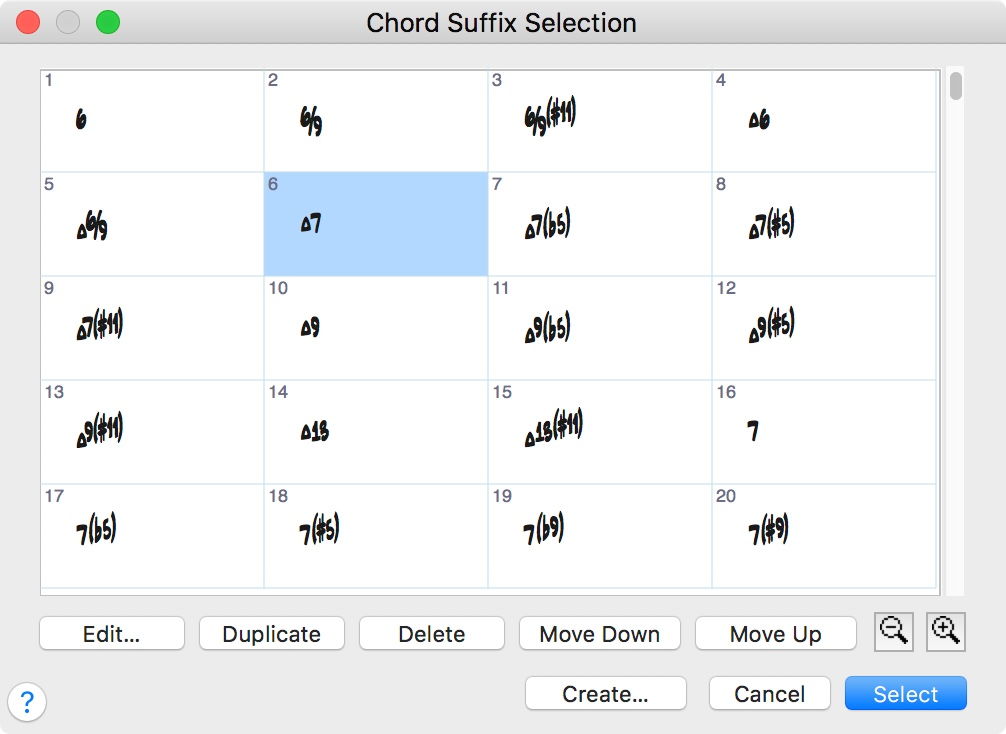
In the dialog box Chord Suffix Selection each suffix has an ID number.

The first suffix (upper left) is #1, the next suffix is #2, &c.


In the screen shot the suffix Δ7 has ID number 6.

You can enter a suffix as colon followed by the ID number.

To enter DΔ7, type D:6.


4) If you prefer to type chord suffixes “as they are”, e. g. enter -7 by typing a - followed by a 7, then you should use the JazzText font instead of the JazzCord font.

Comment actions Permalink
Avatar
0

I just took a quick look at PM 2014 and have what I expect is bad news for you.

  1. PM does not appear to have a handwritten template or document style option that includes Jazz fonts. All its handwritten options appear to use Broadway Copyist.
  2. One cannot load libraries in PM. Nor can one (it appears) edit chord suffixes. Entering a chord letter followed by a colon and zero takes you to the suffix-selection screen, but not if you change the Chord Font to Jazz Cord. I can access the Jazz Cord font and assign it to chords, but that may only be because the font came to me with my full Finale package. Changing the chord font to Jazz Text does not give you access to the triangle and minus suffixes.

If someone can make you a template using the Jazz fonts (and if those fonts exist on your system) you may be able to use Peter's chart to help you assign the Jazz-specific suffixes, but without access to the Chord Edit screens, this will likely be very troublesome compared to using full Finale. Even in full Finale, editing the chord suffixes to default to triangles and minus signs when entering chords via MIDI keyboard takes a bit of doing (in my experience).


Sorry to be the bearer of bad news.

Comment actions Permalink
Avatar
1

http://www.finalemusic.com/products/compare-finale-products/


Fonts included with PrintMusic

Maestro
Broadway Copyist
Finale Percussion
Finale Mallets
Finale Lyrics


Fonts included with Finale:

Maestro
Broadway Copyist
Engraver
Finale Copyist
Jazz
Maestro Wide
Finale Percussion
Finale Mallets
Finale Numerics
Finale AlphaNotes
Finale Lyrics

Comment actions Permalink
Avatar
0

Thank you, Mike. That list is very helpful.

Comment actions Permalink
Avatar
1

If you download and install the Finale demo, you will also get all the Finale fonts.

Then you can also use all the Finale fonts in PrintMusic.


Unless you buy and authorise Finale, the Finale demo will expire after 30 days.

But you can still use the Finale fonts in other programs, like e. g. PrintMusic.


Having all the Finale fonts also means that a document created in the “full Finale”, and sent to you, will display correctly in PrintMusic, even if the document uses a Finale font that did not come with PrintMusic.

Comment actions Permalink

Please sign in to leave a comment.