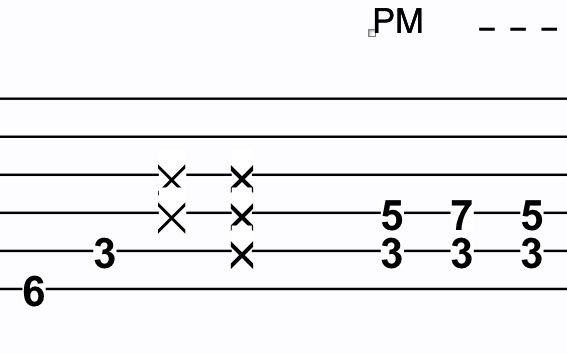
When changing numbers (several strings) to x's in TAB-staff, these x's are overlapping.
Anyone knows how to solve this?
Mac, Finale 2011, consider upgrade to Finale 25


From your description it is not clear to me whether the overlapping is horizontal (= beats too close to each other) or vertical (= x’s on the same beat).
If the overlapping is horizontal, have you tried applying Music Spacing, and Update Layout?
If the overlapping is vertical, consider
- using a different font or font size or font character for the x’s
or
- using a bigger distance between the TAB staff-lines.

A. A. Mittring,
1) In the image you attached, the x’s are positioned a little too low, at least in my opinion.
I would move them a little up so that they are centered around the staff-line.
2) How did you create the x noteheads?
This is what I got:
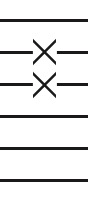
I created the X noteheads as articulations (using the Articulation Tool).
Thanks for replying.
Can you give step by step info on how to create these x's? Is it possible to adjust style to 'bold'? And how do you make these x's break the barlines?
Must be time consuming inputting x's this way?
In the images you can see what I am looking for (only they don't break barlines):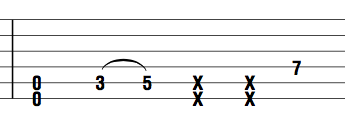

A. A. Mittring,
1) To create the x’s as articulations, just use the Articulation Tool.
In the Articulation Designer dialog box you will find all the options you need.
You can use any font, and you can use ‘Bold’ font style.
2) It is not the x’s that break the staff-lines.
Articulations can not break staff-lines.
But the noteheads can break staff-lines.
To break the staff-lines I replaced the original notehead with a Space character, size 24 Points.
3) Perhaps it is just me, but the x’s in your attached image look a little “wrong” to me.
I think that the angle between the two “branches” should be 90° - at least when notating ghostnotes.
If you create the articulation as a “font character” articulation, then it is a matter of choosing a font for the x.
If you create the articulation as a “shape” articulation, then you can create your own x shape in the Shape Designer.
Peter,
Thanks for replying.
Could you please further explain your 2nd point: how to break staff lines by replacing noteheads? I don't get this part... How do you replace the notehead?
Are there possible shortcuts/program options or do I have to follow these steps for every ghostnote?
To replace the notehead with a space character:
A. Doing it “manually”:
1) Special Tools Tool.
Go to the dialog box Notehead Settings (e. g. via the sub-tool Notehead Position Tool: Select the notehead handle, and hit Return)
2) Change the font character to a Spacebar character.
3) Change the font to e. g. Arial 24 Points.
The font size (= 24 Points) will control the width of the Spacebar character.
NB: It is important that you de-select “Use Default Notehead Font”.
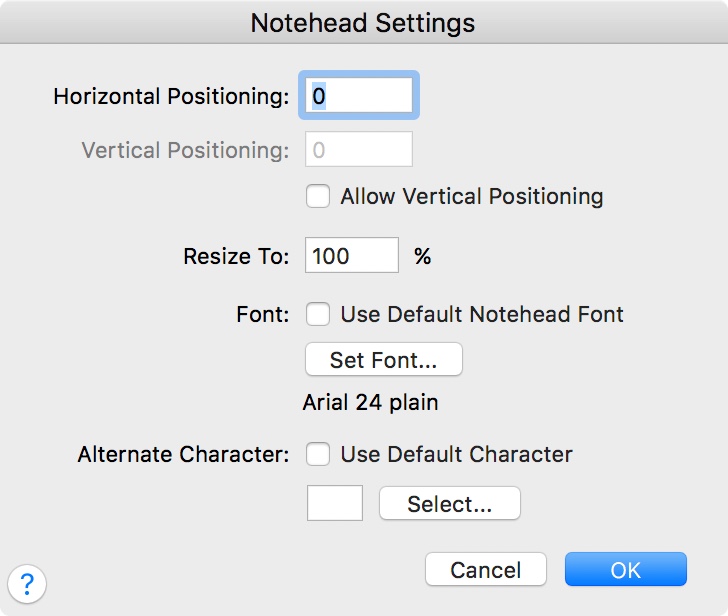
B. In the case where the entire chord is “ghosted”, consider using the utility to change the notehead:
Utilities menu > Change > Noteheads…
The utility can only do one task for you:
change the notehead character to a Spacebar character.
But it can do it for all the notes in a selected region.
By The Way:
Are you familiar with using Finale plug-ins?
Jari Williamson has created a lot of very useful plug-ins for Finale.
Some of Jari’s plug-ins might be useful for you - e. g. the JW Change plug-in.
You can find Jari’s plug-ins here:

Just adding a voice to the fact that this is still an issue in v26. Has anyone found a solution which is not a complex workaround?
I'm not understanding this adding a space with an arial font... do you mean to say you replace it with a blank space then add articulation X's manually?! Would this not then mess with spacing and whatnot when editing the layout?
I just don't understand why the numbers and noteheads interfere with the lines in the tablature but not the notation... Why does the X notepad have an opaque headroom above them in the tablature? Forgive me, but this is frankly very upsetting for such a commonality in guitar notation.
Please sign in to leave a comment.
13 comments
Date Votes