New post
Avatar
0

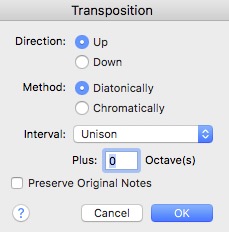
I am confused as to how to use this properly.   I have tried to move notes down, for example, a third but rather than stay in the same key, they often shift keys... How does diatonic work vs chromatic?  And how do you maintain notes in the same key ?  And what is a unison move? 

TIA,

Jeff

3 comments

Date Votes
Avatar
0

1) When you use the dialog box Transposition, the key signature is not altered.


2) When you transpose chromatically, all intervals stay in un-altered size, measured in halfsteps.

In Other Words: After a chromatic transposition the playback will play the same intervals as before.


3) When you transpose diatonically, all notes are moved by the same number of scale steps.

An example: moving the notes up by a third moves all the notes up by two scale steps.


4) Indeed a Unison move does not seem to make sense.

But you can add an octave via the text field below.


5) I am not sure what you mean by your words “maintain notes in the same key” ?

If you want to “maintain notes in the same key”, then why are you transposing ?

Do you perhaps want to move the notes up/down by an octave ?

Moving by an octave does not change the key.

Please explain.

Comment actions Permalink
Avatar
0

Sorry,   Say I was trying to move a string of notes up a third but keep them in the same key.  So instead of the root of the chord, they were the third.   Or I was trying to correct a scanned piece where the notes were not playing as written. The problem was that some of the notes had naturals that were not in the original, for instance.  I was trying to correct  the actual note. 


When I applied a Key signature to the piece to try and correct it, the notes were playing in the wrong key... Does that make sense?  The key signature did not   automatically correct the notes, but say added naturals...   It was a bad scan to begin with, but the transposing option was confusing me...


Comment actions Permalink
Avatar
0

A couple of things...

First, Music to XML is, I fear, a waste of money. The professional versions give you the opportunity to edit the scan, BEFORE bringing it into Finale. Many, many problems are more easily fixed before the XML import.


The easiest way I have found to move notes without changing the key is to select the measures, and move them with the numberpad keys: 8 and 9 for Octave down and up, respectively, and 6 and 7 for down or up by steps. You may still have to correct some accidentals.


Remember, as a Finale owner, you can get SmartScore X2 Pro for half price. If you plan on doing much scanning, it's the only way to go! There is a learning curve involved, but it's well worth it.


I'm currently working on Salomon Sulzer synagogue music from the first half of the 19th century. The charts were collected and engraved in the 1950s, or maybe earlier. Even with corrections, I can get them into Finale faster than by direct entry.

Comment actions Permalink

Please sign in to leave a comment.