New post
Avatar
0

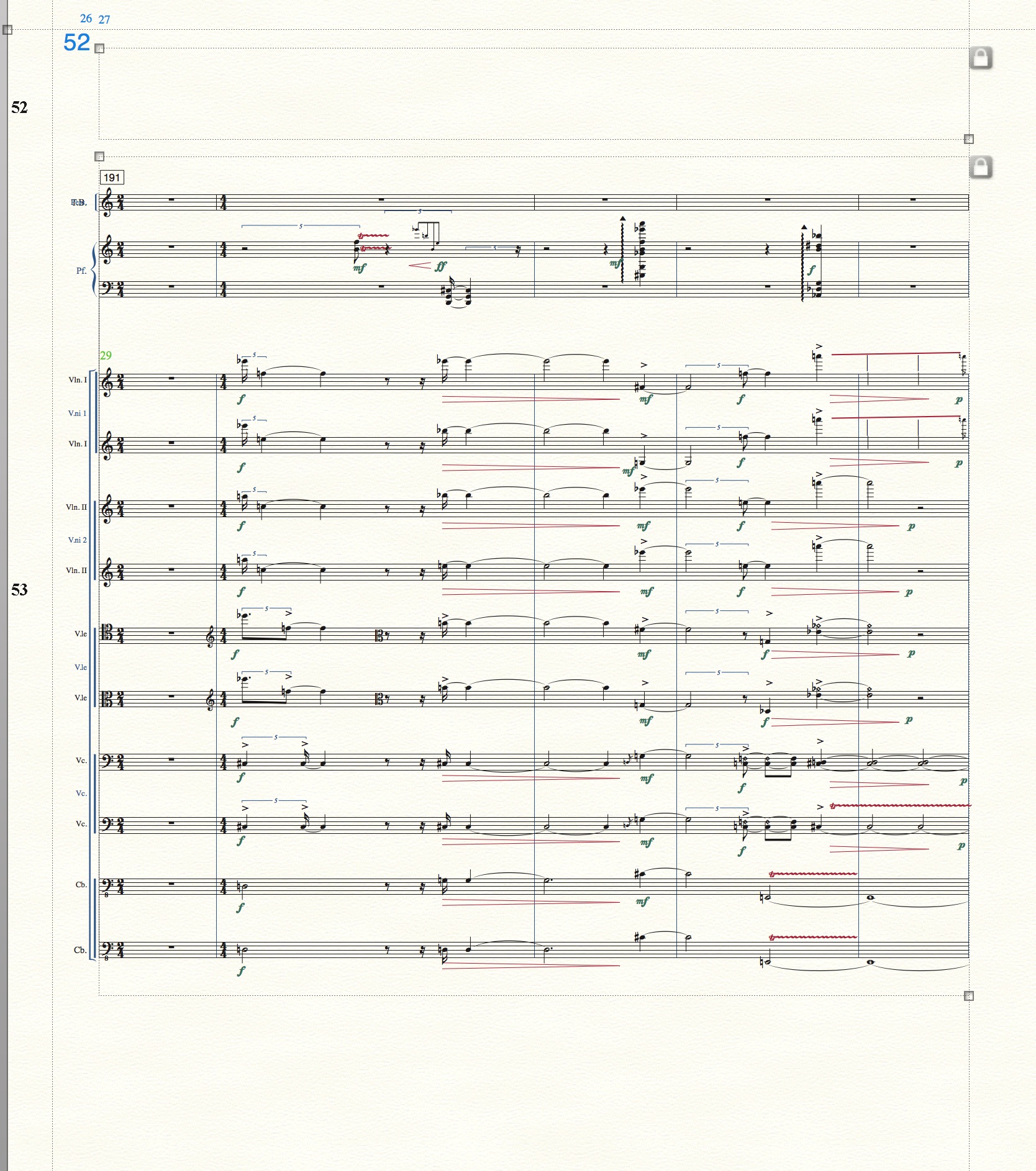
I'm having a problem with page 7 of a large band score. An empty staff has appeared on this one page with no ID. It can't be edited, as the staff tool cannot select it. It cannot me moved, It cannot be deleted, it can not be hidden, and no attributes can be accessed, yet it sits empty on top of the measure stack. I need to get rid of this. Does anyone have a solution? Is it a known bug?  Never had this happen before the latest v. 25 update. This is in page view only. The ghost staff is not present at all in scroll view.


Finale 25.4.0.155

MAC OS X 10.12.4

21 comments

Date Votes
Avatar
0

This is in page view only. The ghost staff is not present at all in scroll view.

Comment actions Permalink
Avatar
0

As a first step I would switch to the Selection Tool, and double-click the rogue staff.

Double-clicking an item from the Selection Tool will switch to the tool in which the item was created, with the item selected.


Knowing in what tool an item was created, is a good beginning.

Since you tell that the “rogue staff” sits empty on top of the measure stack, I suppose that the “rogue staff” is only one measure long, right?

I suspect that the “rogue staff” was created in the Ossia Tool (but I am just “shooting in the dark”).

Comment actions Permalink
Avatar
0

Thanks, Peter, but no, double clicking with the selection tool merely selects the measure stack. This is a page with only a single system (multi instruments) and there are 4 bars on it, including the rogue staff. I've tried deleting that whole page with it's measure stack, but the following page's measures merely advances to take it's place with the rogue staff still on top. So it's page related, not input related, I think.

Comment actions Permalink
Avatar
0

I take it you have checked the Score Manager to see if it shows up there.

Comment actions Permalink
Avatar
0

Yes, I've checked. It does not show up there. Totally rogue.

Comment actions Permalink
Avatar
0

… the staff tool cannot select it …

… double clicking with the selection tool merely selects the measure stack …


What happens if you - from the Selection Tool - single-click on the “ghost staff”?

Can the Selection Tool select it?

You told that the Staff Tool can not select it.

Comment actions Permalink
Avatar
0

Can you send me the score to wawoodman at aol dot com, to look at. You can delete the notes; just send the score.

Comment actions Permalink
Avatar
0

OK, here's an update.

First, to answer Peter, yes, selection tool did select bars within the staff and even the speedy tool did enter notes, but, again it was out of reach with the staff tool.

 But I've been able to fix the problem (I hope!): the same rogue staff appeared at the top of another system on another page and the staff tool did work on it. I was able to delete  the whole thing that way.

But now I'm remembering an anomaly that, thinking back, may have caused this to happen: I had a page with an empty hidden tympani staff. In one of those  bars I decided to add some note data, but I did this in scroll view for that measure, thinking the tymp staff would present itself in view in page view. It did, but it was overlaid on the staff below (a glockenspiel track). The 2 staves were inseparable unless I chose re-order staves, at which time an errant staff went to the top of the system.  But here's the really weird thing: in my attempts to correct this, I tried deleting everything by using a delete all command, all staves, all data (thank goodness for undo).  And all staves were deleted  EXCEPT: a tymp staff, floating alone on otherwise blank  pages.  If I remember, I tried deleting this separately also. Then undid the works to get things back. The rogue staff returned, but then I discovered it's appearance on another page and (2 pages away), and,  lo and behold, it's staff tool handle was selectable, deletable and when deleted, the rogue staff on the first page also went bye-bye.

So, some bug is involved, I guess, with inputting notes in scroll view at a point where that staff is hidden in page view staves. The staves in question were involved with staff groupings, so that may have had something to do with it.

Mike R., I'd send you the file, but since it seems to be corrected, do you still wish me to send it?

Thanks all for attending this. If this update sheds any more light, I'd love to hear from you

Comment actions Permalink
Avatar
0

No need to send it, since you've figured it out.


This is why many of us do all of our note entry in scroll view, and save page formatting and hiding staves until the end.

Comment actions Permalink
Avatar
0

Mike R: "This is why many of us do all of our note entry in scroll view, and save page formatting and hiding staves until the end."

In general, yes, of course, but then, while composing, one may get an idea even after all is formatted, which was the case this time.

 
Comment actions Permalink
Avatar
0

my experience is similar ma more frustrating

suddenly a system (52 in the ex.) disappears from the page view,
in scroll view notes are there and so is the playback
if in scroll view I select to see ALL the staves I see a blank score, where as the other various staff sets are there...

please help

Comment actions Permalink
Avatar
0

forgot to tell you

mac high sierra

finmac 25 last

Comment actions Permalink
Avatar
0

Please specify the steps you've already taken, so that we can rule out things.


I suppose that you have already tried the suggestions in this thread.


Some other ideas:


1) The culprit could be a staff style:


View the score in Scroll View.

Staff Tool.

Staff menu > Show Staff Styles

Staff menu > Show Staff Style Names

A staff style will display as a colour above the staff.

If there happens to be a staff style, examine the staff style’s definition, to see whether the staff style hides the staff.


2) As a last resort you could try re-defining the page.

However, re-defining the page will destroy customized layout on that page (e. g. scaling the page to a different percentage than the document’s default page scaling).

To redefine:

Page Layout Tool.

Page Layout menu > Redefine Pages > …

Comment actions Permalink
Avatar
0

thanks, first of all

 
Staff menu > Show Staff Style Names
appears only if I chose to view other Staff Sets than ctrl+0 
Comment actions Permalink
Avatar
0

…  Staff menu > Show Staff Style Names

appears only if I chose to view other Staff Sets than ctrl+0 …
 
 
If I Understand You Correctly, the staff styles and staff style names do display in Scroll View, but only if you choose another staff set than “All Staves”, right?
 
What happens if you program a new staff set?
Do staff styles and staff style names display in a new staff set?
Comment actions Permalink
Avatar
0

impossible...

I cannot see ALL the staves (ctrl+0) from which chose a new Staff Set 

only the previous SS are there!

Comment actions Permalink
Avatar
0
… Staff menu > Show Staff Style Names
appears only if I chose to view other Staff Sets than ctrl+0 …


… I cannot see ALL the staves (ctrl+0) from which chose a new Staff Set …


If I understand you correctly, when you choose All Staves (= ctrl-0), you can see some staves, but you can not see all the staves, right?


And the staves you can see (when choosing All Staves), do not display any staff styles, right?


If you instead choose another staff set, then staff styles do appear on the staves, right?

Comment actions Permalink
Avatar
0

when you choose All Staves (= ctrl-0), I can not see any (not a single) staff 

screen empty!

Comment actions Permalink
Avatar
0

I think it is time to investigate, whether the issue is program specific or document specific.


(program specific)

Have you tried removing the Preferences file? (quit Finale, remove the Preferences file, launch Finale again)

When launched again, Finale will create a new, fresh Preferences file.


(document specific)

You can open a support ticket with the folks in Tech Support, and send them your document.

Comment actions Permalink
Avatar
0

ok I will try

Thanks


what get lost removing the pref file?

Comment actions Permalink
Avatar
0

… what get lost removing the pref file? …


You will loose all your custom Preferences settings in the program, since Finale will build its new Preferences file with the original “factory settings”.

Comment actions Permalink

Please sign in to leave a comment.