New post
Avatar
0

 Finale 2014.5,Windows 8.1. I have a full orchestral score (one system per pages). I want to create a BRASS SCORE which shows only the 5 adjacent brass instruments used. I have tried hiding the unwanted scores but then I am having problem reordering the music to where I can place say 3 systems per page.

11 comments

Date Votes
Avatar
0

It sounds as if you need to create a Part that includes all the brass instruments. If so, Document > Manage Parts is your friend.


If I have misunderstood you, please give a picture of what you want.

Comment actions Permalink
Avatar
0

I would create the brass score as a new, linked part.

A linked part may include any staves (you can have more than one staff in the same linked part).

Comment actions Permalink
Avatar
0

Thanks so much

Comment actions Permalink
Avatar
0

What would be the actual instructions for accomplishing that


Comment actions Permalink
Avatar
0

… What would be the actual instructions for accomplishing that …


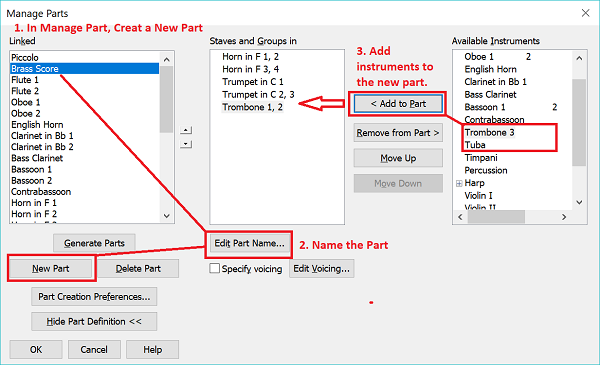
Document menu > Manage Parts…

The window Manage Parts can be expanded - click the button “Edit Part Definition >>” to expand the window.


In the expanded Manage Parts window you have all the options needed “for accomplishing that”.

You can click the button “New Part”, to create a new part.

You can click “Edit Part Name…” to name the new part.

You can add staves to the part - see the right hand column, and use the button “< Add to Part”.

Comment actions Permalink
Avatar
0

Manage Parts is your friend.


To edit, format, whatever you part, go to Document > Edit Part and select the part you want in the submenu.

Comment actions Permalink
Avatar
0

Peter and Adrian,

Thanks for that. I've never used this function, but I can certainly see its value.

Does this create the linked parts, where a change in one is reflected in the other?

Comment actions Permalink
Avatar
0

Manage parts does create an additional linked part that functions the same way as other linked parts. I now almost always create instrumental full scores (which I never expect to print) with an additional rehearsal piano part included. Then I create two additional linked parts: a piano/vocal score and a "conductor score" that omits the rehearsal piano part.


I love the flexibility.

Comment actions Permalink
Avatar
0

Thank you SO MUCH for that information!!!! That I will definitely use for a variety of things in the future. So, IF I WANTED TO CREATE A CONCERT BAND TRANSCRIPTION OF AN ORCHESTRAL SCORE, COULD I USE THE SAME APPROACH?

Comment actions Permalink
Avatar
0

… If I wanted to create a Concert Band transcription of an orchestral score, could I use the same approach? …


Yes.

In that case you might prefer to end the process with extracting the Concert Band “score part”, to get a score document without the original orchestral score.

Comment actions Permalink
Avatar
0

Thank you Peter. I would build the concert band score by copying from the orchestral into the band

Comment actions Permalink

Please sign in to leave a comment.