New post
Avatar
0

I use Finale v25.4.1.163, with Mac OS 10.10.5 (Yosemite).

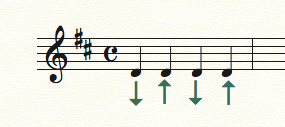
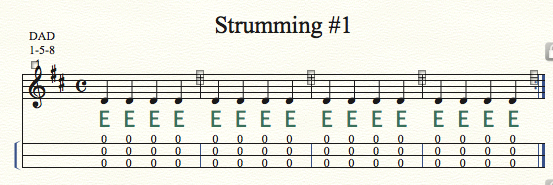
I am editing some files that were created in Finale 2012. They open just fine in v25.4. However, in some of these files there are two expressions that are not appearing correctly on screen. They both use a font called Lucida Bright Math Symbol. They are supposed to look like up and down arrows, but they are displaying as uppercase E and F, probably in the Times Roman font.
I installed the font in question as instructed in Font Book. Within Font Book, when I choose "Validate Font" I get a "yellow light" warning:

I feel pretty confident that there is nothing wrong with the font itself, but I suppose that is possible. My client provided me with this copy of font, and it is working fine on his Mac system.

Can anyone help me resolve this problem? Thanks!


9 comments

Date Votes
Avatar
0

Can you find the character in another font?


Maybe his copy of the font was corrupred in transmission. Do you have something like PopChars?


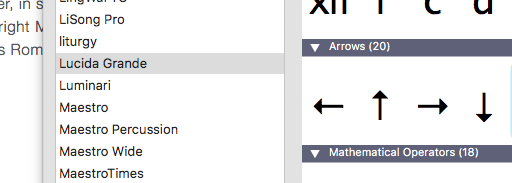
There are up and down arrows in the Lucida Grande font. Would they work, instead?


Comment actions Permalink
Avatar
0

The Lucida font family is not one of the fonts that Finale normally uses. Only Lucida Grande is included in the Mac OS. If you do not see Lucida Bright in Font Book, you will not see it in a Finale document.

Lucida Bright can be purchased from Microsoft and is included in a number of their products.


If Lucida Bright is a 'hidden' font, found only inside an application, it must be installed before Finale or any other app can access it. This is easy — open the font and click on Install. You will get warnings—all notation and symbol fonts generate them. Check the boxes and click through the warnings to install. It will now show up in Font Book.app.


I have it on my system — probably came with Office. I don't recall if it installed with Office or if it was a hidden font and I had to install it manually (I always do that with hidden fonts as I find them).

Comment actions Permalink
Avatar
0

I installed Lucida Bright Math Symbol as you suggested - just double-clicking on the font itself - and clicked "install." As you said, it showed up in Font Book, but still with the same "yellow light" warning. I restarted the computer and opened Finale - still the same problem.

When I access the Expression Designer and look at one of the expressions in question, in the font drop-down menu, Lucida Bright Math Symbol is selected, and of course appears in the long list of fonts. I tried selecting a different font and then coming back to Lucida Bright Math Symbol, but this did not help either.

Any other ideas?

Comment actions Permalink
Avatar
0

Can you use the symbol from Lucida Grande? do you have a picture of what the character looks like?

Comment actions Permalink
Avatar
0

Well, my client really likes this particular font for the arrow, so I'm trying to satisfy him if at all possible.

Do you know, what is the keyboard combination for typing and upward arrow and a downward arrow? I'm having trouble finding that information. I'd like to try some arrows in other fonts. Thank you.

Comment actions Permalink
Avatar
0

Buy PopChar. It's the best $30 you can spend. You don't need to know the keystrokes; you just click on the character.


Yes, I know there are other font viewers, but I have not found anything as useful.


http://www.ergonis.com/products/popcharx/ 

Comment actions Permalink
Avatar
0
Comment actions Permalink
Avatar
0

If you have Office 2011 or later, you probably have the correct version but it may be in the Applications folder. You will need to remove the installed version in Font Book and install the Microsoft version as I mentioned earlier.

Comment actions Permalink
Avatar
0

With the Finale file open have you tried using Data Check, Font tools - compare file fonts with System fonts?


If it flags this font, then that will confirm that Finale is not seeing it. In the font list in any tool it will appear italicised - meaning that it is used in the file but isn't on your system.

I have a couple of fonts that worked fine in earlier versions of Finale, but not in the new 64 bit version. I have had to buy new versions of New Century Schoolbook because the one I've used since 1989 no longer works. 

Comment actions Permalink

Please sign in to leave a comment.