I need to obtain the following :
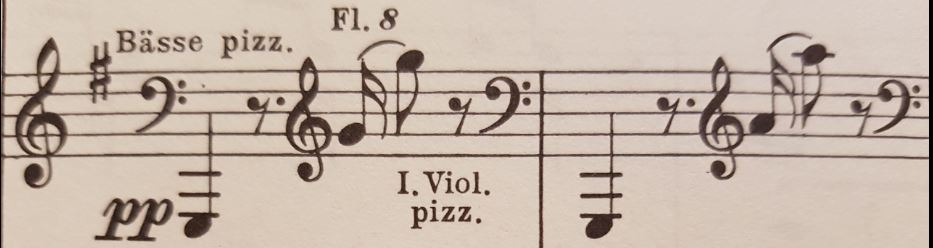
I followed the instructions in the online Finale Manual ... but I did not get much result.
I am using Finale 2014.5.6359 in Windows 10.


(Off the top of my head.) Click the clef tool. Click and drag to enclose a portion of a measure. Right-click to get the choose-a-clef dialogue. Choose a clef. Select the only this measure option. (Should work.)
(Updating your example.) Clef change at the beginning of a system should occur at end of the previous system, not where it is after the key signature. (Your example is not really a valid option.) Also, clef changes work better on the beat, not on the last 16th-note,. This prevents that ugly, huge, empty space in the other voices that are playing all four 16ths. It also visually emphasizes where the beat is, which always a good thing.

Please sign in to leave a comment.
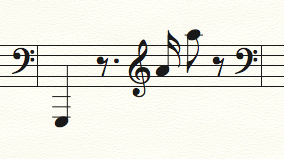
2 comments
Date Votes