New post
Avatar
0

I've used Finale for years with Windows. I recently got a new Mac and have a problem with getting it to open in a configuration that I like. When I open a document, I choose scroll view, 150%, both Simple and Speedy entry palettes, and playback controls. I position the tool palettes where I want them. The next time I open the same document, it reverts to default settings instead (Page view, 100%, no tool palettes.) There must be a simple way to get it to save my preferred configuration. And I've been through the Preferences Dialog box, but it doesn't seem to address any of those things. Also, I'm aware of the "View Percent" setting under New. I change it to 150%, but it always reverts back to 100%. What am I missing?

11 comments

Date Votes
Avatar
1

1) Go to Preferences - New, and set the view % and view style for new windows.


2) Customize the palettes as desired, and go to

File menu > Save Preferences

Comment actions Permalink
Avatar
0

Thanks for your suggestion, Peter, but I've tried that numerous times, to no avail. I had finally gotten it to save my preference for view and percent, so, a partial victory, but the palettes still revert to "none." It's not too onerous a burden to have to open them each time and drag them to convenient locations, but I just don't understand why it won't save those preferences.

Comment actions Permalink
Avatar
0

I ran into that when I first got 25. It's different than before — un-Mac like and there's an extra step.


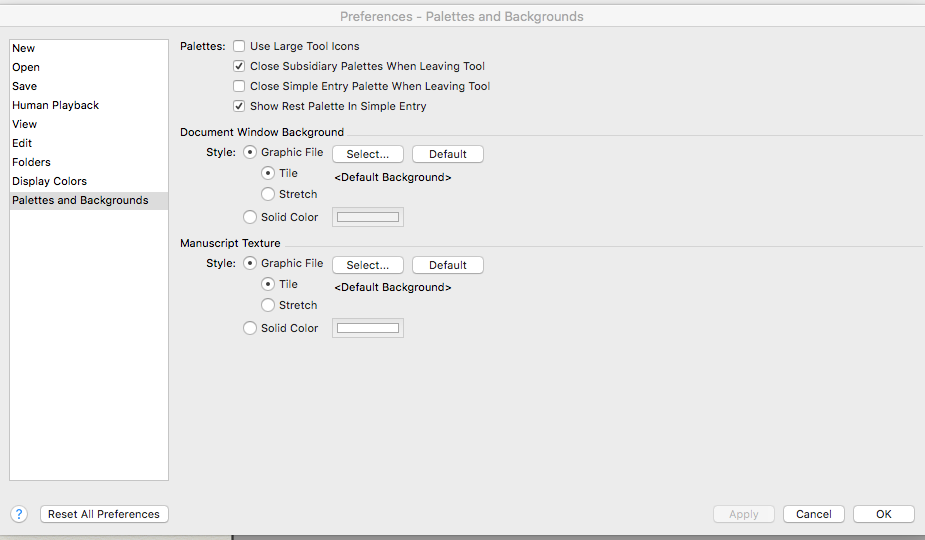
Have the palettes you want visible. Open Preferences and click on the right boxes in the various windows and Apply, then Okay. Save Preferences in the File menu with everything open. 


Comment actions Permalink
Avatar
0

Thanks Mike, that's just what I've tried, but those palettes seem immune to it. Also, I've noticed a few other items that I have to reset every time, such as in the Speedy menu, I have to uncheck the "Use MIDI device for input" every time so that I can use the Speedy entry from my computer keyboard, and playback tempo reverts to 120 every time. I never had these issues with my old Windows computer (although it had so many other problems it was no longer practical to keep using it.)  

Comment actions Permalink
Avatar
0

I found it — couldn't remember where it was last time.


Comment actions Permalink
Avatar
0

Thanks Mike, I've been "unchecking" the two boxes for "Close Subsidiary Palettes When Leaving Tool" and "Close Simple Entry Palette When Leaving Tool" and "checking" the box "Show Rest Palette in Simple Entry" and clicking Apply and OK, and making sure I have all those palettes displayed when I close the document or when I close Finale. The next time I open Finale everything has reverted. I've tried doing this with each of several documents --  doesn't matter.

I've also tried manually opening the palettes I want first, and keeping them open, and then checking/unchecking boxes in Preferences and clicking Apply and OK. And, I've tried making the appropriate determinations in Preferences FIRST, and clicking Apply and OK, and THEN opening the palettes. It doesn't matter. They revert to default settings every time.

(For what it's worth, this page of Preferences refers to the action "...When Leaving Tool" which is not really the same as when closing the document or when closing Finale. I tried it anyway, but doesn't work.)

Comment actions Permalink
Avatar
1

After you Apply, are you saving Preferences in the File menu?

Comment actions Permalink
Avatar
0

Yes.

Comment actions Permalink
Avatar
0

Then the next question must be:


Have you tried (quitting Finale and) deleting the Preferences file?

The next time Finale is launched, it will create a fresh and (hopefully) un-corrupted Preferences file.

Comment actions Permalink
Avatar
0

No. I haven't tried that, but it sounds like a good thing to try. How do I delete the Preferences file? I quit Finale, then ...?

Comment actions Permalink
Avatar
0

On a Mac the Preferences for Finale v25 can be found in the folder Preferences:


In the Finder, hold down the Option key, and go to

Go menu > Library

From the Library, go to the folder Preferences.

The files are - if you are using Finale v25 - com.makemusic.finale.fprf and com.makemusic.Finale.plist.

Comment actions Permalink

Please sign in to leave a comment.