New post
Avatar
0

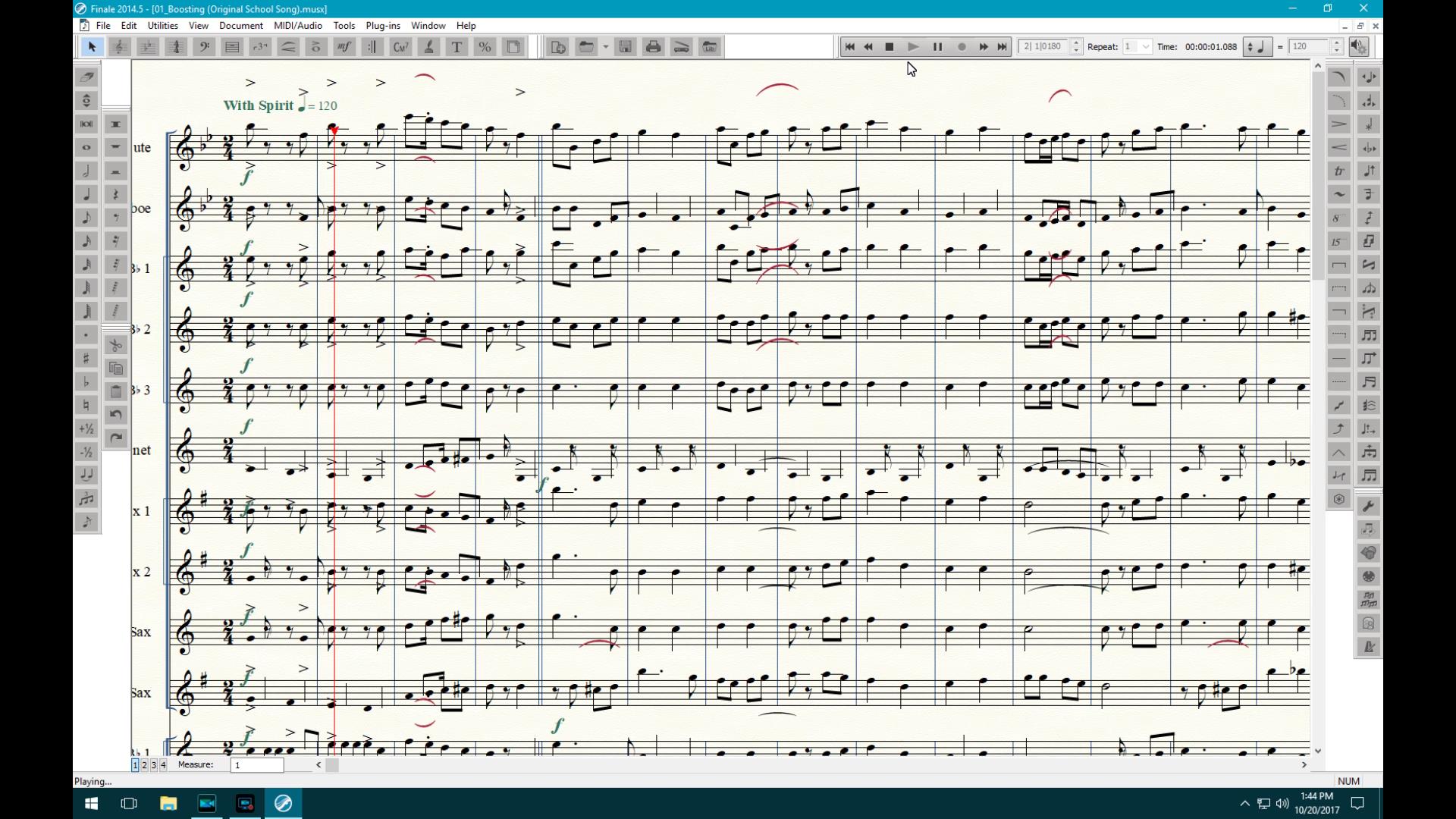
Note head and stem, ledger line, ties, and slur alignment.  The page is a mess.

Windows 10

2014.5

24 comments

Date Votes
Avatar
0

Are you using a font other than those that came installed with Finale? It sounds like it could be a font annotation issue.


Can we see a screen shot? Is this all documents, or just one? What is the source of the document?


We really need more info than just your ranting about it, if we are to try helping.

Comment actions Permalink
Avatar
0

I can't figure out how to use this system.  I don't know if this is getting through or not since I cannot use an e-mail reply.  I have a screen capture, but I do not see a place for an atatchment.

Comment actions Permalink
Avatar
0

You can just drag the screen capture into the reply window.


Comment actions Permalink
Avatar
0

Where is the reply window?

Comment actions Permalink
Avatar
0


Comment actions Permalink
Avatar
0

Drag and drop does not work, but the insert did.  This file was created 7/28/2017 with 2014.5.6359.  This file was imported from another computer (win 7 ) into the Win 10 computer which is the one with the problems which had Finale installed on it 3 days ago.

Comment actions Permalink
Avatar
0
Comment actions Permalink
Avatar
0

I am not using an alternative font.  I am using the Finale Maestro font.

Comment actions Permalink
Avatar
0

You may need to reinstall the fonts. Or even the entire program.

Comment actions Permalink
Avatar
0

OK

Comment actions Permalink
Avatar
0

I reinstalled the fonts and the program.  No change. 

Comment actions Permalink
Avatar
0

If you haven’t done so already, open a support ticket. Use the Submit a Request link at the top of the page.

Do new documents,work properly? If so, you might try copying this doc into a new blank one.

Comment actions Permalink
Avatar
0

This will be the second support request.  I sent one yesterday.  They have not responded.

Comment actions Permalink
Avatar
0

Did you get an email acknowledging your request? (It would have been automatic, just a couple of minutes after you submitted.)


The reason I ask, is that very often users don’t follow all the way through the process. You have to ignore their “suggestions” and go until you see the last Submit your Request button.

Comment actions Permalink
Avatar
0

From the screen shot it looks like a font annotation problem. As Mike suggested, this is usually a problem when using a different default font. But it would be worth checking to make sure Finale is using a correct annotation file for this piece.

Comment actions Permalink
Avatar
0

I am using Maestro 24 plain.

Comment actions Permalink
Avatar
0

I just got a message:  Add Music Font to Symbol Fonts List.  The default music font you've selected is not included in the Symbol fonts list.  etc

Where do I get it?  It appears that it is not included with the 2014.5 download.  I have installed this version 3 times now.

Comment actions Permalink
Avatar
0

… Where do I get it?  It appears that it is not included with the 2014.5 download …


You should be able to find the Symbol Fonts List (= a .TXT file) in the folder Configuration Files.


To find the Font Annotation file (with the file name extension .FAN) for your music font, look in the folder Font Annotation.

Comment actions Permalink
Avatar
0

I downloaded the Finale font pack and installed it.  I got an error message that it may not have installed correctly.  No change.  I am downloading the version 25 demo.  Maybe it will run properly.

Comment actions Permalink
Avatar
0

Version 25 works properly.  Version 2014.5 is a mess.  Unless these two versions use different fonts, the problem is elsewhere.

Comment actions Permalink
Avatar
0

Are you uninstalling and restarting before you reinstall the new download of the same version? (Not necessary for an upgrade.)

Comment actions Permalink
Avatar
-1

I uninstalled, deleted the directory and deleted all of the Finale fonts.  There is an .ini file somewhere, however, because my screen settings came back unaltered.

Comment actions Permalink
Avatar
0

Problem is fixed.  I deleted the .ini files and reinstalled 2014.5.  I am using a 6 core zeon E5 computer with 5 hard drives for video editing.  When the motherboard went out, I replaced it with a new NVMe drive and a new video card.  The drives remained the same.  The old drive with the old ini. files with the user name of david for the file paths.  My new computer has the user name of davidc.  The paths in the preferences folders now have davidc.  This ran me a merry chase.  The path to the configuration files was wrong.

Comment actions Permalink
Avatar
0

Great! Glad it’s fixed.

Comment actions Permalink

Please sign in to leave a comment.