i guess, since updating finale 2014.5
if i try to change the shape of the tool palettes
they become strange.
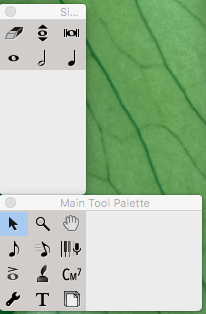
i want use all tools!!!
although palettes are that look!
help me!!
send me E mail plz


i guess, since updating finale 2014.5
if i try to change the shape of the tool palettes
they become strange.
i want use all tools!!!
although palettes are that look!
help me!!
send me E mail plz

This issue has been discussed here in the forum several times.
It is a conflict between Finale 2014.5 and Mac OS X 10.12 Sierra (and Mac OS X 10.13 High Sierra).
Here is the most recent thread:
To avoid the problem you can
- upgrade Finale
or
- downgrade Mac OS X to an earlier version


>You could uninstall and reinstall the program. Then, don't rearrange the palettes.<
Maybe but I wouldn't count on it. 25 had an installation problem over OS 10.13 until MM released 2 updates to fix it. I'm pretty certain that 2014.5 and earlier have similar issues.
The 2014.5 Preferences have settings for palettes and backgrounds with Default buttons. If that doesn't do it, trashing the Preference file should.
Although I have a copy of 2014.5, I don't use it anymore except to open it up and see what is still working. As I have never resized the palettes, mine show up fine.
Please sign in to leave a comment.
5 comments
Date Votes