New post
Avatar
0

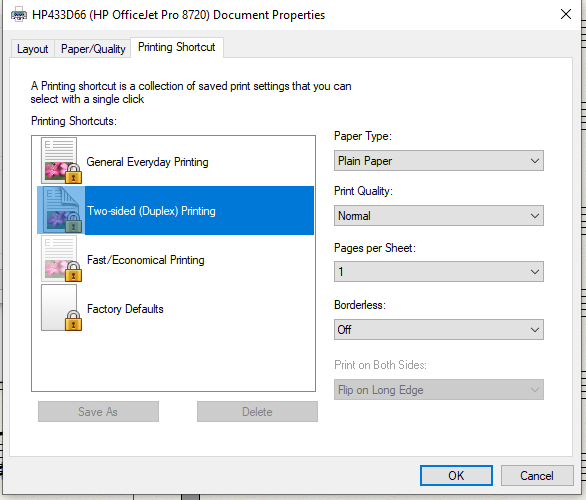
I used to be able to print 2-sided, but that no longer works with Finale. It does work in Word. Any idea what the problem is? Here's a screenshot of the  Properties/Printing Shortcut tab. Notice the "Print on Both Sides/Flip on Long Edge" area is greyed out.
 

7 comments

Date Votes
Avatar
0

Don't know which operating system you are using, but I have no problems printing duplex from Finale with my HP P1600dn.


I doubt this is a Finale problem; there is likely some configuration clash between Finale and the settings for your printer. I hope someone more familiar with your printer model can chime in with addition info to help.

Comment actions Permalink
Avatar
0

No issue here with my HP or Brother printers. We need more information beginning with your OS and, if Windows, what drivers are you using etc.


Comment actions Permalink
Avatar
0

Sorry for the lack of info. My computer is a Windows 10 machine. It says the driver is up to date. It handled 2-sided printing in Finale just fine until a couple of months ago. It will still print 2-sided in Word, just not Finale. The printer is HP OfficeJet Pro 8720. 

Comment actions Permalink
Avatar
0

Try updating your HP driver. You should be able to download the latest driver from the HP web site.

This is possibly a situation where a Windows update has overwritten your HP driver. The Windows driver would of course work with Word, another MS product, but the printer may require its own driver to work with Finale.

Comment actions Permalink
Avatar
0

Sorry for not responding. Just found your reply in my Spam folder!

What you suggest makes a lot of sense. Unfortunately our driver insists that it is current, so I don't know what else to do. 

Comment actions Permalink
Avatar
0

I would still go to the HP site, and check there.

Comment actions Permalink
Avatar
0
Comment actions Permalink

Please sign in to leave a comment.