Finale 27.30.137, Windows 11
Suppose I want to shift an entire passage up an octave. How do I select all the notes involved? I've found details for moving individual notes.


One way, with the selection tool: click and hold down the mouse button, and drag diagonally across the region. You will see the selected area. When you get to the end of your selection, release the mouse button.
There are many ways to select in Finale. This is only,one of them. I suggest you look at the tutorials.

Peter,
This works perfectly. I got lost because per the Keyboard Shortcuts table:
| Change Pitch: Octave Down Diatonically | SHIFT+DOWN ARROW |
| Change Pitch: Octave Up Diatonically | SHIFT+UP ARROW |
| Navigation: Caret - Octave Down | SHIFT+DOWN ARROW |
| Navigation: Caret - Octave Up | SHIFT+UP ARROW |
Mike,
Finale is on my laptop but I don't use its keyboard or mouse pad. I use a wireless full-size standard keyboard w/number pad and a wireless mouse. I made a stand that fits over the laptop keyboard to hold my midi keyboard.
I still don't get consistent results when trying to shift octaves using the number pad 6-9. There must be some nuanced difference between how I select notes. Conversely, I get consistent results when using the Articulation tool to apply things such as accents over a range of notes including selecting multiple staves.
I'm embarrassed some of the simplest techniques throw me.
It would be great to use a non-standard key signature when writing for harp in lieu of putting in all the required accidentals. Can I apply a non-standard (non-linear) key signature to a single instrument, or do they affect the entire score?
Also, I can't seem to select an individual note of a chord either to move it or delete it. Any tricks?
By the way, I've been writing and arranging music for 60 years and had an early version of Finale back in the 80s. My how it has grown up! I constantly consult the User Manual to the point that I open it when I open a score.
I appreciate the community's collective knowledge. Thank you.
… I still don't get consistent results when trying to shift octaves using the number pad 6-9. There must be some nuanced difference between how I select notes …
Do not select notes (in the Simple Entry Tool).
Instead, select a region (in the Selection Tool).
Then, the number keys 9 (= octave up) and 8 (= octave down) will work.
… It would be great to use a non-standard key signature when writing for harp in lieu of putting in all the required accidentals. Can I apply a non-standard (non-linear) key signature to a single instrument, or do they affect the entire score? …
What you need, is {Independent Key Signature} for the Harp.
This is done with the Staff Tool.
When you have {Key Signature} selected as an Independent Element for the Harp, you can - in the Key Signature Tool - select the option {Hide Key Signature and Show All Accidentals}.
… I can't seem to select an individual note of a chord either to move it or delete it …
In the Simple Entry Tool you can move the selection (= purple colour) via keyboard shortcuts.
Take a good look in the sub-menu:
Simple menu > Simple Navigation Commands > …
(and memorize the keyboard shortcuts)
If I misunderstand you, then I apologize.
… For #3, double-click to select the chord. CMD-up or down arrow will let you select a single note …
Thomas Robbins,
Since you are on Windows, you do not have a Command key.
I suspect that you should instead use another modifier key (perhaps the CTRL key?)
Take a look in the sub-menu for Simple Navigation Commands.
You will find the keyboard shortcuts listed there.

I am not sure what the guys are talking about with the advice they have given as I am not aware of any "modifier" key in Simple Entry that allows you to select a single note in a chord. That really doesn't mean much because I admit I don't know all the intricacies in Finale. However if you have a chord, for instance a D, G, and C which are quarter notes and you are using Simple Entry select 5 and click it on any note in the chord. Use the arrow keys to move that note up or down. You can move the D to an E. With a note selected in that way the delete key removes it.
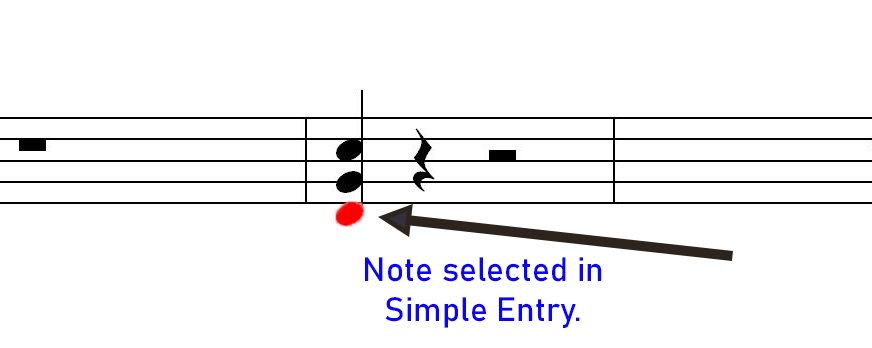
Note is selected in Simple Entry using the same value note. If you use a different value say half note it will change all the notes to half notes. If all the notes are selected in Simple Entry all the notes will move up or down with the arrow keys.
BTW, you can still use the Selection tool and the shortcut keys listed above.
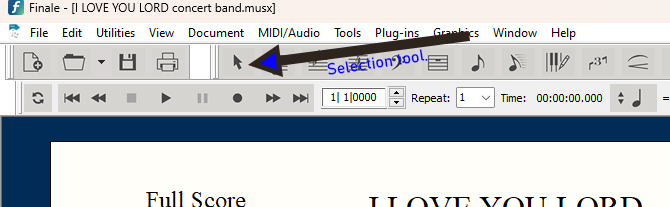
- the number 9 key: octave up
- the number 8 key: octave down
- the number 7 key: step up
- the number 6 key: step down
However they will move all notes in the chord.
You can select a measure or several measures or the entire staff using the Selection tool and these navigation keys will move all.
Please sign in to leave a comment.
11 comments
Date Votes