New post
Avatar
0

I'm having trouble with placing rests where I want them, not at the end of the measure, but when I go to the Help menu to find an answer I get a message saying that access is denied. Finale Notepad 2011, Windows 10.

Thanks.

21 comments

Date Votes
Avatar
0

Where do you want to put them? NotePad will only put them where they are supposed to be. You can't adjust the position, other than vertically.

Comment actions Permalink
Avatar
-1
Comment actions Permalink
Avatar
0

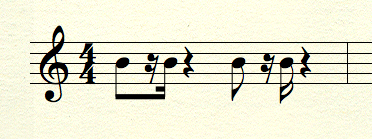
I'm not sure I understand your problem. In the example I've posted, NP created the beam automatically in the first set of notes. In the second set, I broke the beam by selecting the sixteenth note, and tapping the / key.


As for NP being worthless, it's free. You get what you pay for, so you can decide if you want to upgrade.
 

Comment actions Permalink
Avatar
0

Thanks, I thought the software would place the rest there automatically, but it puts it at the end of the measure.  I'd like to be able to move it.

I didn't say it was worthless.  I said it was useless.

PS  What is NP?  I'm using Finale.


Comment actions Permalink
Avatar
0

Eugene,

Now you've got me completely confused. This thread was originated by someone using NotePad, so, since you tagged in on it, I assumed that's what you were using.


Let's start over. What version of Finale? Mac or Windows? What, exactly, is the problem? What are you doing, and what is acting differently than you expect it to?

Comment actions Permalink
Avatar
0

I'm working with Windows 10.  I really need some direction here.  I'm stuck.

Trial version of Finale.  Asus laptop about 8 years old.

Comment actions Permalink
Avatar
0

OK, thanks. But I still need to know what the problem is! What is it that you want to do?

Comment actions Permalink
Avatar
0

I want 1/8th note, 1/16th rest, 1/16th note, all beamed.  The software leaves out the rest and puts it at the end of the meeasure.

The example you posted above is what I need.

See the first measure below.

Comment actions Permalink
Avatar
0
Comment actions Permalink
Avatar
0

In Simple Entry, using a numberpad and the QWERTY keyboard:

Tap Numpad 4, for an eighth note. Enter the pitch by tapping the key A-G on the keyboard.

Tap Numpad 3, for a 16th note. Do not enter a pitch. Tap the 0 (zero) key to enter a 16th rest.

Tap the correct letter key for the pitch for the 16th note.


You enter notes and rests in sequence. The program doesn't know you want a rest somewhere, unless you enter it there.

Comment actions Permalink
Avatar
0

Thanks, Mike.  I've been at this only three days using the mouse for entry.  I'll do as you suggest instead.

Comment actions Permalink
Avatar
0

If you are just using the mouse, enter the eighth note. Then, enter a 16th note at any pitch. While that note is still selected, tap the R key to turn it into a rest. Then, enter the last 16th note.


But the other way is faster, once you learn the keystrokes. Please watch the help videos.


I'm going to bed. If you still have problems, we'll take it up in the morning!

Comment actions Permalink
Avatar
0

Thanks again, Mike.  It looks great.  And I am watching the videos.

Comment actions Permalink
Avatar
0

Glad I could help, Eugene.

I don't visit this forum very often, for a number of reasons. The inability to send you a private message is just one of them. If you need additional help, please come join us at http://www.finaleforum.com/ 

Comment actions Permalink
Avatar
0

I have joined.

Comment actions Permalink
Avatar
0

In Notepad, under the Simple menu, there's a preference setting: Fill with Rests at End of Measure. You want to uncheck that and see if it makes a difference..


I have Notepad 2012, not 2011 but I'd be surprised if it was different. If so, updating to 2012 would be a good idea.


Interestingly, Notepad 2012 should not install over OS 10.12 Sierra but it did fine for me. I only use it to look at things like this, however.

Comment actions Permalink
Avatar
0

MIKE ROSEN wrote...

I don't visit this forum very often, for a number of reasons....


But we are glad when you do, Mike. After perusing your signature file, aren't you also a PrintMusic pro?

Comment actions Permalink
Avatar
0

Not a pro, but I do have some familiarity with it, and with the workarounds.

Comment actions Permalink
Avatar
0

Mike, I want to thank you for the help you gave me, but I've decided that this isn't for me.  I've spent all day fooling around with triplets to no avail.  And the price for that much trouble is outrageous.

Comment actions Permalink
Avatar
0

Eugene,

If you want to give it one more shot, contact me at wawoodman at aol dot com. I can get you through triplets easily.

Comment actions Permalink
Avatar
1

I've spent all day fooling around with triplets to no avail<


They're easy, actually, but you have to understand how to do them in Finale.


It looks to me that you are coming from something else and PrintMusic is not behaving as you expect. What notation app have you been using?

Comment actions Permalink

Please sign in to leave a comment.