New post
Avatar
0

Hi.

I'm in the middle of a BIG project and just discovered this "known issue". First: what a pain! I have to do this for 30+ show cues!

Second: The work-around solution (changing font filename, creating XML, importing...) works just fine but I give you this warning as I almost lost 3 days of work on a score.

When you create the XML, make sure you are looking at the FULL SCORE and not just a part. Otherwise, the XML only contains the part. I wasn't looking at the full score, created the XML, imported it, saved it with the original filename...and LOST MY ENTIRE SCORE! 

Only due to good fortune did I recover that score from the "auto-save" file before I made another move. WHEW!

I hope this issue gets repaired soon.

10 comments

Date Votes
Avatar
0

Tom, sorry you had the problem, and glad you were able to recover, but in what way was this Finale's fault? What would you have expected the program to do?

Comment actions Permalink
Avatar
0

Well, how about removing the problem with the multi-measure rests being out-of-alignment (that I didn't know about until I tried formatting my drum part)?

And I just discovered that the "solution' with the XML file creation that I followed has caused my score to lose all info that I set up for my measure numbers. I like to have large measure numbers on the score, at the bottom, under the centre of every bar.

I just looked at the re-created score and they are gone. And I have no idea what else the imported XML file might be "missing". It looks like some of the "expression tool" entries that I manually positioned are back to where I don't want them, for example.

I can't use this solution. It will add way too much work.

Maybe I can switch default music fonts and not use "Finale Broadway"?

CAN YOU TELL ME: Does the issue exist with other fonts?

Luckily I've only done 5 scores out of 35!


Comment actions Permalink
Avatar
0

In fact I also just determined that all of the measure number regions that I needed to create to accommodate non-sequential bar numbers are also "destroyed" by the XML solution.

That makes it impossible for me to do!

I will have to convince my client (fortunately a long time associate) to accept the parts with the ODD looking multi-measure rests.

So please tell me how to avoid this issue for my next gig.....as already asked, does it exist with other fonts? I will switch fonts if necessary.

Thank you.

Comment actions Permalink
Avatar
1

Don't import your XML back into the same file, perhaps?

I'm not entirely sure I understand what you are trying to accomplish, but changing fonts throughout a document is enough of a drastic change that I would never risk my only copy of an otherwise finished file.

Comment actions Permalink
Avatar
0

I'm going to test this out for you. I have not noticed it. But sometimes XML isn't perfect but should be very close if you export from Finale and back to Finale.

Make sure you have backups set up along with auto save. I also will change the file name (put an A or 2 after it) if I have made big edits so an original always exists. This is a good practice even with other intensive software like Photoshop.

I am curious since I make an XML along with the musx of every project I do. If it is not making a useful XML backup file I want to know.

Comment actions Permalink
Avatar
0

Sorry for the confusion.

There is a posted work-around as a solution to this multi-measure rest alignment issue.

It involves changing the "default file" font file under "preferences", creating an XML of the problem file, them importing it. I import into a new file which is what Finale does by default. This new file has the problems that I have described. The measure number region issue, by the way, is far more problematic than the multi-measure rest appearance.

In any case I just discovered a much simpler work-around that makes the alignment issue far less severe:

In the "Document Options" under "Multimeasure Rests" I changed the "Number Adjustment" parameter to "0.2" and that moves the number over so it is centered on the mulimeasure rest shape. So the shape isn't quite in the center of the bar, but it doesn't look so wonky.

Comments/ideas welcome and THANKS!

Comment actions Permalink
Avatar
0

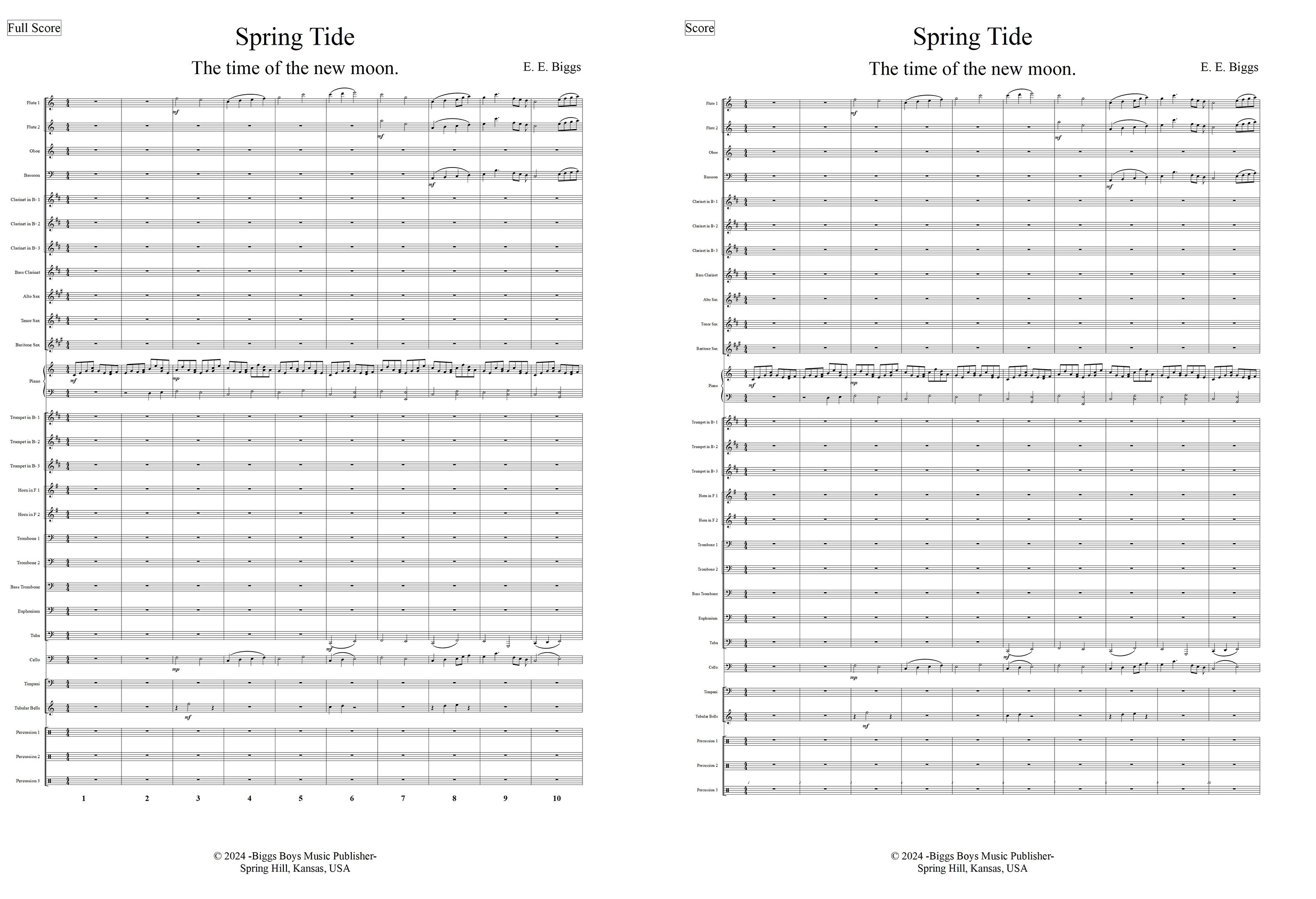
This is what I get and you are correct it is not a facsimile of the original. I never noticed that I must say. It certainly is not a good backup scheme. The musx file is on the left and the xml is on the right. Everything is Finale default fonts. It appears that xml resets some parameters.


Comment actions Permalink
Avatar
0

Yes Ernest I see.

And if you had any measure number regions changed (e.g. jump from bar 5 to bar 12) they would be gone too.

I do not think that XMLs are a good idea for backups. I just copy my MUSX files to another drive every night.

But this multi-measure rest alignment issue is a new one on me! And yet it goes back to May 2022, viz. https://makemusic.zendesk.com/hc/en-us/articles/4973540617239-Multimeasure-rest-displacement-in-Finale-v27-1-Files


I don't know why I haven't encountered it before today. Unless it is font related, as I was asking above. I'm not sure when I began using the Finale Broadway font. This might be the first time.

Comment actions Permalink
Avatar
0

I don't know why I haven't encountered it before today.

Me neither, Tom. I never really looked or checked out the XML that I was using as a cushion if Finale ever went belly up. I knew XML didn't import XML files form other sources entirely correctly but I thought was just the fault of the other source.

The basic creator of XML has passed away so I would not be hopeful this gets attention or fixed. 

Comment actions Permalink
Avatar
0

My final solution. Pretty easy and works well.

In 'document options', using "EVPU" units, set "Adjust start point" to -50, leave the default "Adjust end point" at -30.

And my personal preference is to have the number closer to the bars so "set "Vertical" to 10.

Set "Horizontal" 58.

Looks fine to me.

Thanks.

Comment actions Permalink

Please sign in to leave a comment.