New post
Avatar
0

Mac Sonoma 14.3.1, Finale 27

have an aleatoric section of music, and I would like to indicate measure lengths by time (e.g. 4-5") rather than beats. I have hidden the time signatures, and started creating blank expressions that only contain the playback tempo to give the desired effect, but that is somewhat tedious. I don't want to have to do the math, and would really like to be able to select a measure and tell Finale that it should be 6" long. Is there a way to do this?

Thanks all!

(P.S. If not, I'd like to suggest an option in the Playback tab of the Expression Designer where Type could be Duration (or keep Tempo and add duration as an option in addition to the note values), and then you could Set to Value the length of that measure. Finale could then do the math for you on playback.)

4 comments

Date Votes
Avatar
1

I don’t think any of the notation software can do that. I wonder if it can be done in a DAW, or something like Audacity?


I wouldn’t expect it to ever show up on Finale, although you could write it up as a feature request.

Comment actions Permalink
Avatar
0

Carl Collins,


The following is not exactly what you are asking for, but it is a feature that Finale has already:

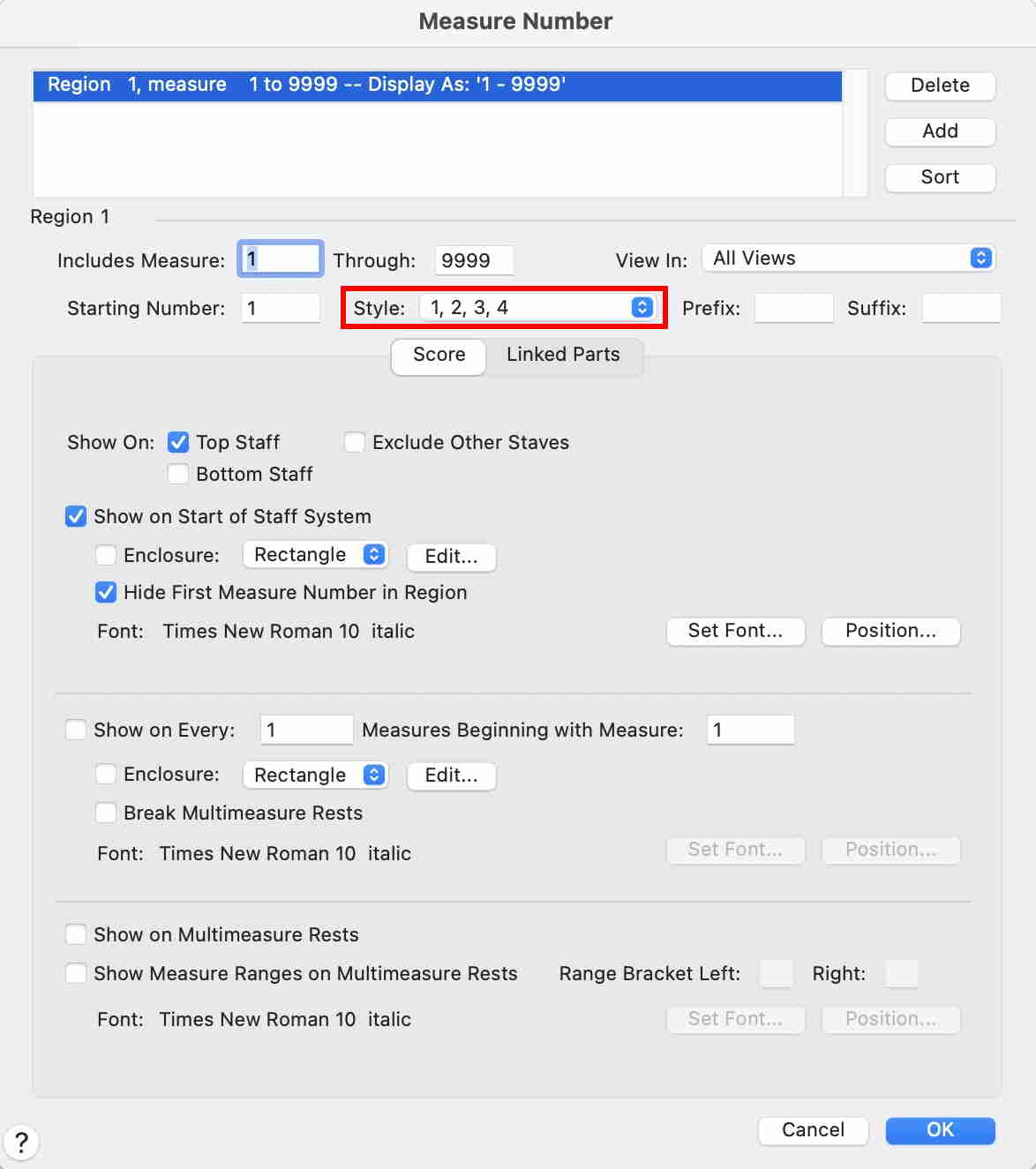
For a Measure Number Region you can choose the style ‘Time’

This is done in the dialog box Measure Number, in the pop up menu Style.


Comment actions Permalink
Avatar
0

PeterT,

I thought of that but it will only show a place in time not a length in time of each measure. Perhaps that in conjunction with a non-standard time sig could work if all measures are to be the same length.  Pretty tedious if they are not. The times sig could be hidden.

Comment actions Permalink
Avatar
0

it appears to me that you may be overthinking this. Concentrate on the goal instead of the method and something simpler should present itself.


The math shouldn't be that difficult. Find a common denominator that accommodates all of your timings. Although one second is obvious, can you make 10 or 20 seconds work? If 20"=whole note, then 10"=half, 5"=quarter, 1.25" = sixteenth and so on. If 16" = whole, then 1" = a sixteenth. Ok, that's a slow tempo but the formula is easy to calculate. For faster rhythms, break your 2'5" measure into sub measures using dotted bar lines. All you have to do is set a metronome mark and write your piece. You don't even have to hide your time signatures in sub measures unless you want to—with faster rhythms, time signatures will make it easier to count. 

Comment actions Permalink

Please sign in to leave a comment.