New post
Avatar
0

I'm trying to change the HyperScribe recording tempo. It will not let me change it from the original tempo I entered from the Setup Wizard. It will let me enter a new value for both HyperScribe > Recording Tempo and Click, and the Playback Controls, but when I start the recording again, it only plays the original tempo I entered in the Setup Wizard. Am I overlooking something?

Thank you for your assistance!

9 comments

Date Votes
Avatar
0

If I open a doc with no defined tempo, I can set the Hyperscribe speed with the tempo box at the top of the screen.


If I set a tempo expression, that overrides what's in the tempo box above; but if I delete the tempo expression, the tempo box at the top regains control (unless you have some residual MIDI data in your file.

Comment actions Permalink
Avatar
0

I am having the exact same problem and am finding it very frustrating. Have you found a solution?


Comment actions Permalink
Avatar
0

That was the solution. Perhaps if you say what solutions you have tried, we can make further suggestions. 

Comment actions Permalink
Avatar
0

I am unable to change the click track to go slower....One person was sayng that I may have residual MIDI data in my file.  What can I do now?


Comment actions Permalink
Avatar
-1

Thérèse,

Are you using PrintMusic, or the full Finale?

Comment actions Permalink
Avatar
0

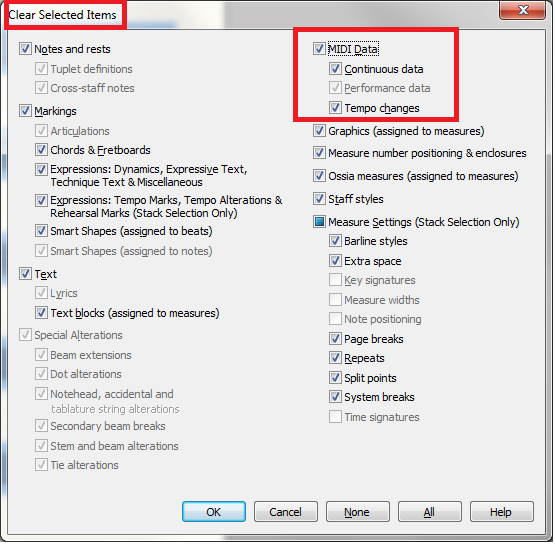
If you have full Finale, use Edit > Clear Selected Items to scrub any MIDI data.


If you have PrintMusic, you may want to download the Finale 25 demo and use it to scrub the MIDI. PrintMusic can open files saved in Finale.

Comment actions Permalink
Avatar
0

Mike, I am using Printmusic


Comment actions Permalink
Avatar
0

Then, as Adrian said, you can't clear MIDI data. His suggestion is a good one, to download the Finale demo. And, until the end of the month, you can upgrade to the full Finale for only $99. Use the code TRADEUP99 at checkout. Highly recommended!

Comment actions Permalink
Avatar
0

Although PM 2014 will still be offered for Windows only, MM has announced that it will never be upgraded. The Window of Opportunity is now open for an inexpensive upgrade to the full version of Finale.


Even if, going forward, you decide to still work in PM, it will be nice to have Finale available for those times such as this when you really need the full version. 

Comment actions Permalink

Please sign in to leave a comment.