New post
Avatar
1

Whenever I get an automatic update to Windows 10, my Finale 25 loses authorization.  I have to call to unregister my current authorization and re-authorize.  The first time wasn't too bad, but this is happening after every update.  Anybody else have this issue?

12 comments

Date Votes
Avatar
1

This is a known problem caused by the Windows 10 updates.

Comment actions Permalink
Avatar
0

Till it is fixed, deauthorize Finale before running an update. Turning off automatic updates will help--you'll get a message saying that updates are available, letting you deauthorize Finale (and any other internet licenses) first. 


Comment actions Permalink
Avatar
0

Oh my god, it seems I ran into the same super-stupid problem. Of course I only read this because my authorization no longer works, too. I hope there will be a fix soon, but until then: How can I de- and/or re-authorize my same computer again?

BTW I have a German localized version, I don't know if this is a special deal here...

Comment actions Permalink
Avatar
0

I am on a Mac but it should be similar for Windows—if not, someone will correct me, right?


Internet authorizations are handled by a server and you need to tell it what you want.

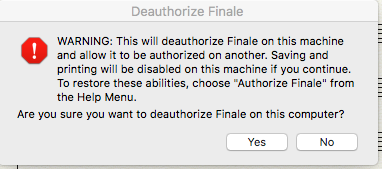
Under the Help menu, you will see Deauthorize Finale. You will get a warning that explains the rest of the process and how to reauthorize Finale.


Unfortunately, if your system crashes and needs to be restored or, with Win10, you do an OS upgrade and haven't deauthorized, the server won't know. If you have used both your authorizations in the process, you need to contact MM Support.

Comment actions Permalink
Avatar
0

...yes the last one is the problem: Mini-update, authorization gone. I wonder though why the authorization is not connected to the hardware (e.g. Motherboard-MAC) and the server after the update just sees that it's the same and that's it. OK, I'll contact MM support...

Comment actions Permalink
Avatar
0

Deactivation befor update of windows is as far as I see not a really possibe solution. Because with Windows 10 it is not so easy possible to deactivate automatic updates?

Comment actions Permalink
Avatar
0
Comment actions Permalink
Avatar
0

If an automatic Windows 10 update trashes your Finale authorization, contact MM Support. (There is a phone number in the Finale Software pulldown of the Contact Us link on their http://finalemusic.com web site.)

Comment actions Permalink
Avatar
0

No phone support on weekend to deal with this.

Comment actions Permalink
Avatar
0

Yes, phone support has been discontinued (bad move!), so you will have to use the "Submit a request" link at the top of the thread to contact MM.

Comment actions Permalink
Avatar
0

Correct/


Comment actions Permalink
Avatar
0

Since this still comes up first in a Google search of the problem, here's the update:


There's now a workaround: Log into your MakeMusic User Account. You should now see a button called Manage Authorizations. Click on it and you can delete previous authorizations. Authorize your copy again.


The problem is not fixed — it will happen again at the next Windows update. This, however, will get you going again. For more info:

https://makemusic.zendesk.com/hc/en-us/articles/218006777-Registering-authorizing-and-deauthorizing-Finale-notation-products


Comment actions Permalink

Please sign in to leave a comment.