New post
Avatar
-1

Absolutely NO support is provided from Makemusic to my problem: A LL my documents ".mus" are locked! I don't know since when, I could still use PM a while ago without any problem.
Actually, I am trying to archive all my personal music and other I transcript or transposed for professional use. In the first part, I didn't know that I could convert my documents in pdf... I did it later on, when this was the only way I could print... Now that I want to convert them, they are ALL locked (at page 1) and the help center doesn't give any answer to "How I can unlock" them... The user manual gives no instruction to such problem. They refer only to Community... or buy something I don't need and can't afford...
PrintMusic11 was downloaded on MacBook2009, and the last version is El Capitan (10.11.6).
I see that I could get the free trial of Final, as long as I can do all of them within 30 days...
If so, I would like to download to another MacBookPro, which is still at Monterey (12.6.2). Does Final will recognize ".mus", even if I export them all from an apparel to another? This is the main question. Otherwise, what else could do the job, at a minimum price?
I would buy only when I might return to write music for myself.
By the way, I saw only upgrade to PM11a for Mac - could I presume that it would have to be done only in the 2009, where is the original PM11? I check out in the site and I saw nothing that seems to help,.. If there is more, like I see up in this page (version 26 - same thing: in the 2009? Mac or Windows?), I would like to know HOW to get there!
Thank you for your kind help!

29 comments

Date Votes
Avatar
0

There isn’t any way to “lock” a Finale doc from opening, as far as I know. Could you put one of them on Dropbox, and see if one of us can open it?

There have been no updates to PrintMusic for Mac since v.2014, and it’s been completely discontinued.

Comment actions Permalink
Avatar
0

But of course a current copy of Finale should be able to open it and at least send Christine a PDF and current  .musx file back.

Whether one would be willing to do that for her entire catalog (or even whether she would want to share that) is another question.

Comment actions Permalink
Avatar
-1

 Could you put one of them on Dropbox, and see if one of us can open it?

Do that. I also know of no way Finale can "lock" a mus file.  I am not a Mac user so I suppose there could be a Mac app that does that but not Finale. U/l to a Dropbox or Google drive and share the link. I will be happy to see if I can open it and give you a PDF. Both MikeR and myself have been and are willing to help folks.

Comment actions Permalink
Avatar
0

How many files are we talking about?

Comment actions Permalink
Avatar
0

To Ernest: I have never use Dropbox nor Google drive (!! sorry...), but WeTransfer. But, in any case, where could I send it, if not to myself, and then share the link? I see nowhere In this site or page where to drop my WT or anything else... I see only the link to be shared...
There are hundreds of files... But anyway, I'de prefer do it myself - it would take me already few hours to share them all..., the "same" time to do the job itself... I just have to make sure of my time schedule within the 30 days.
I am very thankful with all your answers sofar.

Comment actions Permalink
Avatar
0

Christine,

Send me one document by email. Send it to wawoodman at aol dot com. (Replace the at with @ and dot with a period)

Comment actions Permalink
Avatar
0

Ernest: Sent! :-)

Comment actions Permalink
Avatar
-1

Christine,

Either take advantage of MikeR or my email e e biggs one at gmail dot com. No spaces, @ not at, again with normal email nomenclature and the number 1 not one.

Dropbox or Google drive are cloud services. You u/l a file or files and you will get a link. All you have to do is tell us that link.

But you have both of our email address if you prefer that route.

Comment actions Permalink
Avatar
0

Christine,,

Print Music is just a crippled version of Finale. The best solution for you would be to upgrade to full Finale 27 especially if you have a lot of work to do and it sounds like you do. I think your PM is eligible for the $99 upgrade but you need to ask MM.

MM has dropped support for everything further back than Finale 26, I believe.

You have another problem however, that will need to be addressed and that is you are on a Mac. Finale 27 doesn't run on all Mac OS but here again you need to ask  MM or a Mac user on the forum like MikeR.

The Mac OS or MacBook or MacBook Pro has nothing to do with the Finale.mus file. BTW, the new Finale 27 file extension is .musx. If either of us fixes any of your Finale file(s) I am not sure your 2009 MacBook will open it. Again we need a Mac person to answer that question. We can save it in Finale 12 version so perhaps that's the answer. I have not tried it.

Comment actions Permalink
Avatar
0

There isn’t any way to “lock” a Finale doc from opening


Of course there is. One can "lock" any file in the macOS—there's more than one way, in fact—when done on purpose, only the person who locks it can unlock it unless it's protected with a password, then that has to be shared. This is handled at the OS level; there's no feature in Finale that does this as far as I know.


That is probably not what is going on here, however. It's that Permissions have not been granted and there are certainly workarounds for this. The normal cause is that you copied the files from an old computer without zipping them first—this can be done at the folder level. Unzipping onto the new drive grants the necessary permissions. Finale, Word and a few other file types have this issue—and have for the last 30 years or more.


If you have access to the old Mac, zip/archive/compress the folder with all your files. Now transfer them to your newer Mac and double-click on the archive. The files in the resulting folder should now open in Finale 27. Once they do, you can trash the archive. Finale/PrintMusic 11 cannot be installed in Sierra or later.


If you use Dropbox or email to transfer files, this is not an issue. Likewise Apple's Migration Assistant Utility or restoration from a Time Machine backup grants the required permissions to the new Mac.


Since I know all the workarounds for this, you can send them to me via WeTransfer if you like. m i k e (at) h a l l o r a n m u s i c dot c o m

It’s possible that WeTransfer gets around the Permissions issue, too. I’ll know when I open the files.


Comment actions Permalink
Avatar
-1

"There isn’t any way to “lock” a Finale doc from opening ... there's no feature in Finale ..."

This is what I believe MikeR and I know myself meant, perhaps poorly but it is. And, what I indicated here ...

You have another problem however, that will need to be addressed and that is you are on a Mac.

I knew or at least hoped you or some other Mac person would explain better than I could since I don't use a Mac very often.

Thanx


Comment actions Permalink
Avatar
0

Christine said,  Ernest: Sent! :-)


Christine I did not receive anything. Are you sue you got the email address correctly spelled out?

e e biggs one at gmail dot com.  No spaces and the number 1 and the @ character and a period for the dot.


Comment actions Permalink
Avatar
0

Might not be... It seems I send it to the wrong person and he did not follow about!
If I understand, there are 2 "e" before your last name. Right?
I try again!
Thank you!

Comment actions Permalink
Avatar
0

As I mentioned in the email I sent you the file opened up as normal in Finale 27 and saved as a 2012 file normally. I don't know why your PM will not open it but a complete reinstall might help if you still have the original PM setup file.

It is not the issue MikeH opined about.

MacBook2009, and the last version is El Capitan (10.11.6).

Before you consider upgrading to Finale 27 make sure it will run on your computer. I am not a Mac user so I can't tell you but Mac's are very temperamental and contrary about their OS and the software programs they will run.

It looks like a lot of dedicated and detailed work so the effort to save it should be worthwhile.

Comment actions Permalink
Avatar
0

Ernest: As I explained before, I am not going to upgrade Finale into MacBook2009 El Capitan, but in the other one (2018, already old?!), where is OS Montana (12,06.2) or even upgrade to Sonoma.
Yes, It seems, as you said, "temperamental and contrary about (their) OS"... This something quite new to me, so most of musicians around are using Mac vs PC/Windows. And I am very surprised nobody from my hood is not among your specialist's community...
Install Finale is a goal in the following hours.
Thanks for the "dedicated ... worthwhile" appreciation. :-)
Christine

Comment actions Permalink
Avatar
0

Ernie — nothing more to investigate here. I already diagnosed the problem and when the attachment opened successfully, you verified that I was correct. Email attachments are always zipped and when you opened it, permissions were granted on your computer to access the file. 

If you use Dropbox or email to transfer files, this is not an issue.


Christine — Try emailing your files to yourself. The attachments should open.


This is not a macOS issue except that Finale/PM 11 cannot be installed on Yosemite or EL Capitán—period—can't be done. There is a workaround, however: Install an earlier macOS, then PM 11, then upgrade to macOS to El Cap. I verified this and wrote about it here, probably 8 years ago. According to this bulletin from Finale, it shouldn't work at all (but it does):

https://www.finalemusic.com/blog/finale-printmusic-os-x-10-11-6/ 


Most 2009 Macs came installed with OS 10.6 Snow Leopard and PM 11 will install over it. PM 11 will install over OS 10.9 Mavericks as well. Again, I tested that.


If you want to access these files on any Mac built after October, 2014, your only choice is to upgrade to Finale. These Macs shipped with Yosemite or later and Mavericks cannot be installed on them to allow Finale/Print Music 11. There is no workaround.

Comment actions Permalink
Avatar
0

Mike - PM10 and 11 were installed in 2010-11, with Snow Leopard or the next one. So, Everything worked even when updated to El Capitan. I never did more upgrade this 2009 because I bought another Mac in 2018 (because of LogicProX), while always working PM11 on 2009, until not that long ago.
It seems I don't need to email me my files (it doesn't mean I won't do it, just for try): lately, for archives reason they were transferred to an external HD. One hour ago, I downloaded the 30 days Trial. The files opened, but It took a little while before I could first save as .musx and then in PDF. Though there is still a lock on the page, but right now doesn't matter because I don't have to modify anything but save. And I have, alas, no further project in writing music...

Sofar, everything seems alright. I will certainly read the article of your blog, maybe a little later, for I want to hurry with my savings...

THANKS A LOT FOR ALL YOUR HELP! :-)

Comment actions Permalink
Avatar
-1

...  nothing more to investigate here. I already diagnosed the problem ...

MikeH,

Oh, yes, there is. I have to either totally disagree with you or Mac's are even more screwed up than I already believe they are. So you are saying the Mac "lock" when put it on, you can no longer open the file but if you email the file the Mac lock goes away. But when I email it back to her, the Mac OS puts the lock back on. How fricken stupid is that? Besides I renamed the file so her Mac shouldn't have seen it as a locked file should it?

 I downloaded the 30 days Trial. The files opened, ...

As they did for me and should for you. MikeH's explanation needs more thought. I do hope you get it all working as I said you did a lot of work to create these music files.

Comment actions Permalink
Avatar
0

Christine—thanks for getting back to me. this is what caused the problem:

they were transferred to an external HD. 


When you set up that HD, you did not format it in a way that you granted your Mac Write permissions. The normal cause is that you did not format it at all but there ways to format a drive so that is done on purpose. You probably have Read permissions and can see most other file types but, when Finale opens a file, it writes a date stamp and the files must have proper permissions for that to happen.  Had these files resided on a CD, the result would have been exactly the same.


There are ways to grant such permissions to that drive but which to choose depends on a) how the drive is currently formatted and b) whether or not there is a macOS on the drive already. This is not an Apple Support board but I don't care. If you run Get Info on that drive to answer (a) then answer (b) for me, I can post a couple screen shots that let you fix this — it takes a few seconds. 


Ernie — this is not a Mac issue. Had she the same problem on a Windows machine, I could supply a link to the solution but I'm not going to confuse the issue further by posting it. It's easy but the procedure is a bit more complicated and involves Terminal Commands.

Comment actions Permalink
Avatar
0

Ernie, please stop making your lack of knowledge an issue.


The problem is exactly what I said it was. That you don't understand this isn't important.

Comment actions Permalink
Avatar
0

I gave already an answer but I can't see it... 
Things are working well sofar, I decided to work with the 30 days trial, as long as it seems I can finish all the secondary work within this delay. But there is still a lock at the end of each system. though I can correct things, as far as it is needed, or as far as I can find in the Manual... because some short cuts I have forgotten since I am not doing anymore work for a while...
So, if ever I have any kind of new project, I will try to find something small and easy, like PM has been for me. If not, if the special update price is still available to me, I will buy. but not now.

To Mike: I am sorry to tell you you are some wrong... In the first part, at the very beginning, I opened through the 2009, at El Capitan, only. The file I sent to Ernest, was through a USB key, because I have no more access to my Outlook on that computer. Only much later I thought I could send through Gmail... When returned, if I could not open is only because « Unable to open, it has been saved by a later version of Finale”. That's it.
I read the blog you shared. It seems being only an info that is of no more use for me right now. Thanks.
I don't understand about "date stamp". Every file, Word and other, have a creation date and another one if modification has been done, and another one when we reopen.
All my files now have been transferred to a G-drive, which is formatted to Mac OS étendu (journalisé), and I have access for reading and writing. And everything is working. Long to do, because of a lot of sub-files. And I keep them all in that G-drive, having no need to put them on my 2018 (Montana).

I am sorry for having been the cause of such debate. I hope it is constructive in any case.

THANK YOU VERY MUCH, BOTH OF YOU and everyone that has contributed, it has been a considerable help!

Comment actions Permalink
Avatar
0

C'mon, guys...

Comment actions Permalink
Avatar
0

I don't understand about "date stamp". Every file, Word and other, have a creation date and another one if modification has been done, and another one when we reopen.


Finale does the exact same thing.


But there is still a lock at the end of each system


That has nothing to do with the inability to open certain files. This is a function of Finale and covered in the manual on many pages. I would start here:


Music spacing and measure layout

https://usermanuals.finalemusic.com/FinaleMac/Content/Finale/Tut7Formatting1.htm?Highlight=system%20lock 


All my files now have been transferred to a G-drive, which is formatted to Mac OS étendu (journalisé), and I have access for reading and writing. And everything is working. Long to do, because of a lot of sub-files.


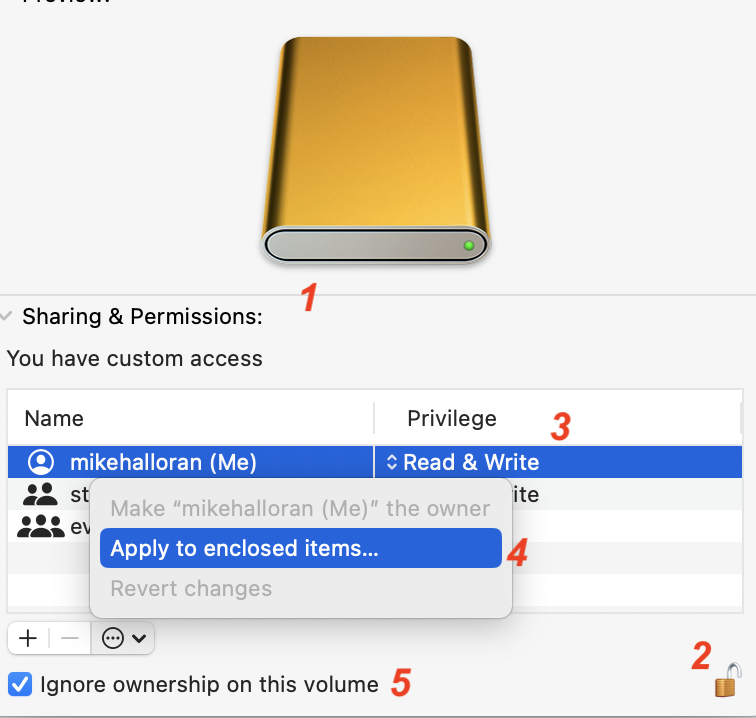
Good to see. Here's how to fix that for an entire drive at once. Note: don't do this if you have a macOS on that external drive—the way you already did it is fine.

1 — Select the drive and run Get Info; Open Sharing and Permissions

2 — Unlock the drive with your Admin Password

3—Make certain that you have Read and Write permissions

4—Check the dropdown menu and Apply to Enclosed Items... You will be asked if you really mean this. You do (unless you have a macOS installed on the external)

5—Check the box for Ignore Ownership on this Volume


You will now have granted Read/Write permissions for every file on that drive.


Comment actions Permalink
Avatar
0

Well, I must say that I rushed a lot, 3-4 hours/day, to go through that work, I finished, at last, few days ago!
Because I have worked with the 30 days trial, I have around 10 days left... And for I am going outside for several weeks, I had no intention to bring with me this external HD. I don't know if I will have time to check with what you explain before I leave. Does it mean I have to check with all those files?! Hope not...
I am very grateful about all your help! Sincerely! 
I was going to give some news about it, anyway :-) 

THANKS!

Comment actions Permalink
Avatar
0

Mike : I did what you suggested for my G-Drive. There is nowhere the "Apply to enclosed items", à #4. So, I can understand it is already formatted so. My drive is not quite recent... 

Concerning the Manual, I was concerned only with accidentals, like clusters where C# against C natural on the same chord. I realized that the sing (bécarre, in French) was not on the score. So I finally found a short cut so the sing becomes in parenthesis only. Many of those short cuts, I knew them by hart... or I could find them easily. It took me long time to find that one, Outside some characters in the titles, this was the only correction I had to make.

THANKS again!

Comment actions Permalink
Avatar
0
Mike : I did what you suggested for my G-Drive. There is nowhere the "Apply to enclosed items", à #4. So, I can understand it is already formatted so. My drive is not quite recent... 
 
Christine,
Respecting MikeH, does it make sense for a Mac to be able to lock a file so you can not look at it, edit it or open it just to be able to email it to someone and they have full access and control over it. That makes no sense and I still doubt that is your problem.
Comment actions Permalink
Avatar
0

This was not the problem, but there was no reason I can't try... The problem was that may PM was over. Since I downloaded the 30 days trial, I could do everything I needed, even if at every end of system there is a lock, what I still just don't understand. I doubt it had to do with the Drive. 
My job is over now and I really THANK you for your great and diligent help!

Comment actions Permalink
Avatar
0

You are welcome Christine so glad you got what you need . You have my email if you need anything further.

EB

Comment actions Permalink
Avatar
0

MERCI BEAUCOUP!

Comment actions Permalink

Please sign in to leave a comment.