New post
Avatar
1

On music that has multiple lyrics against a common melody, I would normally turn lyrics auto number on, (and later, use adjust syllables to and the lyric number to each line, as advised elsewhere (thanks Peter Thomsen.)

However, I find the space after the lyric number very close to the verse itself. Does any one know of a way to widen the gap (other than putting a couple of "hard" spaces in they lyrics?)

Thanks
peter

13 comments

Date Votes
Avatar
-1

I don't think so. What is the problem using an extra space or two, if that makes it better to your eye?

Comment actions Permalink
Avatar
0

Mike Rosen,

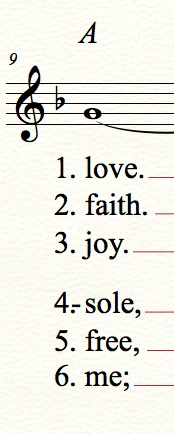
I could put the hard spaces in, but most of my music has verses, and to remember that hard space every time is going to slow me down. I also number each line of each verse, it makes it easier for my singer, and adding extra spaces would require me to do this after I format the page, and the spaces may require me to respace. In lyric options, I would prefer to turn on the option for hyphens to always when it carries over to a system ( I find it easier to read and sing that way), but if I do, the hyphen then appears in between the non-existant space. See my first picture, vs 4).


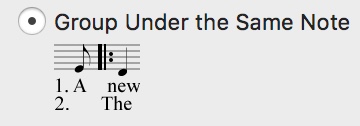
What would be nice is to have the sort of distance in the lyric option vs 2 (see second picture) - it could sit all the way to the left margin (or several spaces to the left if not starting at the start of a system.

Sometimes I get around it by putting a text block with the verse numbers instead - again, possible but a fair amount of work if you are doing it all the time. One of the Litanies we do for church has 16 verses : > ((

[ps. your comment came through to my email, but I can't see it here. There's a label "1 comment" but it doesn't expand]

Comment actions Permalink
Avatar
1

… Sometimes I get around it by putting a text block with the verse numbers instead - again, possible but a fair amount of work if you are doing it all the time …


Instead of a text block, try an expression.

With an expression you might save some time since an expression can be set up to a default positioning.

Comment actions Permalink
Avatar
0

Hi Peter,

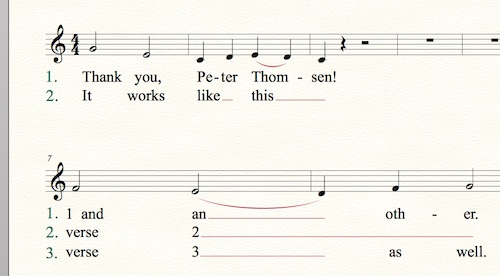
That works - I'm still fiddling with the exact offsets for each expression - I'll do 1-6 (at which stage I've gone from uncommon to rare) 1-3 done so far. Interestingly, Finale treats it's font sizes differently. I have my lyrics and chords in Times New Roman 18 (poor eyesight), yet when I put an expression in at font size 18, it comes out much larger, so I've set them to 16. As you can see in the second system in the picture, they're still not precisely the same!

I also tried an expression with 3 lines, but the default line spacing didn't work. I need to explore my default lyric spacing to fix this. Also, the expressions don't appear to save once I close the piece I'm working on.


Comment actions Permalink
Avatar
1

Is it possible that one element is fixed size, and the other is not? And, are you using the same font for both the lyrics and expressions?

Comment actions Permalink
Avatar
0

Update - saved to a common template, it works when I open that. Now have 5 individual verse numbers, plus sets for 1&2, 1&2&3, etc. Thanks Peter


Comment actions Permalink
Avatar
1

… Finale treats it's font sizes differently. I have my lyrics and chords in Times New Roman 18 (poor eyesight), yet when I put an expression in at font size 18, it comes out much larger …


The font sizes should be the same.

But without examining the actual Finale document we can only guess about the culprit.

Comment actions Permalink
Avatar
0

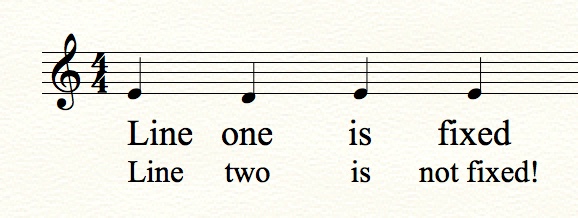
Mike, Peter, thanks for the help. Mike your last comment solved the last puzzle - I put fixed against the Lyric font size, wrote the first line of lyrics in the attached pic, and then then wrote the second verse lyrics. Clearly I don't understand fonts at all, because I thought a font size of 18 was the same (ie fixed/non fixed were tautological - see https://websemantics.uk/articles/font-size-conversion/). Clearly there is more to it than that, but with the knowledge that it isn't, for whatever reason,  I can sort myself out. May you both get lots of Valentines Day chocolates tomorrow : >)


Best wishes

Peter


Comment actions Permalink
Avatar
1

The difference is that a fixed size stays the same, regardless of page or system scaling. If you have not fixed, and you reduce the scale to 85%, the font will also get smaller, where a fixed size will not.

Comment actions Permalink
Avatar
1

… I don't understand fonts at all, because I thought a font size of 18 was the same …


This is not a matter of understanding fonts, but rather a matter of understanding scaling in Finale.

The general, over all, scaling can be done on three levels:

- on the Page level (= Page Scaling)

- on the System level (= System Scaling)

- on the Staff level (= Staff Scaling).

All three scalings affect the size of the lyrics - unless the lyrics size is set to Fixed Size.


Example:

If the Page Scaling is 75%, the System Scaling is 75%, and the Staff Scaling is 100% (= no Staff Scaling), then a font size of 16 Points will get scaled to an actual (printing) size of 0,75 * 0,75 * 1 * 16 Points = 9 Points.

If the font size is set to 16 Points Fixed Size, then the actual (printing) size will be 16 Points.


Warning:

Setting the Lyrics Font to a Fixed Size may cause spacing problems since Finale spaces, as if the font size was not Fixed Size.

Comment actions Permalink
Avatar
0

Peter Bowron,

Another option is to enter the verse numbers separately from the verses. What I mean is enter the verse in Finale's "Verse" and enter the verse numbers in Finale's "Section or Chorus". Using this method you'll be able to adjust the positioning of the numbers separately from the positioning of the verse.

Jeff

Comment actions Permalink
Avatar
0

If the problem is the size of the lyrics in each stanza ("verse"), I suggest manually checking the font and size of each stanza separately by highlighting the lyrics in the edit window for each stanza and then opening the font menu item to check the font and size (and style). Changing the default lyric font does not change lyrics already typed, and manually changing the lyrics in stanza 1 does not necessarily change the settings for stanza 2.

Comment actions Permalink
Avatar
0

Thanks for all the comments. I have now made sure that all of my fonts are set to be non-fixed (seemed the most sensible option.) For whatever reason, the default setting was set as fixed as an expression (possibly because I changed the font rather than using the preset,) while the lyrics default was non-fixed. By changing the lyric line spacing to suit the settings produced, and saving that as a template, I can now use expressions as originally suggested (6 different expressions for up to 6 different verses,) and they tie directly under the start of the staff.

Jeffrey Turner, I did try that, but I am starting to use both chorus and verses in the lyrics (coming from PrintMusic, where I don't think that was an option and my chorus was just done using the first line of a verse.) I can see using sections might lead to problems in the future, plus I presume the number would still be under a note/rest, unless I fiddled with where it tied back to.

J Adrian Verkouteren, thanks for your comment too. I had checked this already, but until the other comments from Mike and Peter above, had not realised the concept of fixed vs. unfixed fonts.

Regards

Peter

Comment actions Permalink

Please sign in to leave a comment.