New post
Avatar
0

I have not found anything in the online users manual,  nor comments and blogs that address my problem.  Recently I set up my Choral Composition for Soprano, Alto, Tenor, Baritone and Bass plus Piano .  After I set up my page and started composing I decided not to use piano accompaniment.   My Choral piece is 133 measures long and all accapella.  I do not want a Piano accompaniment with this composition.  I tried to delete the Piano part and extra Treble Cleff line below it and cannot remove it.  When I clicked onto change region and put in measures  1-133 and lines 6,7,8, and hit the delete key after those 3 lines were highlighted the lines did not go away.  I also double clicked with my mouse onto the highlighted section and then hit my delete key and they extra lines did not go away.  I read my manual and there is nothing that addresses this particular problem. So my composition has the 5 Choral parts and the blank Piano staves and the extra Treble Cleff line at the bottom of this music.  I was told that I no longer can receive technical support because I have Finale 2012.   I have been using Finale products since  2005  or 2006 when I started with Allegro then I went to Finale 2007 and then 2012 which I now have.  I have Windows operating system. 

9 comments

Date Votes
Avatar
0

I meant to title this blog.  Cannot Remove Blank Unused Piano Accompaniment Staves in Accapella Choral Piece.


Comment actions Permalink
Avatar
0

I think what you want to do is "Delete Staves."

Select the Staff Tool, select the staves you want deleted and from the Staff Menu, select "Delete Staves and Reposition" (or just hit CTRL+Del on the selected staves).


I'm not too familiar with Fin 2012, but I believe this should work ...

Comment actions Permalink
Avatar
1

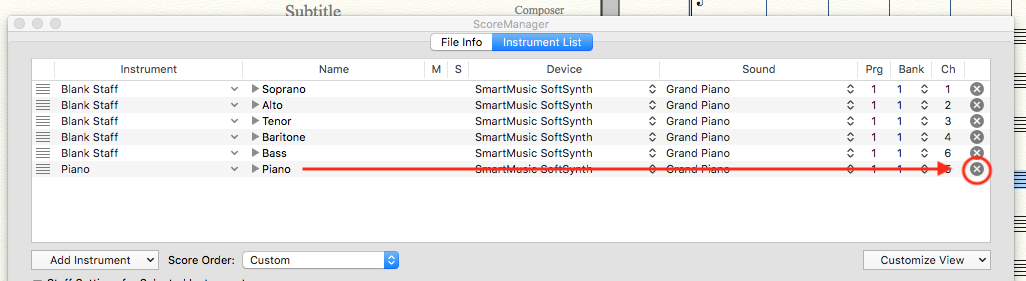
Or, you could go to the Score Manager, and tap the X at the right end of the undesired instruments.


(And, rather than your CV, which I'm sure is riveting to some people, what we really need to see is your Finale version and OS...)


Comment actions Permalink
Avatar
0

You can also delete staves and change their order in the ScoreManager (Window menu). The X on the right of a line allows you to delete a staff, and on the left, click & drag on the 3 lines to move a staff vertically.

Comment actions Permalink
Avatar
0

Is anyone else here really ticked that

  1. E-mail copies of comments show up long before they are posted here and can be replied to?
  2. I make a comment and then find out later someone else has said that same thing hours before I posted, which means I've wasted my time and look foolish (not that I'm not used to either of those things)?
  3. The Forum table of contents says an update was posted half an hour before, but when I open the thread the last comment was two days before (and none has been edited more recently or voted on, which might explain the time stamp)? Another waste of time!

Apparently MM's attempts with Zendesk to respond to the recent spamming problem has just messed up the forum beyond any of its former shortcomings.

Comment actions Permalink
Avatar
0

Hello Adrian,

1. correct

2. correct 

3. I don't understand the chronology, posts appear in a wrong order, and at unpredictable moments, with delays.

My reply (ScoreManager) was posted at a time the anterior post by mike rosen was not visible. His was posted 14 hours before mine !

What a mess...

Comment actions Permalink
Avatar
0

I have been in constant conversation about this with Chad at MM. They are aware of the problem, and are talking to Zendesk about it.


It seems that nobody at MM is willing to admit to the mistake in adopting the software, with this and all of its other faults. Please add your voice, and open a formal support ticket.


The only other option we would have would be for the regular responders - and we know who we are - to simply stop. I am considering it.

Comment actions Permalink
Avatar
0

Just got a follow-up email by mike rosen, which I don't even see here yet.

BTW, this message jumped above my previous reply.

Comment actions Permalink
Avatar
0

I've been communicating with MM Support as well, but the synchronization between what has been typed here, what shows up in e-mail, and what makes a timely appearance in this message queue remains pathetic.


I suspect MM depends on Zendesk for their overall Customer Relations Database back end and therefore appear chained to a sad forum interface complicated by an approach to spam filtering that throws a wrench into everything.

Comment actions Permalink

Please sign in to leave a comment.