New post
Avatar
1

 Finale 25.5, Windows 10

I have been dealing with tech support for two weeks trying to get the issue of missing and incorrect sounds in custom percussion layouts resolved. One tech told me, after a week of dinking around, that upgrading from Finale 2012c to Finale 25 should solve the problem. I uninstalled Finale 2012c and ARIA Player as completely as I could, and did a full install of Finale 25. It didn't solve the problem. The second tech gave me some unhelpful woo about percussion MIDI maps and the uselessness of trying to use MIDI numbers for most of a week, then finally told me just before going home for the weekend that "Custom MIDI maps are not designed to build a la carte percussion staff full of Garritan sounds." I find that odd, as it is a selling point for Finale.

Anyway, as I am trying to make a document for playback rather than reading, I have decided to make a score with extra percussion parts using standard layouts containing the instruments I need. So I opened the original Finale 2012 document (including the abortive percussion layouts) in Finale 25, saved it as a separate Finale 25 version, edited it a bit in Finale 25, saved it and closed it in Finale 25, opened it again in Finale 25 and set out to notate the multiple percussion lines I shouldn't need.

UNFORTUNATELY, although the ScoreManager window and its Perc. MIDI Map dropdown menus (Garritan Instruments for Finale --> Basic Orchestral Percussion, Percussion Toys, Marching Percussion,... Rainstick, Washboard) acknowledge the fact that I am working on a document in Finale 25 (a fact also affirmed by the bad main tool bar), each time I add an instrument and select Percussion, I get a warning that

"The selected Document Style does not include the Percussion
Layout required by the intrument(s) **.
To ensure proper notation, you can either:
- Select a different Document Style,
- Select a different Percussion instrument, or
- Manually set up or load the necessary Percussion Layout."

1. I did not select a Document Style. I opened a Finale 25 document in Finale 25.
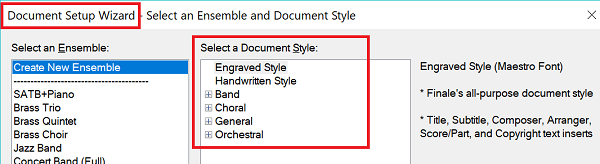
2. I have no idea how to select a different Document Style. (This is not for a lack of trying to find out.) The document in question is a band score that is complete except for the effing percussion parts. I have no idea how to change the Style of an existing document.
3. I need to notate percussion parts, so selecting a different instrument would not help.
4. I have no idea how to manually set up the necessary Percussion Layout. (This is not for a lack of trying to find out.) It appears that I need to get the Finale 25.5 percussion layouts to apply themselves, but I have no idea how to do so. (This is not for a lack of trying to find out.) Besides, I just spent two weeks finding out that I can't set up percussion layouts. Phooey on that.

Despite the notice, I have selected sounds and MIDI maps for three percussion parts:
Basic Orch. Perc | Basic Orchestral Percussion
Orchestral Toms | Orchestral Toms
Percussion Toys | Percussion Toys
per the Finale 25 ScoreManager menus.

However, when I go to the Settings... for these three parts, the Percussion Layout Selections are from Finale 2012, and the layouts I'm stuck with are Orchestral Percussion, Concert Toms/Tenor Drum and Auxiliary Percussion, respectively.

How do I get those nice new percussion layouts and MIDI maps to show up and make themselves useful in my old documents? On bad advice, I spent $149 for more Garritan Instruments, percussion layouts and MIDI maps (and a bunch of other stuff that I don't like the look of); I might as well get the use of them. I'm under a deadline; it's been two weeks already and I can't spend another week while technical support puts on a very slow show of assisting me with no result.

Thank you.


DF

15 comments

Date Votes
Avatar
1

First, I also feel that Finale Percussion should be a lot better. The least they could do is have a percussion map keyed to each of the included Finale Percussion sound sets. For example, there should be a map for the Basic Orchestral Percussion called Basic Orchestral Percussion Map so there is no doubt which Percussion Map goes with which included percussion sound set. That would make creating or editing Percussion Layout much more straightforward. I have found that, particularly with the added Garritan Libraries, one usually has to use the manuals to search out the MIDI numbers for each instrument. Bummer.


For your questions:

#2: Styles are chosen via the Setup Wizard. If one has an existing file, one can usually create a new file with the same instruments and then copy and past the data form the old file to the new.


To add v25 Percussion Layouts into your 2012 transplant, load the appropriate library from the File Menu. There should be a Percussion Layouts library in the Libraries folder. That at least will give you acces to the v25 libraries. You will still have much work ahead going through the Score Manager > Percussion Settings button to create or edit layouts.


Hope that helps a little.


(Posted 3/10/18. Don't know when you will see it since mssgs are often delayed for approval over the weekend.)

Comment actions Permalink
Avatar
2

I'll agree with Adrian. It could be a lot better. My pet gripe is that many sound are listed, but not all of them have a playback sound. At the very least, there should be some indication which sounds will work.

Comment actions Permalink
Avatar
0

Thank you for the quick responses. Installing the Percussion Layouts did the trick. I had forgotten that they are treated like Libraries. I could write a tome on the problems with Finale, based, of course, more on what I think than on what I know.

It took me a while to notice that some note types in the Percussion Layout Designer have dashes instead of numbers. Say I select the Orchestral Toms Sound and Perc. MIDI Map in ScoreManager. One would first think that he would find Orchestral Toms in the Percussion Layout Selection window, but the layout is called Concert Toms/Tenor Drum. One would second think that all of the instruments therein would have MIDI note assignments because Finale seemingly grouped the instruments for a reason, but in fact the Floor Toms 1 and 2 and the Snare Drum (WTF? The Side Drum sound is more like a tom) have no MIDI notes.

If you go to the Percussion MIDI Map Editor (Orchestral Toms), you will see that there are more sound options for the regular toms, but the floor toms and snare drum are not mentioned. If you look at the Jazz Fusion and Brush Drum Kits, they both have Floor Tom 1 and 2 (notes 43 and 41 respectively.) One would third think that thise MIDI numbers would apply to floor toms in the Concert Toms/Tenor Drum layout. So I click the + in the Percussion Layout Designer so as to have a blank slot for a new instrument, then go to the Percussion MIDI Map Editor, select the Jazz Fusion Drum Kit Map, and-- without clicking on "Select a Note Type to Add"-- click on Floor Tom 1 in the map list, then click OK. (The window will demand a note type for the blank slot; I used Custom 1.) In the Percussion Layout Desgner window, Floor Tom 1 miraculously has MIDI note 43 and Floor Tom 2 more miraculously has MIDI note 41. The MIDI notes for the toms remain, but those for the buzz rolls are in parentheses. The Custom 1 slot has no MIDI number.

Upon testing note entry, the High Tom and High Tom Buzz Roll both play low-mid tom buzz rolls; the High-Mid Tom and High-Mid Tom Buzz Roll both play low-mid tom strikes; nothing else plays. It took a little doing to restore the Concert Toms/Tenor Drum layout to its proper function. Apparently when one tries to borrow a MIDI number from a different layout, the foreign layout invades the intended layout and buggers it.

At various points during the creation of a percussion layout or MIDI map-- and forgive me for not remembering exactly where these points are, as I have spent two weeks wandering around in the Percussion User Buggery region of Finale-- one is given the option of typing in a MIDI note number for a sound. As this is a useless-- even counterproductive-- task, it is perverse for Finale to offer the option. Given the lack of consistent nomenclature, the arbitrary groupings of instruments in the standard layouts, the failure to provide MIDI numbers for all the arbitrarily selected instruments, the multiple MIDI numbers assigned to some instruments, the spotty and opaque documentation, the apparent inability of Customer Success Representatives to provide valid and/or needed information (whether in a timely manner or not), I just don't know. And, as many times as it was recommended I go to the ARIA Player, I find the ARIA Player interface useless for anything beyond inducing eyestrain.

Here is an example (from one of my tech support posts) of multiple MIDI note assignments for sounds I was trying to put into a catch-all percussion layout-- none of which work when placed in a custom layout or MIDI map:

"Here's part of the problem. On a whim, I went looking for Tambourine, Triangle Open, High Tom and Low Tom MIDI numbers in the Percussion MIDI Map Editor. These are the numbers I found in my admittedly-not-exhaustive search:
.
"Orchestral Toms map (the one I was interested in because I figured the samples might sound better in a concert band):
Low Tom - 48
Low-Mid Tom - 55
High-Mid Tom - 62
High Tom - 69
.
"Marching Percussion map (the one you appear to have used. Why would I go to a Marching Percussion map to score a piece for concert band?):
Low Tom - 77
Low-Mid Tom - 76
High-Mid Tom - 74
High Tom - 72
.
"Jazz Fusion Drum Kit (because why not?):
Low Tom - 45
Low-Mid Tom - 47
High-Mid Tom - 48
High Tom - 50
.
"Basic Orchestral Percussion map:
Triangle Open - 96
.
"Percussion Toys map:
Tambourine - 72
Tambourine Shake - 73
Triangle Open - 82
.
"Jazz Fusion Drum Kit:
Tambourine - 54
Triangle Open - 81
.
"Brush Drum Kit:
Tambourine - 83
Triangle Open - 81"

Thanks again. I find this interaction helpful, and my lovely wife appreciates the fact that I'm ranting in an online forum instead of yelling blasphemous and scatological obscenities at the ceiling.

Comment actions Permalink
Avatar
0

One discovery you have likely made is that one cannot combine multiple sound sets into a given Percussion Map (which you use to link sound names to MIDI numbers). Therefore, you cannot combine sounds from multiple sound sets into a single Percussion Layout (staff) although someone (Zuill) once somehow managed to use layers to simulate the situation. (I forget how he did it.) Perhaps, with luck, you can manage to put sour sounds on different staves (you can determine how many lines a staff has) and via hiding unused staves simulate a single part.


Ideally such a work-around should not be necessary, but for the present....

Comment actions Permalink
Avatar
1

I won't, can't, help you here, but I just want to add a comment in case anyone from Makemusic actually pays attention to these questions. Yes, the percussion map is AWFUL. It's just a pain in the butt, hard to work with. Entering notes is even much more difficult that it should be. Do a survey of what users really use and need - and make it work! I've been working on a straightforward orchestra score with basic percussion: snare, bass drum, triangle, cymbals. But then I wanted to add one simple instrument - claves. What a chore that was. Error messages all over, no playback. Stinks.

Comment actions Permalink
Avatar
0

The annoyance continues. I have all the percussion layouts I'm supposed to have, but most of the instruments in the layouts have no MIDI notes assigned.

For example: For a Percussion staff, the ScoreManager offers Sound --> Percussion --> [Basic Orch. Perc., Crotales, ... Temple Blocks, Woodblocks, Wind Machine] I want a Woodblock staff and a Temple Block staff, so I select Woodblocks and Temple Blocks under Sound, and Garritan Instruments for Finale --> Woodblocks and Garritan Instruments for Finale --> Temple Blocks under Percussion MIDI maps.

Then I go to Settings... --> Percussion Layout Selection and try to guess which layout has woodblocks. What luck! The Percussion, Drum Set and 1-line Woodblock layouts have them, with MIDI notes assigned; JABB3 Blocks and Bells calls them Jam Blocks, and the numbers are in parentheses. No other instruments in these layouts had MIDI notes assigned. In all layouts, the high block and low block sounds are reversed-- though they are so nearly inaudible that it might hardly matter.

Next, I try to find a percussion layout that has Temple Blocks in it. Temple Blocks do not appear in any of the instrument lists in any of the percussion layouts. The most recent (as far as I know) list of Garritan Instruments for Finale, brought to my attention by a Customer Success Representative, says that NEW! Temple Blocks are available. They show up in the ScoreManager Sound and Perc. MIDI Map menus. Also, as I had apparently selected a sound that is not provided, not a single instrument in any of the percussion layouts had a MIDI note assigned to it. Nary a one. I seem to recall seeing MIDI notes all the hell over the percussion layouts whether I wanted them or not, and even when they were useless.

Double ewe tee effable.

Comment actions Permalink
Avatar
0

Using VST Sounds, see if the following MIDI Map setting and MIDI numbers work for you. The Current Percussion map is part of the Garritan Instruments for Finale (GIfF) set, which is included with v25.


Comment actions Permalink
Avatar
2

Thank you for your quick response. There are too many rabbit holes-- excuse me: different procedures-- involved with percussion in Finale. Having been through a series of exercises related to achieving this result based on your helpful information, I hope I might remember this one.

It's as if a bunch of Nazi war criminals, smugglers, kidnappers, buggerers, sociopaths and people who pull the wings off flies designed Finale's percussion management. If this hadn't been an issue for years, I'd be tempted to blame the Trump administration, as it seems like something they'd come up with: perverse, counterproductive, and not as promised.


DF

Comment actions Permalink
Avatar
0

I hope the developers can make changes for the better in the near future. It has taken me a long time to learn even the rudimentary in's and out's I now know. In an effort to make percussion easy for some and flexible for others, former programmers created a hybrid that is very problematic.


The biggest problem for me is that finding which MIDI note number trigger which sounds in order to make a map means spending hours in the manuals looking up codes, even for Garritan libraries.


And as I have said before, not having maps and layouts whose names mirror the name of the sound libraries from which they draw their sounds is an obvious oversight.

Comment actions Permalink
Avatar
0

Well, now I have my woodblocks and temple blocks. Using the mixer, I have set the woodblocks to maximum volume (127, whatever that means). They are inaudible. I have the temple blocks set to minimum volume (0, but not muted). They are the loudest instrument in the piece. I can find no settings in ARIA Player that make any appreciable difference. Why does Finale provide a mixer that has no effect on percussion sounds?

Pardon me, but [deity-specific blasphemy] them all to [biohazardous and otherwise unpleasant location].

Comment actions Permalink
Avatar
0

Make sure you use the Finale Mixer--not the Aria Mixer--to set base volumes. The Aria Mixer is designed to vary with dynamic settings within the music.


(I have often sworn at my machine when things did not go as intended, but I would encourage you to remove the finale sentence from your post using the Edit option behind the small cogwheel at the bottom right of your post.)

Comment actions Permalink
Avatar
0

Thanks again.

The volume settings are in the mixer that opens from the Window menu in Finale. The very mixer that needs a scroll handle instead of left and right arrows for navigation.

Comment actions Permalink
Avatar
0

This is the most frustrating experience I've ever had -- working with the percussion layout designer. Changes I make are undone for no reason. The entire process slows down my workflow. And Finale just crashed as I am typing this while working with this tool.

Can the engineers please design this tool properly? This software is so way too expensive to have this many problems.

Comment actions Permalink
Avatar
0

Guess what -- we Mac users have identical problems.  I am beginning to think I have wasted a tremendous amount of time and money purchasing Finale and Garritan voices.  For me, the problem only emerged when switching to version 25 rev &c.  Scores that worked with numerous percussion sounds under 2014 suddenly want maps that I never created for those scores.   Also -- to David Franks -- I had similar experiences with the tech support people.  I ultimately had to solve the problems as their suggestions were always variants of "clean install."  I think the folks at MakeMusic owe their users more than they are giving us.

All that being said, the above does described how to work through some of the Finale 25 inadequacies.  I am afraid to upgrade again -- the fear being that MakeMusic will screw up something else and I will be left with scores that do not play.


J.M. Block, Santa Fe


Comment actions Permalink
Avatar
0

The bad news would seem to be that, if MM ever does reconfigure percussion to make it more transparent and accessible, that will probably make it necessary to reconfigure earlier maps and layouts.


But then, if one decides to move to Dorico, one would still have to rebuild percussion layouts there as well.

Comment actions Permalink

Please sign in to leave a comment.