New post
Avatar
0

I came across a strange phenomenon today: After attaching a text block to a measure, the text block looses its selection handle and cannot be selected at all. When trying to double click the text block, it dissapears completely. I have some older text blocks in the same score though which cán be attached to a measure. Anyone having a clue?
Thanks!

14 comments

Date Votes
Avatar
0

Is this in all documents?


Comment actions Permalink
Avatar
0

No, and even in the mentioned score some text blocks can be attached to a measure. I tried to use 'Clear items'. That didn't help but I found out that the text blocks which don't attach are indeed being erased when 'Edit' - 'Clear selected items' - Text blocks (attached to measure) is being used.

Comment actions Permalink
Avatar
0

@Mike: I have to clearify my reply above: The text blocks I'm referring to cán obviously be attached to measures. However it's not possible to select these blocks after attaching. Selecting handles don't appear. Attaching to a pages is still possible in the regular way (selecting handles appear after selection).

Comment actions Permalink
Avatar
0

… The text blocks I'm referring to, cán obviously be attached to measures. However it's not possible to select these blocks after attaching. Selecting handles don't appear …


… When trying to double-click the text block, it disappears completely …


I am not sure what you mean.

Did you double-click the text block from the Text Tool?

Or did you double-click the text block from the Selection Tool?


You mention that “Selecting handles don't appear”.

For what do you need the text block handles? What are you trying to do?

- move the text blocks?

- edit the text?


The better we understand, the better we can help.


Comment actions Permalink
Avatar
0

@Peter Thomsen: I received your reply to my post by a no-reply e-mail notification but cannot see it here. Could you resend it so that I can reply?

Thanks!

Comment actions Permalink
Avatar
0

Attaching text blocks to measures doesn't appear to possible in 'Looseleaf style column view'. Is this standard behaviour or am I missing something?

Thanks!

Comment actions Permalink
Avatar
0

I think Michel H. is correct - when not in scroll view - text boxes are not attached to measures...

In Finale 25 Mac, I can create a text block with the text tool - while in Scroll view - and it seems to be attached to the nearest measure to the entry click. Although - there are no attachment dotted lines connecting the text box to the measure (as with other items attached to measures/notes) indicating as such. So, when I reposition the text box, there is no visual indication it is attached to a specific measure.

However - when I return to page view, if I force that specific measure to the next page, the attached text box follows the measure to the next page.  The specific part displays the same behavior. The text box also repositions if the measure it is attached to is resized.

I am concluding that since scroll view doesn't deal with "pages", the only option for the software is to attach the text to a measure. It then stays attached to the measure when score/part is displayed in any of the page view options.

Can anyone else confirm this?
Thanks!

Comment actions Permalink
Avatar
0

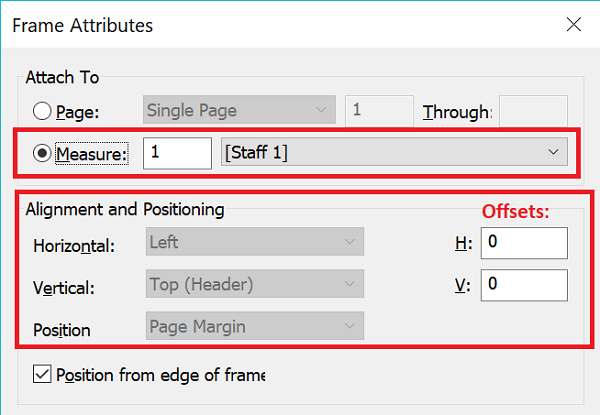
By right-clicking on a Text Box handle, you can adjust the positioning of a text box's Frame Attributes even in page layout.


(If your program cannot do this, you need to consider reloading it or contacting MM via the "Submit a request" link above.)

Comment actions Permalink
Avatar
0

@Doug: thanks for replying. I can actually attach a text block to a page in scroll view (Finale 25.5 - Win10). In that case the text block jumps to the entered page number. Attaching a text block to a measure in page view however seems to make this text block impossible to select, I have to switch to scroll view to do that. At least I found a way to handle the problem....

Comment actions Permalink
Avatar
0

That's interesting. If I'm in any view but Page View, Assign to Page is greyed out and the text block gets automatically attached to the closest measure and the text is by default red instead of black, as when attached to a page. I thought this was universal for both platforms and was Finale's intended behaviour.

Comment actions Permalink
Avatar
0

… @Peter Thomsen: I received your reply to my post by a no-reply e-mail notification but cannot see it here. Could you resend it so that I can reply?

Thanks! …


Michel Havenith,


Sorry about the late reply.

My post (from 13 days ago) displays correctly for me.

Have you viewed this thread recently?

If not, look at this thread again.

If you still can not see my post from 13 days ago, let me know.

Comment actions Permalink
Avatar
0

@Peter: Thanks for resending. As you can see I already found out a way to deal with the problem. Possible reason for the problem is the fact that the score was originally imported as an xml-file.

This is the first time I can see your earlier post here. I review threads on an almost daily basis.

Comment actions Permalink
Avatar
0

This is a long shot, but I sometimes find my ability to edit text boxes is limited when I am in certain modes of viewing pages in Page View. Try setting your page view style to a single page, tather than several pages at once (assuming this isn't already the case) and see if that helps. 

Comment actions Permalink
Avatar
0

@Thomas P. : Thanks for replying. In my case it's the other way around: when I'm in Scroll View, I can attach text blocks, but not in page view. The fact my score was originally an imported xml-file is probably the reason for this - and other - weird behaviour.

Comment actions Permalink

Please sign in to leave a comment.