New post
Avatar
0

Mac OS High Sierra 10.13.4

Finale Version 25.5.0.259

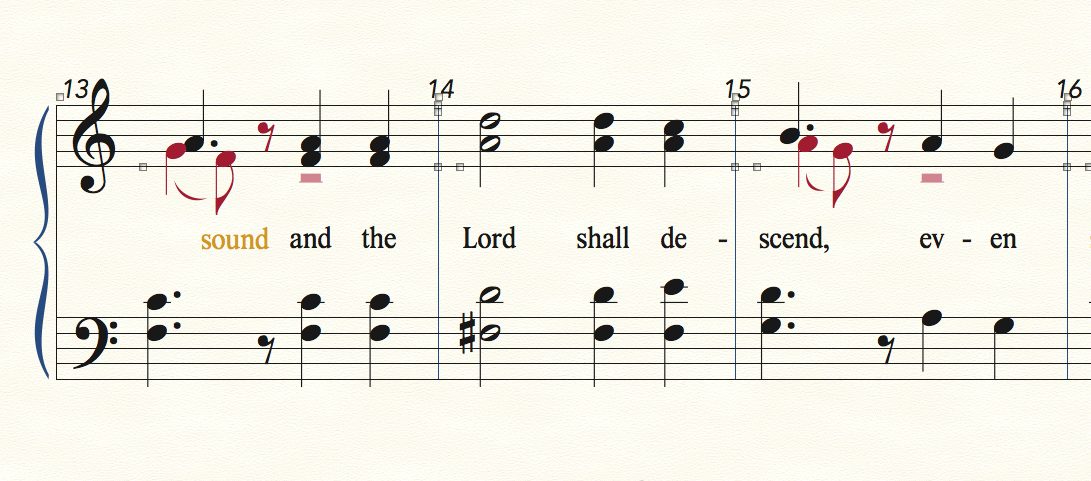
In the picture below, please compare m.13 and m.15 and how the 2nd layer is displayed.  In m.13, the alto part is displayed before the 1st layer and in m.15, the alto part is displayed after the 1st layer.  Furthermore, in the bass clef, the first beat is not "in line" with the first layer in the treble clef.  What can I do?  
 

5 comments

Date Votes
Avatar
0

It's hard to say exactly what you should do but:

To fix the note spacing, select all staves of the system or systems and apply note spacing.

m. 13: it looks like the lyric is assigned to layer 2 and/or positioned differently in the part/score. You can which layer it is assigned to by showing active layer only. If it's just repositioning, you can reset lyric positions from the utilities menu or by selecting the lyric handle and hitting backspace.

Comment actions Permalink
Avatar
0

Did you enter the notes yourself, or is it imported from an XML/scan? Or possibly from someone else's older Finale file?

First, I would select the measures, and Apply Music Spacing, as George suggested. If that doesn't help, select the measures, and Clear Selected Items... > Special Alterations.

If they both fail, you'll have to do it by hand, using the Special Tools > Note Position tool.

Comment actions Permalink
Avatar
0

… In m.13, the alto part is displayed before the 1st layer and in m.15, the alto part is displayed after the 1st layer. …


In this case it is because of the dot on the Layer 1 dotted quarter.

It makes a difference whether the dotted note in on a space or on a staff-line.

In Other Words:

In this case Finale does what it is supposed to do.


… Furthermore, in the bass clef, the first beat is not "in line" with the first layer in the treble clef …


My first guess would be that the culprit is some “manual positioning” that has not been cleared.

This wording - “manual positioning” - is “Finale-speak”!

Normally you would think that “manual positioning” means “positioning done manually by the user”, but in “Finale-speak” the wording “manual positioning” means any positioning different from the default positioning, no matter whether the positioning was done “manually” by the user, or done “automatically” by Finale because of colliding seconds between Layer 1 and Layer 2.


Take a look in

Document Options - Music Spacing > the pop up menu “Manual Positioning”.

My guess (while being blindfolded and not lookning at your computer) is that Manual Positioning is set to the menu item “Ignore”, right?

Change it to “Clear”.

Then apply Music Spacing, and Update Layout.

This step should move the notes back to being “in line” with the bass clef staff.


You can change “Manual Positioning” back to “Ignore” when you are done.

Comment actions Permalink
Avatar
0

The notehead/dot position makes perfect sense. Thanks (again!) for the education, Peter!

Comment actions Permalink
Avatar
1

AHH YES!  Very good.  Fixed!  Thank you to everyone for your time and your great input!

Comment actions Permalink

Please sign in to leave a comment.