New post
Avatar
0


Dear Community,

The wizard uses a default for letter size. I am used to write in A4 format. How can I resize an already arranged document?


Thx

Best regards

Tim

5 comments

Date Votes
Avatar
0

Save As so you are working on a copy. The Help Files have a great deal of information on resizing your documents.

Comment actions Permalink
Avatar
0

?

Comment actions Permalink
Avatar
0

… How can I resize an already arranged document? …


1) Page Layout Tool.

Page Layout menu > Page Size…


2) To make sure that also new pages added to the document will get the same formatting, go to

Document menu > Page Format > Score…

and specify the Page Size there, too.

Comment actions Permalink
Avatar
0

Dear Martin, Dear Peter,


Thanks for your help!!

tried a bit:

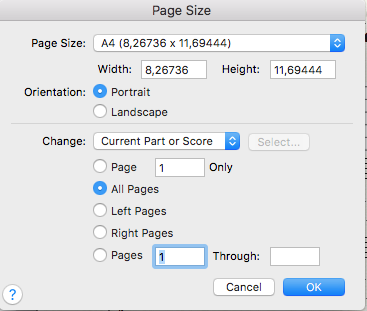
The page size is not accepted and switches back to letter immediately, after choosing A4 for several times in the menu shown below...It does not keep my A4 setting.


 ...and found the solution in setting the pull down menu to Current Part or score , whatever the reason is not to set All parts.

Did your advice (2) also

Nice!
 

Comment actions Permalink
Avatar
0

It depends. This is why I suggested that you consult the Help files first.

Comment actions Permalink

Please sign in to leave a comment.