New post
Avatar
1

 In Finale 26 auto-stacking articulation causes stacking the SAME articulation for all notes in the chord, so there might be a "tower" of same articulation, each, seemingly applied to a different not in the chord. That looks ridiculous if you read off the screen or print the score.

Can you tell Finale NOT to stack articulation on chords?

Thanks,

Ruben

14 comments

Date Votes
Avatar
0

Ruben Tahir,


I am unable to reproduce this issue.

For me, Finale v26 only puts one auto-stacking articulation on a chord (not one articulation for each chord note).


Can you provide exact steps to reproduce the issue?

Comment actions Permalink
Avatar
0

Earlier versions of XML imports did put articulations on each note of a chord, but in past versions of Finale they all overlapped, so you didn't see them.

You can turn the stacking off in the Articulation menu for those files where it is a problem.

Comment actions Permalink
Avatar
0

Thanks Adrian.

Is there a way to turn off stacking at the program level, e.g. not just per note?

Comment actions Permalink
Avatar
0

You should be able to bulk select articulations with the Articulation tool and a marquee and then apply the no stacking setting that way, but I know of no way to turn it off in Preferences or Document Options.


Correction: That did NOT work. (I wonder what the "Never" stack option is for.)

Comment actions Permalink
Avatar
1

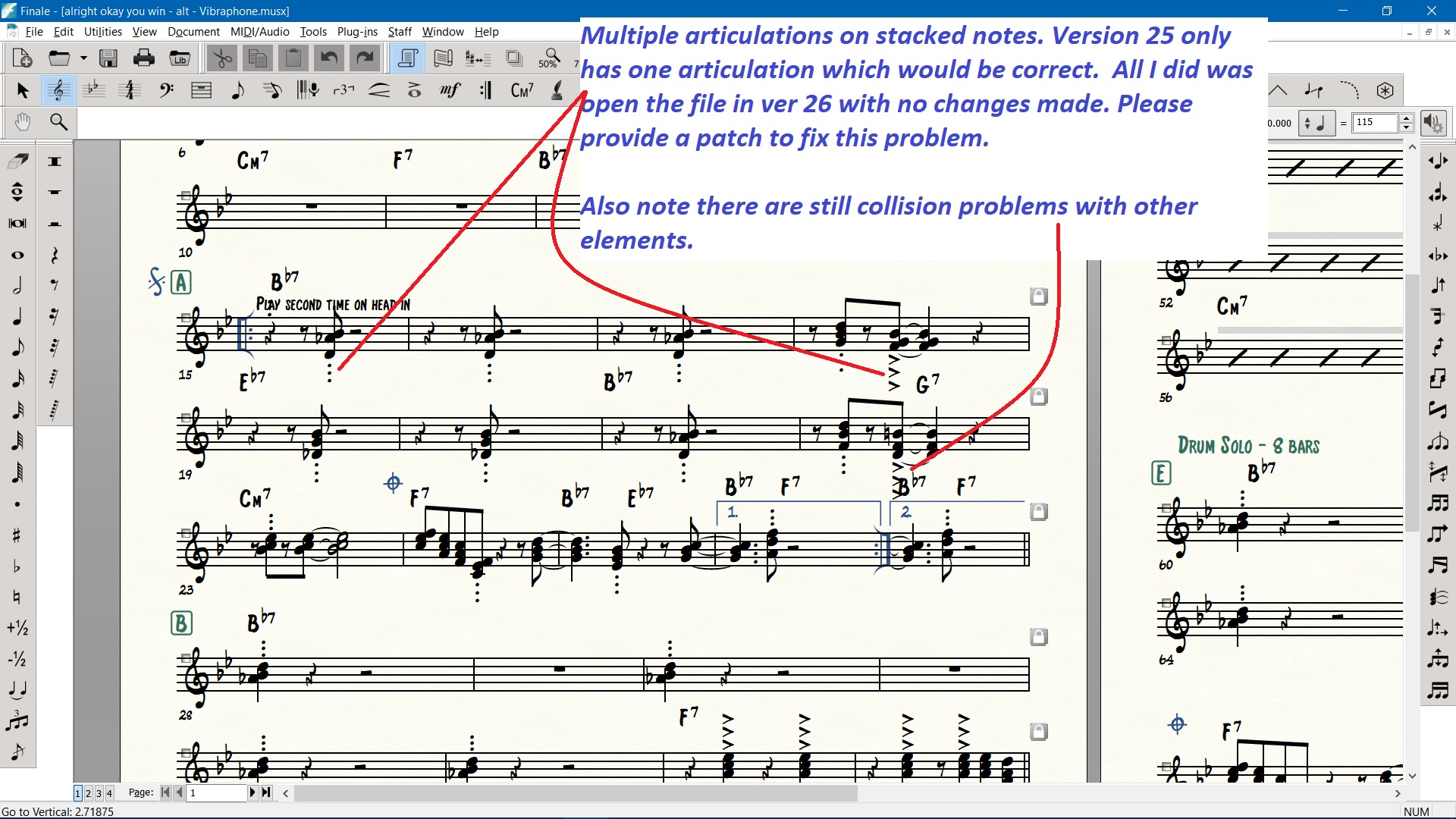
Hello.  Having this same problem - multiple articulations on stacked notes.  In v25 there was only one articulation. Simply opening the file in v26 shows multiple. No changes have been made to the file.    Screen shot attached.

PS - I split the divisi to a new staff and the new staff has one note with three articulations. 

Please get this fixed. It's creating a lot of work to remove the extra articulations.

Comment actions Permalink
Avatar
0

Ruben and Gordon, do either of you recall if the parts in your documents that are showing this behavior were created using the Implode Music Utility?

Comment actions Permalink
Avatar
0

No. I can see that in non-imploding parts.

Comment actions Permalink
Avatar
0

The parts were entered with the simple entry tool.

Comment actions Permalink
Avatar
0

Ruben, if that's the case, would you mind opening a case with us using the Submit a Request button? I would like to take a closer look at your document and find out why this is happening and get some more details on the situation. 

Comment actions Permalink
Avatar
0

I have often gotten duplicate articulations upon exploding a staff. I can understand that imploding can cause duplicate articulations (but why doesn't Finale have a function to delete them automatically with one command?) but I have no understanding of how a simple explosion will do this, when the source staff has only ONE articulation per note.


This has been happening for many versions now. It is only with the new stacked articulations feature that everyone can see it now.

Comment actions Permalink
Avatar
0

I have had scanned XML imports of piano music which looked normal in v25 suddenly have multiple articulations in v26. As Christopher says, the problem is that the v25 had the multiple articulations, but they were superimposed. (I verified this by trying to delete some in v25; it took multiple selection/deletes to rid a single chord of a supposedly single instance of an articulation.) So what seems to be happening in v26 is that it now makes sure these multiple articulations do not conflict by spreading them out; but they were there already although superimposed.

Comment actions Permalink
Avatar
0

When checking for superimposed articulations in either v25 or v26, click directly on the selection handle with the articulation tool to select only one articulation - then delete it.  If you drag a box to select it, you will actually select all of the superimposed articulations that are within your drag box... then when you delete, it will remove all of them, making you think you didn't have any superimposed articulations to begin with.

Many users will often drag to select, rather than trying to click the mouse exactly on the tiny handle... 

Comment actions Permalink
Avatar
0

I am having the same problem.  Is there a solution?


Comment actions Permalink
Avatar
0

I had the problem when importing scanned XMLs, as well. I had to go to each offending articulations, and switch it off. (Not every single one, just each different one: i. e., one staccato, one tenuto, etc.)

Comment actions Permalink

Please sign in to leave a comment.