New post
Avatar
0

When entering umlauts in text tool entries, the Mac way is to hold down option key while pressing "u", release, and then the letter (ä, for example).  This crashes the program (still on v25.5).

Are other users experiencing this?  

You can still copy umlauted characters from another program like TextEdit and paste them in.

I did not see this when searching for the term "umlaut", sorry if this is a dupe.


6 comments

Date Votes
Avatar
0

I could be wrong here, but I suspect that you have come across an incompatibility issue between Finale v25.5 and Mac OS 10.14.


In case you do not want to downgrade to an earlier Mac OS version, try the Finale v26 demo.

Could not hurt.

Comment actions Permalink
Avatar
1

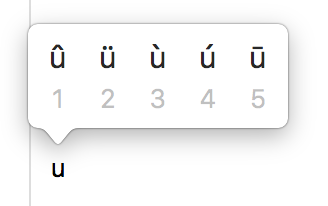
That was the old Mac way. For the last few versions, you can use the long press method: hold the "u" key down for a couple of seconds. You will get a flyout, with a choice of accents. Tap the number for the one you want; in this case, 2. Works on all the vowels, and some of the consonants, as well.


Comment actions Permalink
Avatar
0

I learned something new today, look at that.  And this doesn't crash it.  

Still, it's interesting to be able to bring down the whole program with one keypress.

Thanks.

Comment actions Permalink
Avatar
0

Not on Mojave, not experiencing the Option u crash in 25 or 26 either. 


Thanks for the reminder on holding down the keys. It's actually quite old but I've not done it in years. 

Comment actions Permalink
Avatar
0

I have seen this problem in the forums, before. And I never learned the two-key method. I’ve always used PopChar, until I found out about the long press. What’s more, I think I learned about it on the iPad, first!

Comment actions Permalink
Avatar
0

One needs to know both methods. There are some web sites where i post that only the two or three key method works to create such characters while, with others, only holding the key is successful.

Comment actions Permalink

Please sign in to leave a comment.