New post
Avatar
0

I have version 25.5

I have been working with Finale for 20 years, but now for the first time I wanted to create the cross-bar beamings that I have avoided so far because they are troublesome. I have used the Patterson Plug-in, which works fine but I need to do the lay-out of those bars afterwards manually because it is usually quite messy. Now I am in a situation where everything I do AFTER those bars (this is seems very random and as far as I can tell can be anything: change a time signature, changing standard beaming or even changing the slurring) will change the carefully created lay-out to become a complete mess. Anyone here with experience on topic? I can show some Screen shots, but I don't know how to do that here. I am using this forum for the first time.

Help is very welcome!

Best, Raaf

7 comments

Date Votes
Avatar
0

The plug-in uses two different tricks depending on whether the beaming goes across a system break or between two measures in the same system.

For your work flow (= doing layout after you have beamed across barlines) it is better to use the former trick (= beaming across a system break).


That is:

Before you beam two measures together, arrange the layout so that the first measure ends a system, and the second measure begins the next system.

Then, run the plug-in on the two measures.

You will get an extendable (forward) beam at the end of the first measure, and another extendable (backward) beam at the beginning of the second measure.

When you have run the plug-in, you can freely re-arrange the layout, thus allowing the two measures to be in the same system.

(You may have to adjust the two extendable beams)


And the layout will not “become a complete mess”.

Comment actions Permalink
Avatar
0

First, save all of your layout and special work until the note entry is complete. Many of us work in scroll view, for note entry. Second, turn off Automatic Music Spacing. Third, work front to back.


That should eliminate most of the problems.

Comment actions Permalink
Avatar
0

Thanks so far! Tomorrow I will have time to continue my work, and I am sure your tips will help me. The thing was that this is a saxophone solo piece, which makes it tempting to work in page view immediately and not (like i usually do) in scroll view. The other complicating matter is that I am using not only cross-bar beams but at the same time two layers. Would love to post a picture but don't know how....

Comment actions Permalink
Avatar
0

Posting an image is easy: use the "landscape/mountains" icon above and select your image file (.pgn, .jpg or the like) from the open-file window.


Capturing and editing (cropping, sizing, etc.) the screenshot depends on the computer OS you are using;

  • on Windows, ALT+PrtScn puts the top window/panel into the Clipboard, from which you can paste it into Paint or a similar (free) program/utility for editing and saving.
  • I've done something similar on Mac, but I don't do it enough to recall how.
Comment actions Permalink
Avatar
0

Hi there: new chapter in this problem. I wanted to take your advice and work in scroll first and then do the specialized beaming later. In order to clean everything up (the music spacing of the entire doc is now very strange, and it won't let itself be normalized) I wanted to get rid of all the patterson cross-bar beams. But it now gives an error when I do that: "cannot process notes that are invisible. To avoid this, turn off the Ignore bit (Speedy 'O') and/or remove Alternate Notation". I have no idea what to do.... To me this is Chinese. I thought that Patterson MAKES notes invisible, so how can it not process what it does itself.....?

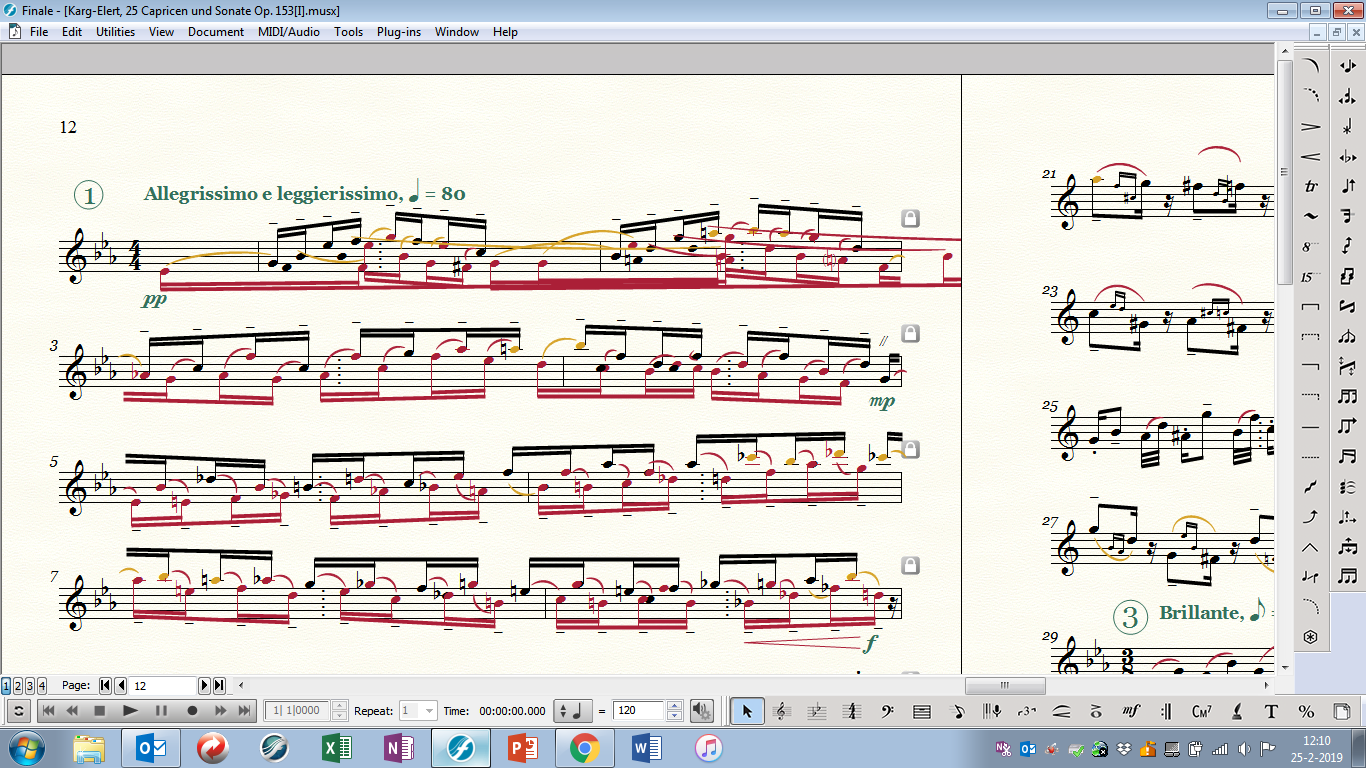
Hereunder a picture of the most hopeless page that I created so far. 1st line is the kind of mess I was referring to earlier. It should look more like lines 2, 3 and 4. those lines keep on changing whenever I do stuff on completely different pages. And yes I have unticked Automatic music spacing in preferences.

help is much appreciated! thanks, Raaf


Comment actions Permalink
Avatar
0

It looks as if your first measure or your pickup contains more than allotment of notes/beats. IIRC this is one of the ways the Patterson special beaming works. Try moving your second measure (temporarily) to the second system to see if that can help you straighten things out or see what is happening.


You may wish to work on a copy of the file to leave the rest of it intact.

Comment actions Permalink
Avatar
0

OK, tried it, but everything keeps moving along and it is a mess.

The way this worked was: I made the two layers (typically beamed 16ths), then ran the Patterson, then corrected all the layout by hand (a tiresome process) and then it was all ok, until I continued a few lines further. Then it started to create its own creative layout....

Comment actions Permalink

Please sign in to leave a comment.