New post
Avatar
0
 

Jun 10, 8:00 PM MDT

How can I now access very old finale v3.5 files I have stored on Mac formatted 3.5"floppy discs? They were originally back ups from my former MacIntosh (LC?) desktop computer which I purchased in 1996, but no longer own. I now use a modern windows 10 PC, on which I run currently licenced versions of Finale v26.

Is there any way to access, read and transfer my old disc music files across?

34 comments

Date Votes
Avatar
0

First question is do you have a machine or USB add-on that can even play and read 3.5 floppies?

  1. If you still have the old machine, does it have Internet access? If so, you could use a cloud app like Dropbox to transfer the files themselves.
  2. If your new computer can open the old files, you may find you need to do clean-up (depending on the version of Finale you used to save them).
  3. Again depending the age of your older machine (if you have it), you might find it easier to download and use the free Dolet XML plug-in from Makemusic to export your files as XML for transfer into Finale 26. Again, some clean-up will likely be necessary.
Comment actions Permalink
Avatar
0

Will Dolet work on anything that old? But we don't know what version of Finale this is. This isn't really an issue, however.


You need to get the files off the floppy. The best machine for that is any early Apple PPC from the from the 6100 to the early G3 — the Beige one, not the B&W. Unfortunately, I gave mine away years ago. Most of the old third party USB floppy drives out there will not read 800K Apple disks which are probably what you have. I don't recall the LC having 1.4mB floppies which is the only Apple disk any 3rd party USB drive might read.


Once you get the files, you will need to append the .mus extention. This may have been done if it was a late enough version of Finale and you were running OS 9. Anyway, you will need to examine a file to make sure that the extension is there, unhide it if hidden and add it if missing. There are ways to add extensions to batches of files in Mac and Windows.


Once done, these files should open in current versions of Finale. It is probable that you will have to change the display, expression, text and lyric fonts to see them nowadays. If the files are old enough, the music font, too.


You shouldn't need an old copy of Finale to do this but, if so, Macintosh Garden is your friend.


Comment actions Permalink
Avatar
0
Comment actions Permalink
Avatar
0

>Here's one:<

That will read 1.4mB Mac floppies only. It cannot not read older Apple formatted 800k or 400k disks.


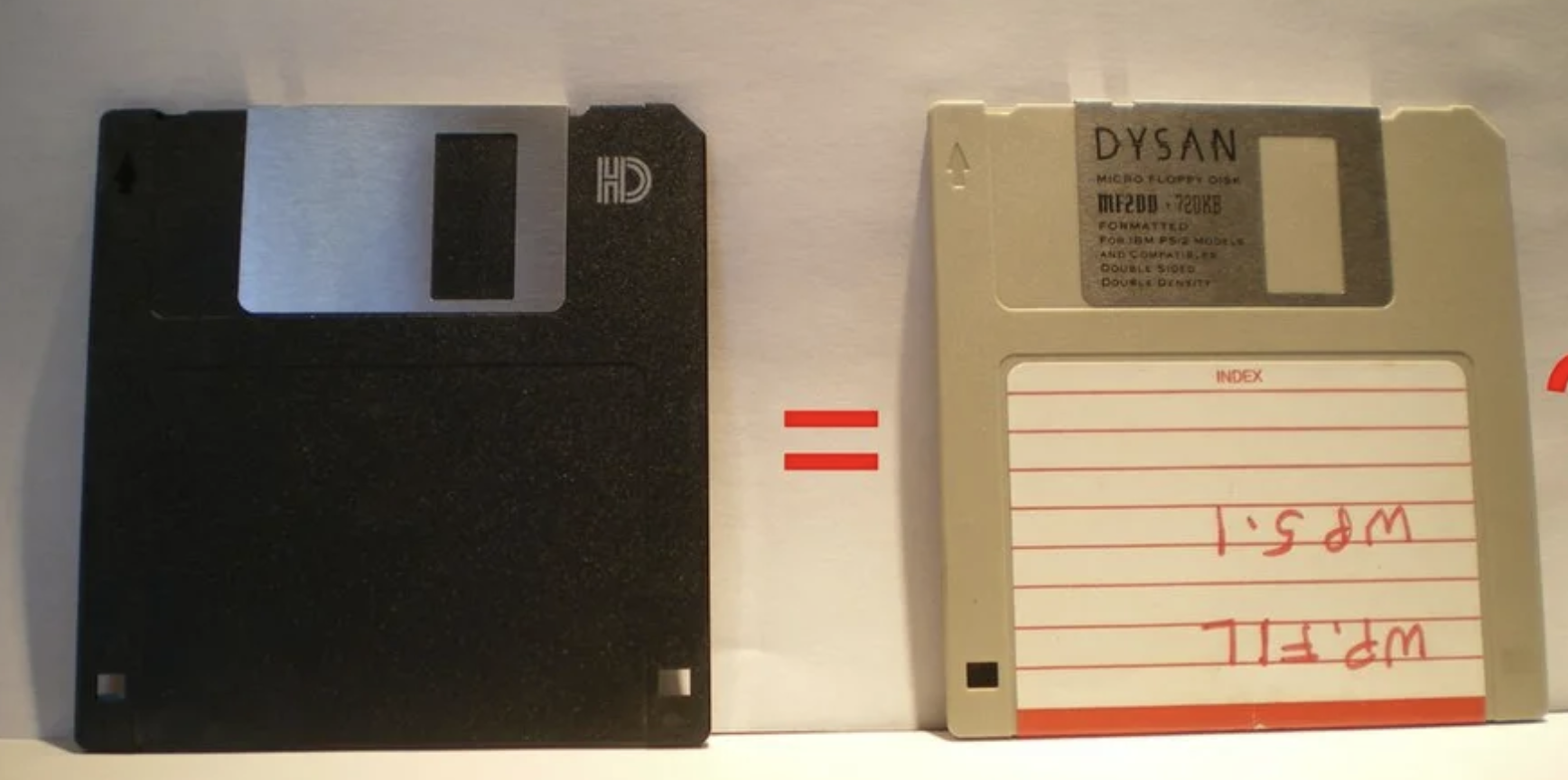
This is the only picture I can find showing both types. DOS/Win formatted 720k while Apple could use 800k but it's the same disk. If your disks look like the one on the left, one of these units should work. If the disk on the right, no.


The LC was the first Mac that shipped with a 1.4 floppy drive, backwards compatible with 800k and could read the 400k disks used on the earliest Macs before the 800k drive on the Plus. The last machine that could read those was the Beige G3.


Although there were Apple and 3rd party 400/800k floppy drives, those were off the market before USB was adopted in the B&W G3. 


Comment actions Permalink
Avatar
0

Good luck. Even when I had a floppy drive, I got to a point where the older disks themselves had become unreadable.So I have my fingers crossed for you, Frank.

Comment actions Permalink
Avatar
0

Hello all, and thanks to Adrian, Mike, and Jeffrey for your individual responses and suggestions -all appreciated. Apologies for my own slow feedback to you.


Unfortunately, I have tried various options to access and read material on my very old floppy discs (originally formatted on my approx 1997 Mac Lc, and savedfrom the then curent Finale version relevant for Apple Mac), including assistance from computer techs, and also MakeMusic.

I also purchased a separate external usb floppy disc drive reader (as I mentioned before, I lost access to my original Mac desktop computer in about 2000) - but it simply says that the floppies are in an ïnvalid format".

So, no good - I will have to accept advice that somehow, all of my collection of recorded floppy discs have somehow become  "corrupted and unreadable" - just from sitting in a secure plastic box, untouched, for 22 years.

Cheeers,

Frank, Melbourne, Australia.

Comment actions Permalink
Avatar
0

I empathize. I just tried to open some OCR files I scanned some years ago into Omnipage of a privately published family history reaching back to the 1600's and found that none of the files would open--and these were saved on hard drives. Hope you have a way to save the music, even if it involves re-entering from printed copy.


Losing the convenience of having the digital files is horrible, but losing the music itself would be even worse.


Best wishes.

Comment actions Permalink
Avatar
0

If there's a computer repair shop that repairs Macs near you, you might want to check with them and see if they can read your disks. It's worth a phone call. Good luck.

Comment actions Permalink
Avatar
0

>I also purchased a separate external usb floppy disc drive reader (as I mentioned before, I lost access to my original Mac desktop computer in about 2000) - but it simply says that the floppies are in an ïnvalid format".<


Ok, back to what I wrote about a Beige G3 being the last Mac that has any chance of reading these. Unfortunately, no Mac exists with the old 800K compatible floppy and USB unless someone installed a PCI-USB card into one.


If successful, then you need to get those files off. The best way is to email them off if possible as that zips the files first. Next best is a CD if someone installed an IDE or SCSI CD-RW drive. If the old Mac has an Iomega ZIP drive, that also works in case someone has a ZIP drive that can read those disks. Macs often had ZIP100 drives from Apple—these cannot read or write ZIP250 disks but ZIP250 drives can read/write the older disks which are still available.


Always Zip or Stuffit the files before burning to disk or moving to a shared drive including Dropbox. Un-Stuff/Zip grants privileges to that user automatically. Not necessary with email as it zips attachments automatically.


I gave away my old Macs years ago including my BeigeG3 with the ZIP250, CD-RW and USB card.


I still have a ZIP250 sitting in one of my G4 towers, however, and do some restoration work that comes to me that way.

Comment actions Permalink
Avatar
0

Don't know where you're exactly from, but these guys - http://www.repc.com/ - could help you out.

They have a huge stock of various old PCs and MACs.


Give it a try, maybe it will work out...


EDIT: Just noticed you're from Australia, hmmm... Well, try this guy - https://www.youtube.com/user/bryaneasy/about - it's worth the shot.

Comment actions Permalink
Avatar
0

Dear Finale Friends,

Thanks for your input! Perhaps the following is already answered:

I have 2 2HD MAC 1.40MB discs which have orchestra files on them (probably from the 1990s or early 2000s). I tried to download these two compositions on a Dynex Floppy Disk Drive onto my macOS Big Sur Version 11.4, but no dice. Jeepers! It would take a lot of time beginning these two compositions "from scratch." Does anyone have any suggestions? Thanks.

Comment actions Permalink
Avatar
0

Do you have them printed? If so, you can scan them and use SmartScore or one of the other scanning apps, and go from there. Otherwise, I'm afraid you're stuck.

Comment actions Permalink
Avatar
0

If you live near a computer store with a help desk, you might phone to see if they can transfer floppy info to a thumb drive for you. Even if you can get the files off your disk and into your computer, you may find that Mike's idea of scanning any existing hard copies might be less work (although not negligible) than dealing with such old files in a new version of Finale.

Comment actions Permalink
Avatar
0

> I tried to download these two compositions on a Dynex Floppy Disk Drive onto my macOS Big Sur Version 11.4, but no dice<


There's no way that can work. You can try hooking that up to an older Mac running a much older OS that supports 32 bit. If you see your files at all, follow the earlier instructions from a couple years ago. Once again, if those disks were not Mac formatted 1.4mB, they cannot be read on anything newer than a Beige G3 with an internal floppy—and possibly not even then. 3rd party drives cannot read Mac formatted 800k disks.

Comment actions Permalink
Avatar
0

Many thanks to Mike Rosen, J. Adrain, and Mike H.! Definitely appreciated! Now, let me pose a extremely basic question: assuming that Mike H. is correct, I will have to make use of a (old) Roland E-68 keyboard to rewrite the notes. However, I can't figure out how to use the keyboard to compose music either in an older iMac (2009) or a brand new 2021 MacBook. My bigger than average Luddite tendencies are showing here! Your able assistance will once more be of great use . . . ! Thanks again.

Comment actions Permalink
Avatar
0

A Roland E-68 has a pair of DIN 5 jacks for MIDI In/Out. You will need a MIDI interface or DIN 5 to USB cable so that your Mac can see it. 


What to buy depends on if you need the interface to do anything other than see MIDI Out from your keyboard.

Comment actions Permalink
Avatar
0

Ed, are you talking about using your Roland keyboard, or the computer QWERTY keyboard? I use simple entry, on the QWERTY keyboard.

Comment actions Permalink
Avatar
0

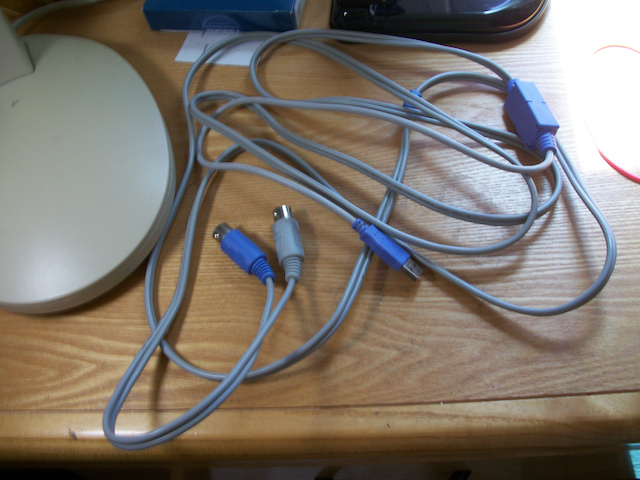
Mike, I am speaking about the Roland keyboard. It seems to me that "Speedy Entry" is a much better way to compose for a variety of reasons, for which I've always used a Roland. Mike H., where and how do I purchase a DIN 5 interface? Right now, I have a MIDI In/Out cable which plugs in directly into a USB port in both the 2009 iMac and the MacBook. (In the newer MacBook, I use an "Aukey" adapter to accommodate the USB). Thanks!

Comment actions Permalink
Avatar
0
Comment actions Permalink
Avatar
0

Adrian, are you suggested something different from the usual interface ("Turtle Beach") pictured below?

Thanks.  

Ed

Comment actions Permalink
Avatar
0

An "interface," in most professionals' parlance is something more like a standalone unit such as the Focusrite units

https://www.guitarcenter.com/Focusrite/Scarlett-Solo-USB-Audio-Interface-Gen-3-1500000280086.gc?cntry=us&adlclid=085fc71c98881e5291e6a7ab62920b3e&source=4WWRWXMP&msclkid=085fc71c98881e5291e6a7ab62920b3e&utm_source=bing&utm_medium=cpc&utm_campaign=%5BADL%5D%20%5BGC%5D%20%5BPLA%5D%20%5BShopping%5D%20-%20(Pro%20Audio%20-%20Recording%20Gear%20-%20Audio%20Interfaces)%20-%20%7BMQ%7D%20-%20%5BClient%20Push%5D&utm_term=4578641322634317&utm_content=%7BMQ%7D%20Pro%20Audio%20-%20Recording%20Gear%20-%20Audio%20Interfaces%20(GC)%20(Bing) 

as opposed to the MIDI interface cables such as the one you pictured.


I myself use a cable like the one you show but used to use an interface that allowed me to plug a microphone into my computer.


With the cable, realize that cables can (on rare occasions) break internally after a while and that one must plug the MIDI plug into the correct outputs on your synth. Not knowing how your cables are labeled I cannot tell which goes where.

Comment actions Permalink
Avatar
0

We can play the what goes where guessing game but you need to look at the unit and your cable.


MIDI IN on the cable or interface is connected to MIDI Out on the keyboard — and vise versa if you want to access the keyboard's internal sounds (not necessary if accessing the Garritan Instruments for Finale).

Comment actions Permalink
Avatar
0

Thanks, Mike H.! Something as simple as this seems to be working very well. Thus far, I can finally compose, again. Now, let me pose a question to you. I do better with a mouse rather than a trackpad. I purchased a rather expensive "Magic Mouse 2" (Model Number A1657). I don't use any buttons on the Mouse system preferences, because they are too complicated and cause lots of problems. However, the cursor, when using it on Finale (and using it especially on Scroll), wanders wildly over all of the place. I tried purchasing other simpler and more inexpensive mice (e.g., iHome, logitech [M325, and M185]), but none seem to work. Any thoughts (with hats off to Mike Rosen, ands J. Adrian!)? -Ed 

Comment actions Permalink
Avatar
0

Three thoughts:

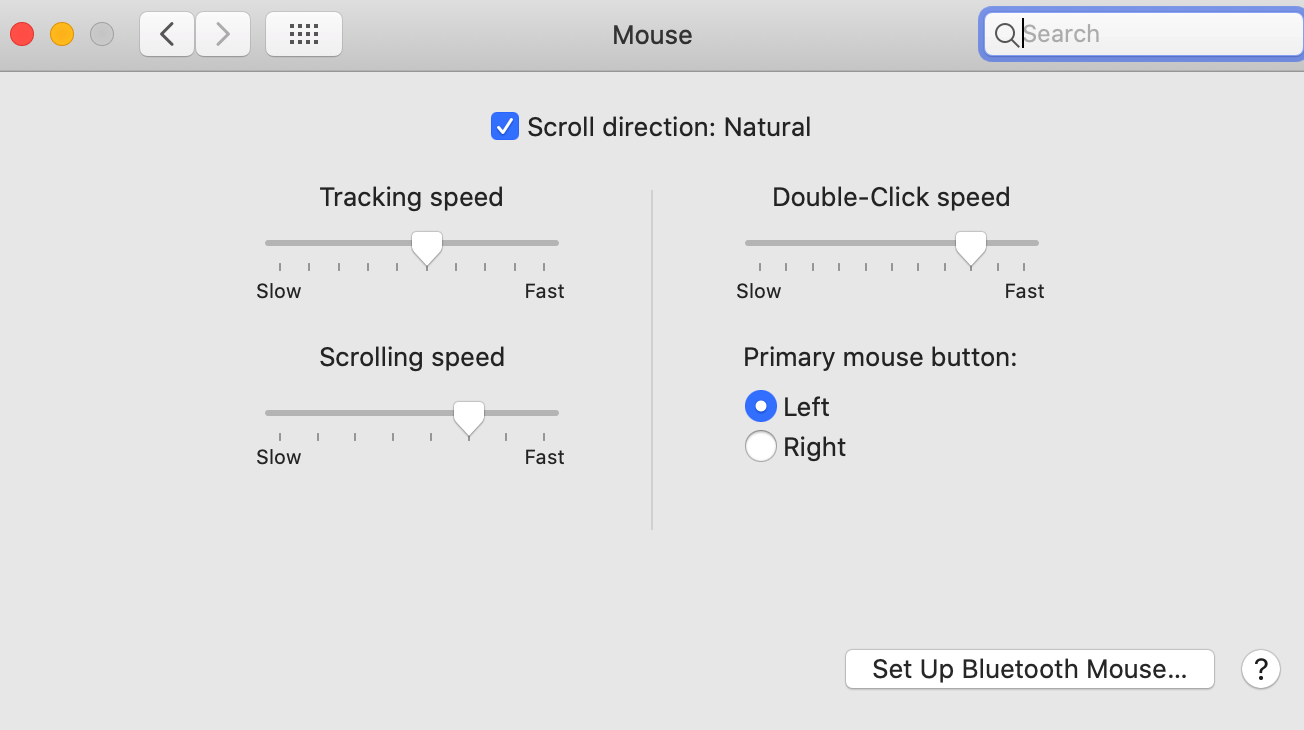
First, have you played with the settings in the control panel? System Preferences/Mouse? It will look something like this:

(I have a couple but never use my MM2).


Next. If the above doesn't do it, try a different surface. Some are better than others.


Third. If the cursor seems to wander by itself, something else could be paired to your Mac. To fix this. Open the BT control panel, unpair everything, turn it off, reboot. Now re-pair only the device you intend. When my wife had that problem, it was the mouse for my daughter's Mac that had accidentally paired was causing the problem.


Finally: Any new piece of hardware like this has support from Apple. Navigate to the Support pages and have an Apple Tech person call you. They will.

Comment actions Permalink
Avatar
0

Hey, Mike . . . Thanks very much for your help, which was easily remedied by switching the Magic Mouse with an older mouse, which never wanders. Now, here's another question: suddenly the "Help" window which allows you to access the Finale base (up on the top of the screen; right side) just refuses to give any information about anything. Anything typed into the window yields only "0". Any thoughts? I've never had this question before. Thanks.

Comment actions Permalink
Avatar
0

??? Do you have a screen shot? 


If you hit the Shift Command 4 keys, the cursor will change. Click-drag it over the area of the screen you want to capture and it will save a .png file to your desktop that you can upload through the Insert Image box at the top of text box. 

Comment actions Permalink
Avatar
-1

Well . . . Mike H., here it is! I get the same stuff, every time I try to use "Help." Thanks!


Comment actions Permalink
Avatar
0

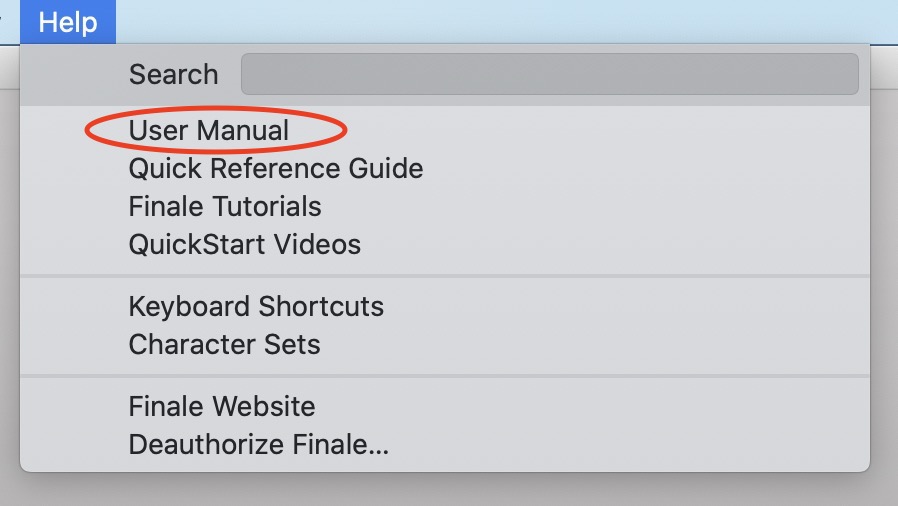
Huh. Is that from the User Manual entry in the Help menu? When I did that, I got 436 hits. You might want to send that in to Tech Support.


Comment actions Permalink
Avatar
0

Here it is in full color. Tech support? I suppose you mean Finale Tech Support? Thanks, Mike.


Comment actions Permalink
Avatar
0

Dear Friends,

I finally emailed Finale Tech support, who gave the following link: https://usermanuals.finalemusic.com/FinaleMac/Content/Contents.htm

She admitted, "Bugs" have been occurring regarding the Finale "Help" search. I had no problem with Help prior to two to three weeks ago. So she suggested bookmarking the link, which I have certainly done!

I hope this is of some use. Perhaps Finale will fix the bugs.

Thanks.

Ed 

Comment actions Permalink

Please sign in to leave a comment.