How can i write music score from the right to the left, cz i need to write arabic music with arabic lyrics from the right to the left.
So How can i change the direction of scoring ?


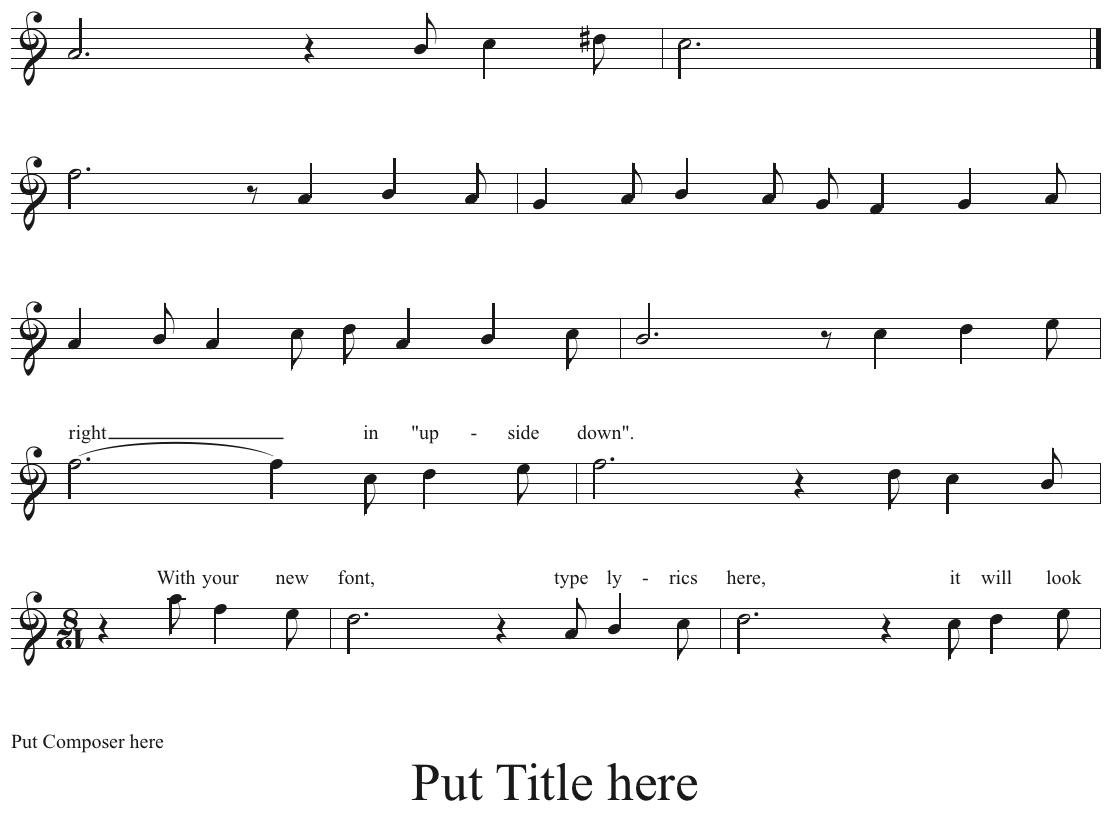
Create the layout "upside down". Use a font editor to create a custom version of your arabic font where each arabic
font character is rotated by 180°. When you enter these "upside down" characters in Finale, in Finale's usual
"left-to-right" manner, the character will run "right-to-left" when you turn the printed page upside down.
Hide the real time signature (12/8), and create a false time signature as an expression.
Use the Shape Designer to rotate the time signature 12/8 "upside down".
To do so, use an invisible line (= 0 thickness) with a "custom arrowhead" that consistes of the number.
When you draw the invisible line right-to-left, the arrowhead will be rotated by 180°.
You might want to use a horizontally flipped version of the Maestro font. When you use the "rotate text" trick I
mentioned above, on the horizontally flipped Maestro font, you will get clef symbols and flat accidentals that look
right.

Please sign in to leave a comment.
2 comments
Date Votes