New post
Avatar
0

Computers: W7 machine, W10 machine, OSX 10.13 machine
Versions of Finale: v2014.5, v26 (latest release)


I am working on a violin school book. Some parts have lyrics. Until page 28 I've had no problems adding/editing lyrics.
I've started on Windows 10 in v2014.5 (many clients still rely on this version, for compatibility reasons I cannot switch upwards)


Now every time I try to input lyrics (type into score, click assignment) Finale crashes, or rather freezes and I have to terminate it.


I've tried a number of various methods to troubleshoot the problem:
- save it as Finale 2012 file (.mus)
- opening it in v26
- both on PC and MAC (various machines, various versions of the OS)
- erased the preferences file
- clean w10 with v26 install
The result is always the same: Finale freezes and crashes.


The only viable solution was exporting it as XML and importing it back again. The problem disappeared but most of my work was lost due to how XML handles everything. It would require a lot of time to get back to the state where it was before without guaranteeing the problem wouldn't reappear.


Does anyone have any idea how to solve my problem?


I've attached a link to the file, if someone wants to try it out:
https://1drv.ms/u/s!Atciu26cqkiKhcdKMpcDvMhTYskk2w


This problem occurs only in this document (as far as I've tried only new documents).

22 comments

Date Votes
Avatar
0

I got the same result. Any attempt to enter lyrics gave me the spinning beach ball.


Have you tried trashing the preference file?

Comment actions Permalink
Avatar
0

Thanks Mike!


Yes, forgot to mention that.
I've also tried a clean w10 install with v26 (albeit w10 in Sandbox mode and v26 in trial, but still, shouldn't affect it in any way).


For now I've created a new document, imported the library file from my document, started from page 28.

Everything seems to work OK, but I am weary and would like to avoid such problems in the future.

Comment actions Permalink
Avatar
0

>I've started on Windows 10 in v2014.5 (many clients still rely on this version, for compatibility reasons I cannot switch upwards)<


Why not?. Finale 2014 will open a 26 file unless using features specific to 25/26 and then those might not display correctly.


You also have a number of export options including as a Finale 2012 file.

Comment actions Permalink
Avatar
0

Mike H, given the issues people have noticed with the stacking articulations as they move back and forth, I wonder if upgrading’s really the best option. Unless there are other real improvements (and I haven’t noticed them in my workflow), why bother? 

Comment actions Permalink
Avatar
0

I had no idea that 2014.5 could open v25/26 files.
Good to know!


Anyways it does not solve my problem, nor does anything else it seems.
I'm continuing in a new file from 28 on...

Comment actions Permalink
Avatar
0

UPDATE


The second document has the same problem - from page 28 on I can't use the lyrics tool.


This seems to be some very weird behavior...

Comment actions Permalink
Avatar
0

Have you sent this in to tech support? Even though there is no longer support for 2014, since the problem persists in 26, they should help. Use the Submit a Request tab at the top of the page.

Comment actions Permalink
Avatar
0

Thought about it, will do.

Thanks

Comment actions Permalink
Avatar
0

Marek,

You might also consider registering and posting on the other Finale forum, which is not sponsored by MakeMusic, but has a lot of very knowledgeable users. You can even post a Final file (although not until you have a few posts to your credit.)  


https://www.finaleforum.com


Comment actions Permalink
Avatar
0

So the support team tried their best but didn't figure out what happened and could not help.
There is a problem on page 12, but they don't know how/what happened.


I've finished the work in 3 files.


Next time (hopefully there won't be any :D ) I'll try also the finaleforum, thanks!

Comment actions Permalink
Avatar
0

im having a similar problem adding lyrics (counting) to a exercise worksheet. the file (1st two pages) was a v26 file, and im using v27 to add an additional 3rd page for a student... beachball when using the Lyric tool.

 the only thing that changed was my macOS was updated from 13.4 to 13.5 Ventura several weeks/months ago

is there any headway on this? is it a Mac specific/ Silicon thing?

Comment actions Permalink
Avatar
0

Hey Karl!

I haven't encountered the problem since, I'm afraid I can't be much of help.

But try contacting support and sending them the file.

All the best

Comment actions Permalink
Avatar
0

Karl, you can’t post a Finale file here, but you can post it to Dropbox or OneDrive and post a link. That way, we can have a look under the hood.

Comment actions Permalink
Avatar
0

hi, thanks. Funny it doesnt seem to trigger a slow-down/beachball till I try to open/add Lyrics to pg 3.

heres the file. This behavior is new I havent had any issues last semester.

Comment actions Permalink
Avatar
0

Export your file as XML, and import it back into Finale. You will lose a little bit of formatting, but you will be able to add lyrics to page 3.

Comment actions Permalink
Avatar
0

Hi Mike, thanks. For these exercises, I wont bother but good to know theres a work-around next time it happens.

Is there any understanding or answer to the "why" this is going on. (for example, updating/editing older files, Finale Pref files, etc)

I just created a new doc in v27.3 to test; I was able to add lyrics (verse 1&2) without issues... Could it be something to do with editing old files?

Comment actions Permalink
Avatar
0

Nope. Sometimes a file will get corrupted for no apparent reason. The XML trick often works to get it back to normal. Again, for no apparent reason.

Comment actions Permalink
Avatar
0

UPDATE: Solved (for me, I think)

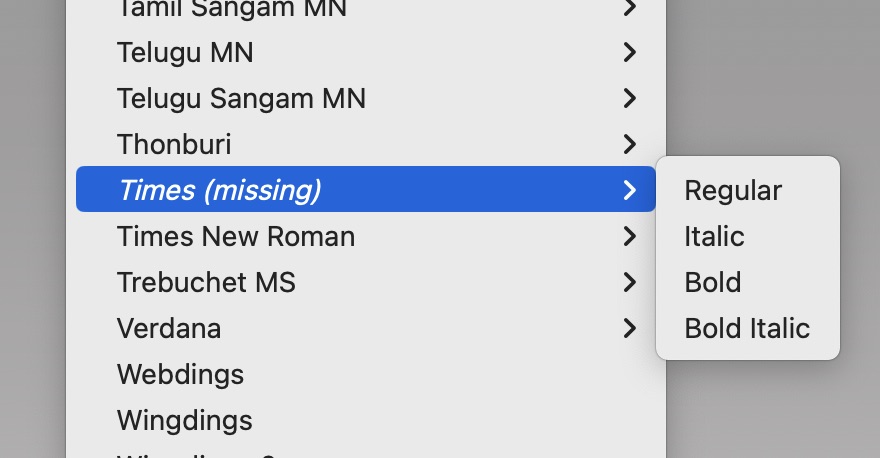
This file originally was formatted (2021) with the Times font—which is no longer part of macOS. Could this be the issue?

Along with the Lyric Tool issue, there was some weird anomaly with changing/selecting font/style/size in this document... but I then found that if I selected all the text blocks, then re-selected the "missing font" (Times), the lyric tool works again. No more beach balling. 

Comment actions Permalink
Avatar
0

This file originally was formatted (2021) with the Times font—which is no longer part of macOS. Could this be the issue?


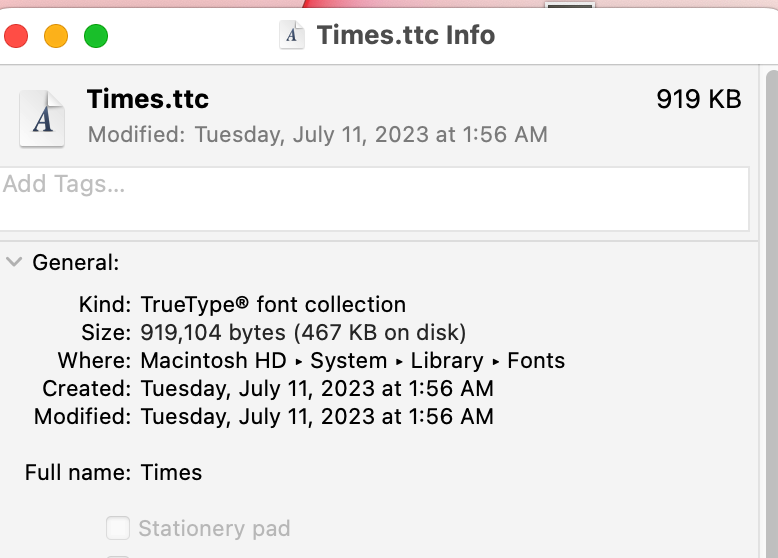
No, it cannot. Times is one of the Mac's Core Fonts as it has been since 1984. You'll find it here: HD/System/Library/Fonts. You cannot install nor delete fonts to this folder, only Apple can through OS and Apple app installations/updates. Hmmm... I see that it was modified when I ran the 13.4.1(c) Security Update on July 11.


This is often confused with Times New Roman, a core Microsoft font that's easy for Mac owners to obtain by downloading Adobe Reader or Microsoft Office. TNR remains an application specific font, however. To make it available to all applications, find it in the Application Support folder, double-click on the font, then click on Install.


Anyway, because Mac and Win do not contain both Times and Times New Roman natively, Finale does not use either as a default font and using either is not recommended.

Comment actions Permalink
Avatar
0

HI Mike,Thanks for info. Yeah Ive never experienced anything like this (on my Macs or in Finale) so this struck me as bizarre. From what I can gather online, looks like "Times" was "removed"(?) in Monterey. I also did those 13.4.1a-c security updates earlier this month—maybe thats why I didn't notice this during the semester. *shrug*


But to solve my beachball error with the Lyric Tool, I simply reselected all the text blocks in the doc, then re-selected the original formatted Times reg *which shows as (missing) in my Finale 27 app. —Everything now functioning correctly. (So maybe changing/re-selecting the text blocks or using the *XML export/import option are possible solutions to the Lyric Tool beach-balling.)


Comment actions Permalink
Avatar
0

I get the same screen shot in Finale over Ventura.  


Apple has changed Times to a Document Support font (whatever they really mean by that). Although still installed as I showed you, it is being depreciated and no longer shows up as being available to applications. It is not the only font being depreciated in Ventura, BTW and will be removed from a future build of the MacOS.


Finale 27 is set up for SMuFL fonts. Maestro is the default and MaestroTimes is one of its subsets.

https://usermanuals.finalemusic.com/FinaleMac/Content/Finale/ht-fonts.htm#character-sets 


It was never a good idea to use Times in Finale for reasons already stated. Now that it's going away, time to find a new Default.  You don't have to use an SMuFL font but there are many advantages to doing so including a much larger character set in most of them.


If you don't like MaestroTimes, there are plenty of others that are not Apple Core Fonts. You already have Times New Roman, I see. Adobe's Minion Pro is quite popular for its readability and installs with any Adobe app including the free Reader. Although app specific on installation, you can make it available to all apps on a Mac the same way I outlined for Times New Roman.

Comment actions Permalink
Avatar
0

Good to know about the other fonts usage.


Using Times was not a preference merely a hastily made choice in the moment... which grew into an issue. LOL  

So, as the adage goes 'haste makes waste' ;)

Comment actions Permalink

Please sign in to leave a comment.