New post
Avatar
0

Win 10, Fin 2012, laptop

I had to apply the fix from "Engraver font errors when exporting to PDF" from the Knowledge Base on a piece a while ago.  It worked well.


However, on a piece in which I'm using Broadway Copyist & Text fonts, although it appears one must change each letter in something like "Maj7," one at a time,

there seems to be something wrong with the font, and I was wondering if this is the same kind of issue.  I'm not even trying to export to PDF.


I have changed all the characters, but was shown this screen.  Am I missing symbols?
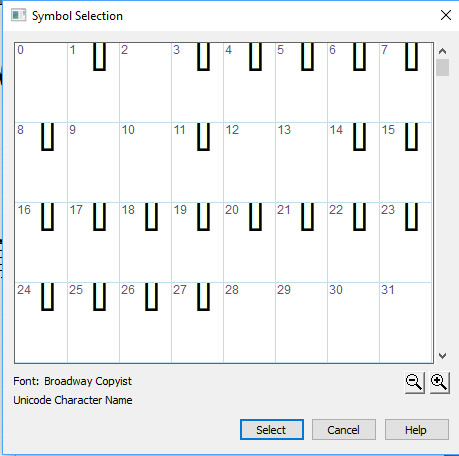
 

Thought it might be the font, so checked Broadway Copyist TEXT.  Same thing.
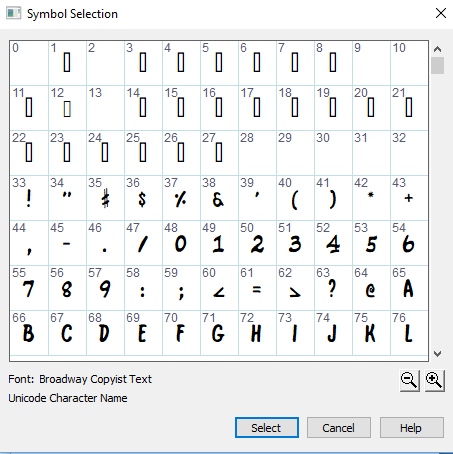
Thanks for any help!

3 comments

Date Votes
Avatar
0

Jon Thingvall,


Are you talking about the character slots #0–#31 ?


Those character slots are not supposed to contain any font characters.

You will see empty slots #0–#31 in any font.

Look e. g. in Times New Roman, Palatino, Arial, &c.


You wrote:

“I have changed all the characters, but was shown this screen. Am I missing symbols?”


The screen shot does not show all the symbols.

If you look carefully at the dialog box, you will see that there is a vertical scroll bar in the right side of the dialog box.

Scroll down, and you will see all the (many) other symbols in the font.

Comment actions Permalink
Avatar
0

Peter,

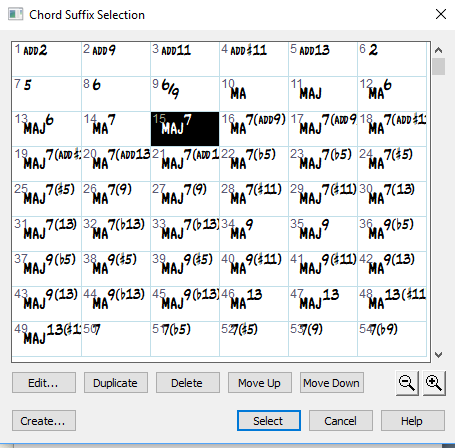
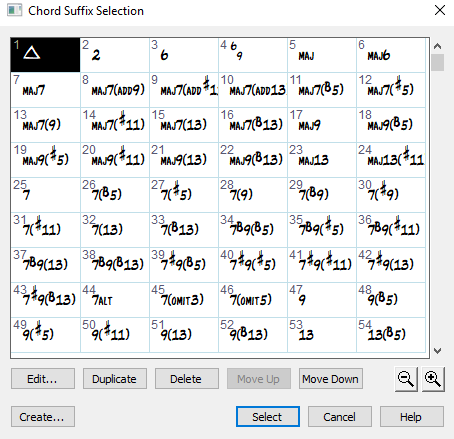
My concern is that I think I made/designed a "Maj7" symbol (the triangle in the second box) because some of my musicians prefer it.  But it's not there anymore, as far as I can tell.


If you'll notice, the symbols in the first box are different from those in the second, and though both pieces are on my computer right now, I can't find the triangle symbol anywhere. Is it two different versions of Finale 2012?


If I made the triangle symbol myself, I'll just have to make another.

Comment actions Permalink
Avatar
0

First, apparently, the 2 files have loaded a different chord suffix library. You can load another library via the File menu.

Second, the addition of new suffixes only affects the file in which you are working.

But you can (in the Edit menu) save a library containing your new suffixes. Then you can load it into other documents. Be aware that the suffixes  will be placed under the existing ones.

To avoid duplicates, you can also delete the existing suffixes before loading the new library, or create a library only containing your new suffixes (just delete the other ones before saving the library).

You can also load the new suffix library into all your templates.

Comment actions Permalink

Please sign in to leave a comment.