New post
Avatar
0

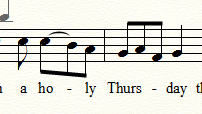
I have a score in 6/8 time and one of the vocal parts needs a tie over three eighth notes so that a single-vowel word will have those three tied notes associated with it.  .Can't seem to figure out how to do this.

9 comments

Date Votes
Avatar
0

We need more info:


1) Layout or playback? (or perhaps both?)


2) Do the three 8th notes have the same pitch? - or three different pitches?

Comment actions Permalink
Avatar
0

Different pitches.  See two notes tied for first syllable of "holy."  I need three notes tied for first syllable of "Thursday."

Comment actions Permalink
Avatar
0

I might do something like this:


Comment actions Permalink
Avatar
2

Rick,


You're confusing ties with slurs. Only use a tie when the pitches are the same. You should be using a slur which is found in the smart shape tool. You can use slurs for 2 notes, 3 notes, or as many as you need.

Comment actions Permalink
Avatar
1

As Jeff said, you’re confusing the tie and the slur. Choose the slur tool, and double-click and hold on the first note. Drag the cursor to the fight. As you pass the second note, you will see it highlight. Keep dragging until the third note is highlighted, and release the mouse button.


Here’s a link to a tutorial I wrote for barbershop, but the principles are the same: https://www.dropbox.com/s/gn5sadj3flmvluq/Ties%20vs.%20Slurs.pdf?dl=0

Comment actions Permalink
Avatar
0

Thanks, Jeffrey. Even though I've had Finale since version 2.0 I don't use it very often.  Since the tie button was visible I just clicked it and it worked fine for the first two notes even though the pitches were not the same.  I changed to slurs and it works as expected.

Comment actions Permalink
Avatar
0

Before this thread is closed is there anyway to make the slurs more consistent?  It seems I have to manually select the start and stop point and each one I do looks a bit different from the last.


Comment actions Permalink
Avatar
1

The slurs may vary depending on the note placement (line or staff) distance between pitches, and note spacing. Generally, I find the default placement pretty good, although long ones do occasionally need a tweak. 

If it’s just a two-note slur, double-clicking on the first note should give the optimum placement and shape.

Comment actions Permalink
Avatar
0

Rick,


In you smart shape pulldown menu, make sure you have "attach to notes" selected, rather than "attach to beats". That will give you better slur placement.

Comment actions Permalink

Please sign in to leave a comment.